
Printing 5x7 photo gets cropped to 5x5
After using Photoshop Elements 15 (Windows) for a year, I am suddenly having problems rotating 5x7 photos using the print dialog box (see attached screenshot). I open the print dialog box and rotate the 5x7 photoholder from vertical to horizontal (with "image only" unchecked). The print preview shows 5x7 but resulting print is 5x5 cropped. That's the result I would have expected if I had checked the "image only" option, but I didn't. The photo prints as correctly (5x7) if I do not rotate it. This is a problem for all photos, not just one. I tried (1) resetting the preferences, then (2) uninstalling without keeping the preferences, rebooting and reinstalling the program with default settings, but with no luck. Thanks in advance for any help.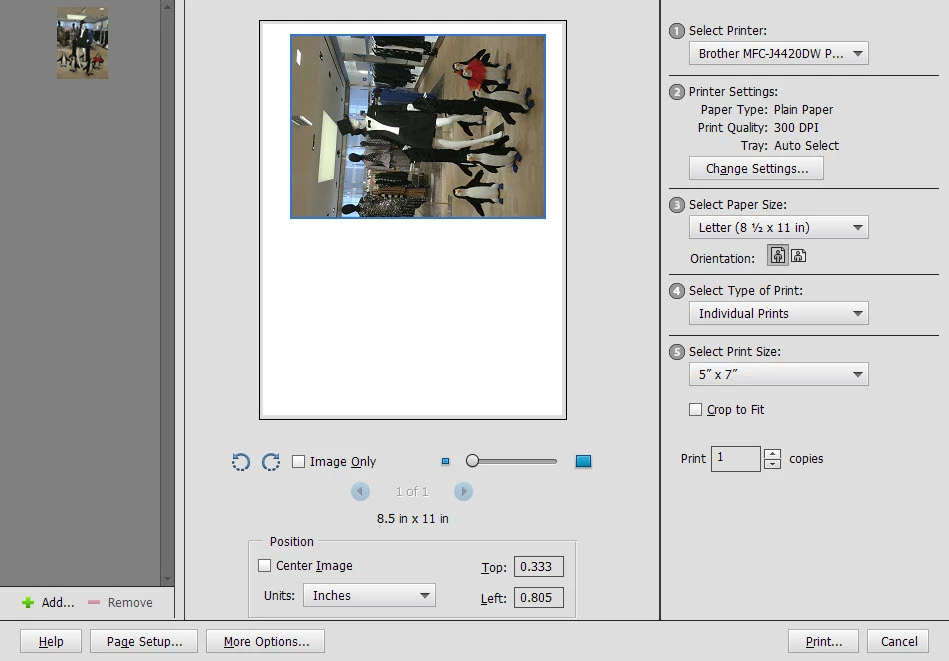
 AdChoices