
Participant
January 13, 2017
Question

Printing problems with new printer

  • January 13, 2017
  • 1 reply
  • 291 views

I recently change my home printer, marking the new printer (different make / model) as default and deleting the old printer.  But Photoshop Elements 15 initially "sees" the printer, but when "print" is pushed I get
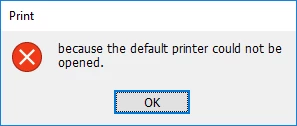
and nothing prints

    This topic has been closed for replies.

    1 reply

    Community Manager
    January 13, 2017

    Sorry for the inconvenience.

    Please try resetting preferences once. To do so, launch Editor and go to Edit > Preferences (WIN) / Adobe Photoshop Elements Editor > Preferences (MAC)

    In Preferences dialog, click on Reset Preferences on next launch.

    Now try re-launching Editor and then use the new printer.

    Let us know if issue still persists.

    Thanks,
    Anwesha

    Participant
    January 16, 2017

    That worked just fine. Thanks for the tip.

    Don Grafton

    Sent from my iPad