
Problem colour matching prints to screen with Photoshop Elements 2025
Prints with my Epson XP-625 printer do not match the image on my monitor. Images are edited in Elements 2025 using sRGB IEC61966-2.1 colour profile and the the monitor is calibrated with SpyderX. The Elements colour management for prints is set to "managed by printer" with rendering set to "Perceptual" using the "Glossy Photo Paper" profile as the paper I use is not made my Epson.
A print simulation in SpyderX shows the colours in Elements and the SpyderX print simulation to be pretty close. However, when I do a print preview there is a colour shift and the print image is darker. The print preview image is pretty close to what is actually printed (see attached screen dump).
I have tried various brands of paper and also tried using Photoshop to to control the printer selecting the printer colour calibration profile that matches Glossy Photo Paper. No matter what I do the colour and density of all the prints are all very close to one another and show the same colour and density shift.
There is a good colour match and print density between screen and print when printing documents with colour graphic.
I am at a loss as to what is causing the issue and what else to try to resolve it. I would be grateful for any help the community can provide in sorting this problem.
Thank you.
MDH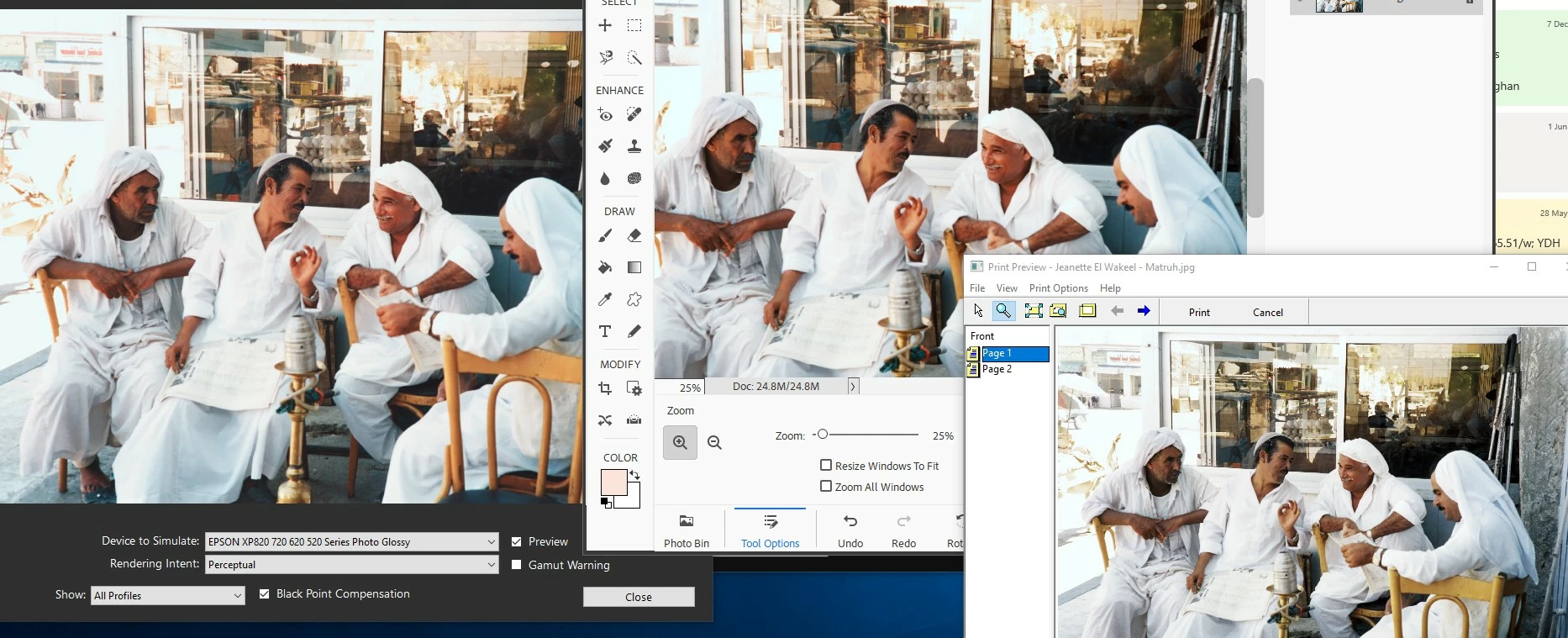


 AdChoices