

Participant
November 13, 2021
Question

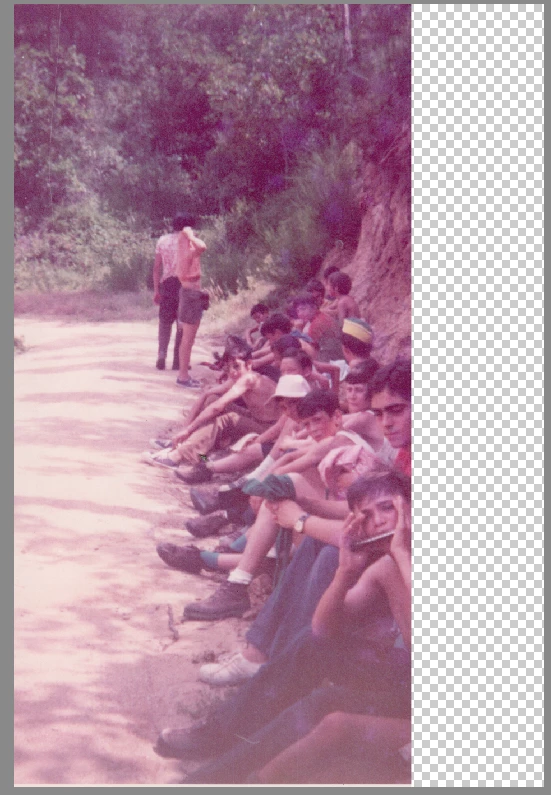
problem opening TIFF file with photoshop elements 19.0

  • November 13, 2021
  • 3 replies
  • 456 views

Hello

When I open a TIFF image I am loosing the right part of the image.

How can I solve that?

Thank-your for your help

Miquel


This topic has been closed for replies.

3 replies

Jeff Arola
Community Expert
Community Expert
November 13, 2021

Right click on one of the TIFF files, go to Open With and click Paint.

(that's Microsoft Paint)


Then in Paint, File>Save As>Other Formats and select TIFF.


Hopefully then your TIFF file(s) will open normally in photoshop elements.

Nancy OShea
Community Expert
Community Expert
November 13, 2021

Try updatating your graphics drivers from the card mfg's website.


Nancy O'Shea— Product User & Community Expert
Jeff Arola
Community Expert
Community Expert
November 13, 2021

Are you on a mac using Image Capture?


If so, it's a bug in Image Capture.


You can open the TIFF files into Preview, uncheck Alpha, hold down Option while going to File to get Save As, save them as TIFFs that should open normally in photoshop elements.


Participant
November 13, 2021

I am working with Windows 10
