
Participant
November 26, 2017
Question

Problem opening TIFF file with PSE15

  • November 26, 2017
  • 2 replies
  • 1565 views

I have been scanning hundreds of pictures in TIFF format (since that is a lossless format) but when i want to import them into PSE15 on my mac i am get the message that the organizer does not support the format and with the editor i get this picture.
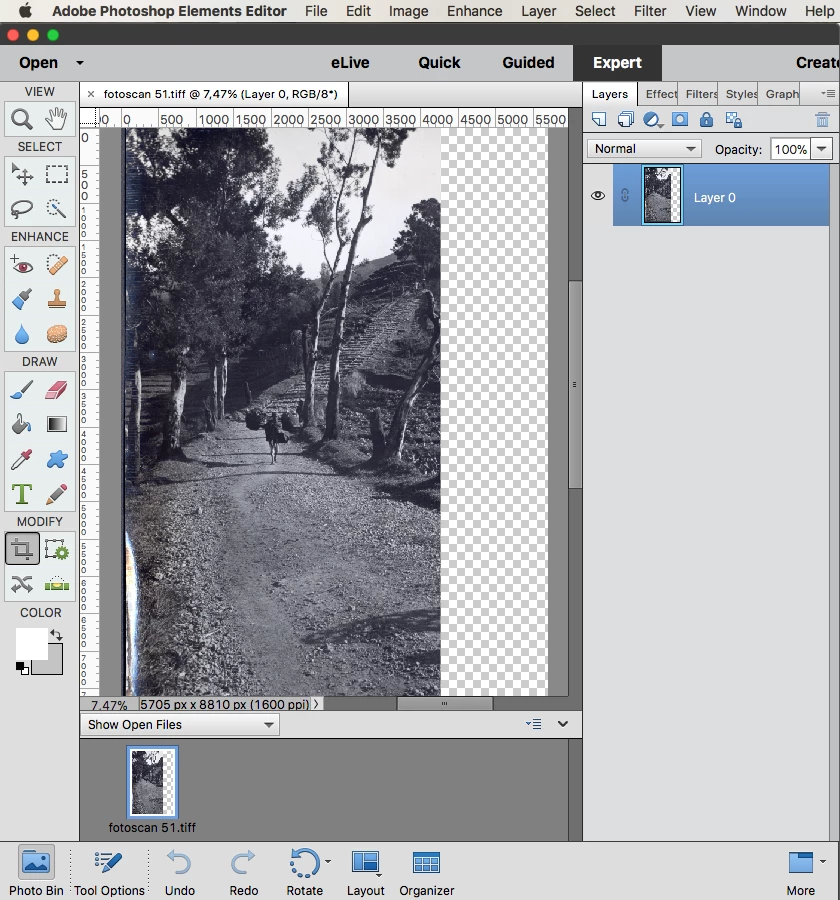
So part of the picture is missing. With aperture there is no problem but since that is not supported i am switching over to adobe.

But what is going wrong here? Tiff is shown as supported format by PSE15.

This topic has been closed for replies.

2 replies

emo95494929
Participant
March 31, 2018

I was getting the same right part of the image missing when I dragged a tiff file into PSE11 but realised the files that came across okay were ones I had not altered the level of when using the scanner overview prior to scanning. 

When putting the dotted line around the photo being scanned there is a 'person in the middle' which can be rotated to compensate for a not straight photo on the the scanner bed.  Whenever I rotated the 'person in the middle' to create a level scan, those images were the ones cut off when dragged into PSE.

So work with the existing level and straighten later in PSE, rather than straightening using the scanning process.

Although the preview showed a good scan there was a clue that things were not right as the file size was too small for a properly scanned tiff.

I hope this helps someone else.

Jeff Arola
Community Expert
Community Expert
November 26, 2017

What version of mac os are you using?

There is a long thread in the photoshop forum about the issue.

Re: tiff file displays correctly in Preview; gets cut off when opened in Bridge or Photoshop

Anyway, probably the best thing to do is open the Tiff in preview and save out a Tiff from there.

That Tiff version from Preview should then open in pse 15.

For me i found that scanning more than one picture per page seemed to lessen the problem.

Participant
November 26, 2017

Hi Jeff, Thanks for your answer.
I am using the latest version of OSX high sierra.

I am sad i did not check the forums to see if there were problems with Tiff. Adobe is claiming it is supporting Tiff which they clearly don't do.
i thing i will stay away from adobe products it gives a lot of work arounds. Something i don't pay money for.

Participant
November 26, 2017

Strange thing is that same TIFF files import ok in PSE15 on windows 10. Converting the files into jpeg works fine but is extra work.