



Walter_H
Legend
January 5, 2020
Answered

Problem With "Open Closed Eyes..." Tool

  • January 5, 2020
  • 3 replies
  • 3866 views

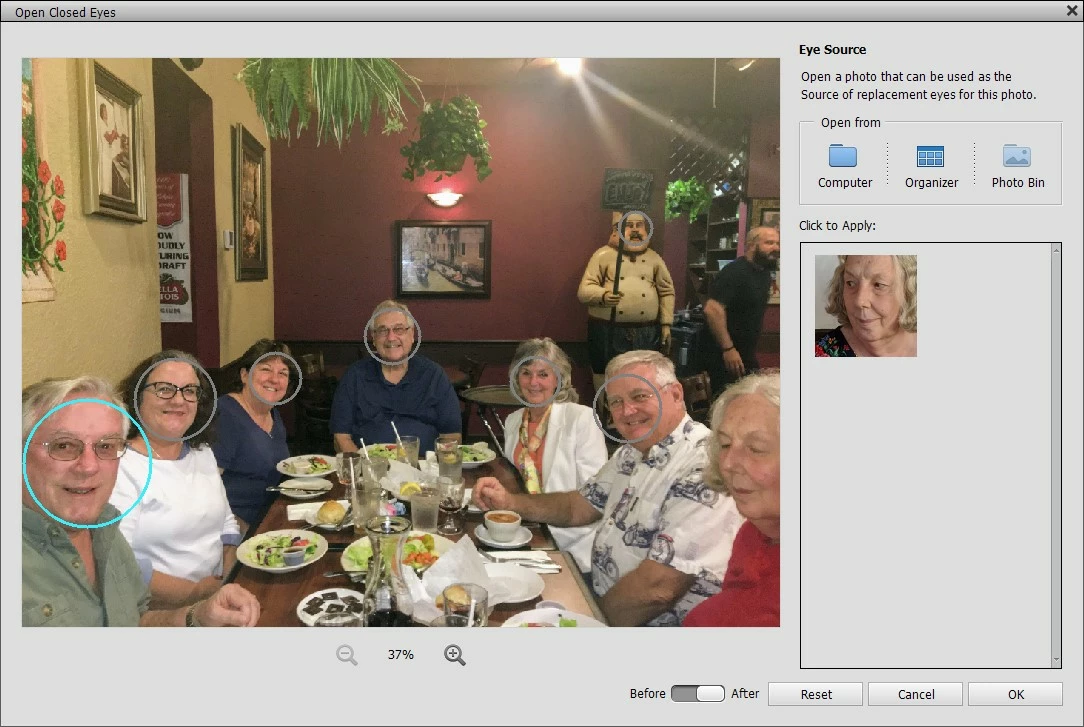
I am using PSE 2020 in Windows 10. I have a cell phone photo that was taken at a family dinner party last night. One of the people in the photo had her eyes closed when the pic was taken. I'm trying to correct it with the "Open Closed Eyes..." tool. I have a photo selected with open eyes but I can't select the face with the closed eyes in the photo. I can select all the other faces except the one with the closed eyes.


What am I doing wrong? a screenshot of the tool window attached.
Correct answer hatstead
  1. Open the picture file with the "good" eye.
  2. Activate the Clone stamp tool. Use the bracket keys next to the letter P on the keyboard to increase/decrease the size of the cursor so that it will fetch the eye.
  3. Press ALT+left click on the eye
  4. Open the picture file where you wish to deposit the "good"eye, and open a blank layer at the top, then left click to deposit the "good" eye
  5. Activate the move tool to position. Note the cloned eye  will come in on a separate layer in the layers plaette.

3 replies

hatstead
hatsteadCorrect answer
Inspiring
January 6, 2020
  1. Open the picture file with the "good" eye.
  2. Activate the Clone stamp tool. Use the bracket keys next to the letter P on the keyboard to increase/decrease the size of the cursor so that it will fetch the eye.
  3. Press ALT+left click on the eye
  4. Open the picture file where you wish to deposit the "good"eye, and open a blank layer at the top, then left click to deposit the "good" eye
  5. Activate the move tool to position. Note the cloned eye  will come in on a separate layer in the layers plaette.
Walter_H
Walter_HAuthor
Legend
January 7, 2020

Thank you! I'll give that a try.

--Walter in Davie, FL
Greg_S.
Community Expert
Community Expert
January 6, 2020

See if the Guided Edit>Photomerge>>Photosmerge Group Shot works for you.

If not, post the two photos you are using so that we can guide you through the process in Expert mode.

Greg_S.
Community Expert
Community Expert
January 5, 2020

I don't think the open closed eyes tool will work with that photo.  The image does not contain her whole head and her face is turned to the side.  You should try the traditional method of cloning/copying the eyes from one photo to the other.

Walter_H
Walter_HAuthor
Legend
January 6, 2020

Thanks for your reply. I've only been using PSE for a few months and I'm struggling to learn it. Can you give me a few hints about how to clone and copy the eyes from one photo to another? That would be much appreciated!

--Walter in Davie, FL
