
Participant
August 22, 2017
Question

Problems with task bar in Photoshop Elements 9

  • August 22, 2017
  • 2 replies
  • 539 views

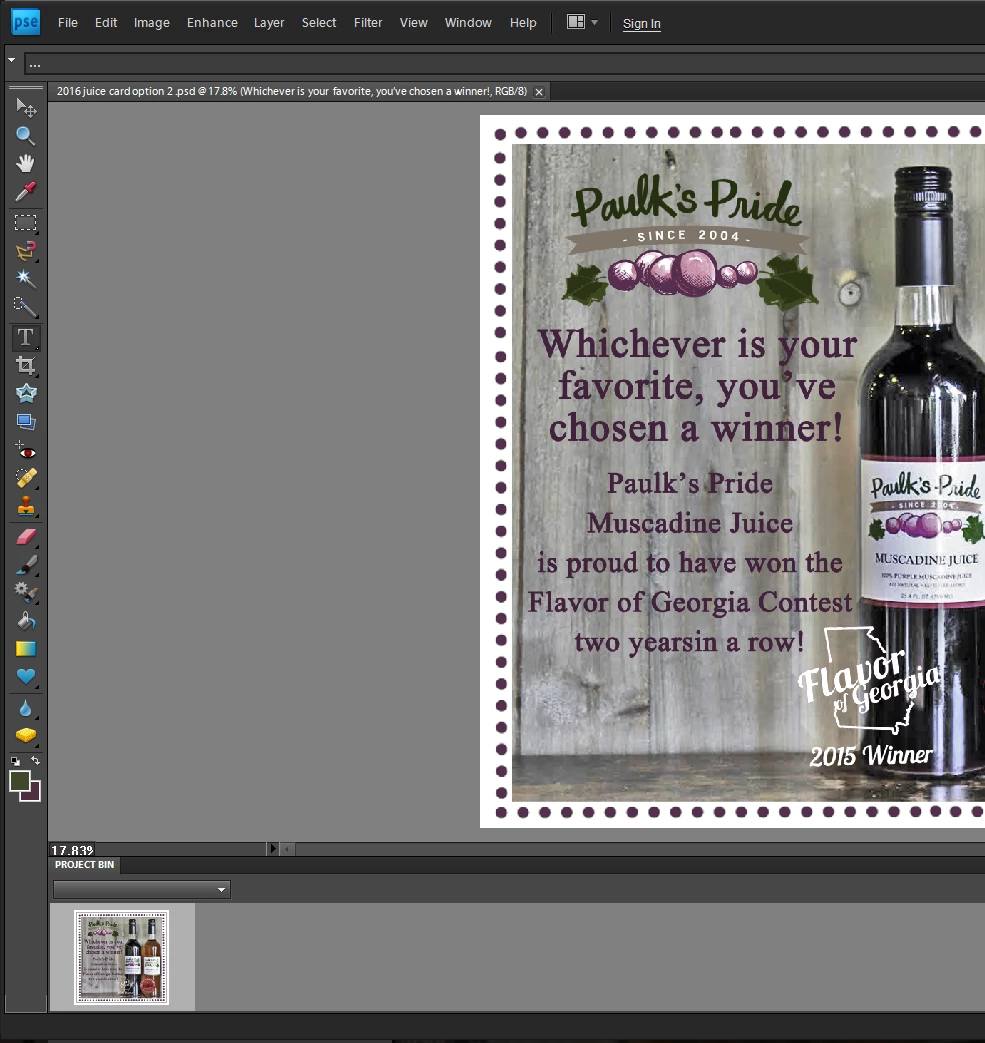
Hi!  I have used Photoshop elements 9 for years with no issue.  Today I got on to work on some marketing pieces and my task bar gives me no options.  If I click "file" only a yellow folder shows up for me to open files.  There are no other options.  If I click "edit" the drop down menu is blank.  I tried to get a screen shot of this but the drop down menus will not stay open while I am trying to click to take the shot.  What you can see in the screen shot is that I have selected the text tool which should give me a bar of options at the top such as font, size, color, etc.  none of those options show up.  I basically have no editing capabilities and am not sure what could have happend or changed between last week and now.  I would appreciate any help as I am not computer savy at all!  I had to have help just to get to this discussion board.  Thanks! 
This topic has been closed for replies.

2 replies

Participant
September 11, 2017

Hello,

I had the exact same problem where the drop down menus didn't display anything but icons, and the program would stop working as soon as you open it. After some research, I found that a new Windows 10 update made the program incompatible with the new software. I just uninstalled the updates that corresponded with the time the problem occurred. I did this by accessing the settings --> update and security --> update history --> uninstall updates. I uninstalled one called 'Security Update for Microsoft Windows', followed by the code (KB4034674). It may be different for you, but this solved the problem for me.

Hope this helps!

Participating Frequently
August 23, 2017

Please follow the discussion in thread Photoshop Elements 10 pulldown menus are now blank after Win10 Updates - Microsoft Community  for possible solution.

Thanks,

anwesha