
Participant
July 11, 2017
Question

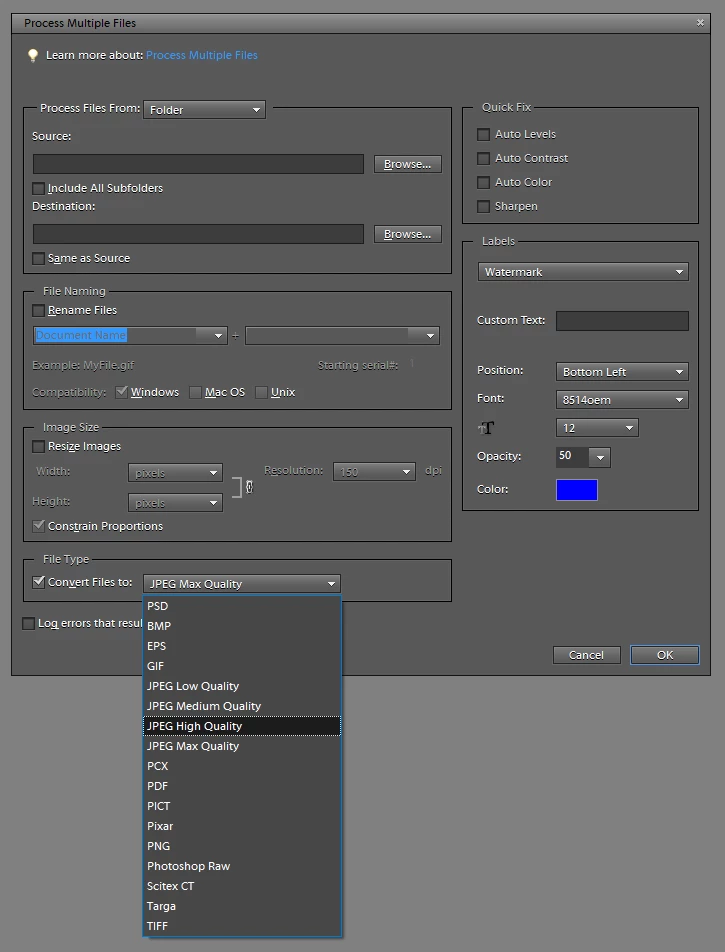
Processing multiple files: convert .NEF to .JPEG - Quality level?

  • July 11, 2017
  • 1 reply
  • 480 views

Hi,

So I am using "Process Multiple Files" options to convert NEF files to JPEG. But the quality options I am given are limited to JPEG Low/Medium/High/Maximum Quality.

What quality factor (1-100) does each of them use? I have also encountered Photoshop's different quality scales (1-12), but I could not find official documentation on the relationship between these scales and the quality factors. I appreciate any help!
This topic has been closed for replies.

1 reply

Jeff Arola
Community Expert
Community Expert
July 11, 2017

The Jpeg Save Options in Process Multiple Files correspond to the File>Save As>Jpeg compression settings.

Low = 1 to 4

Medium = 5 to 7

High = 8 to 9

Maximum = 10 to 12

The approximate values in the 0 to 100 scale are

Low = 0 to 29

Medium = 30 to 59

High = 60 to 79

Very High = 80 to 99

Maximum = 100

For most uses a setting of High 8 in the jpeg save as settings or High 60 in the 0 to 100 scale is a good compromise between quality and file size.