Answered
PS Elements 2023 Paragraph Text - Justify (Blocksatz)
How can I justify the text in PS 23?
Thanks for the help.

How can I justify the text in PS 23?
Thanks for the help.
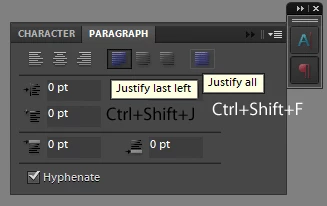
If you paste the text into a paragraph box, try one of these keyboard shortcuts while all of the text is selected:
Ctrl+Shift+J (Cmd-Shift-J)
or
Ctrl+Shift+F (Cmd-Shift-F)
If you had a paragraph panel in photoshop elements (like photoshop cc) then these are the buttons that those shortcuts correspond to:
(unfortunately the other two justify options don't have any default keyboard shortcuts in elements nor photoshop, as far as i know)
Already have an account? Login
Enter your E-mail address. We'll send you an e-mail with instructions to reset your password.


 AdChoices