
Mystic_Lark0D44
Participating Frequently
December 7, 2016
Question

PSD icon displayed instead of image thumbnail

  • December 7, 2016
  • 3 replies
  • 7806 views

I've searched a lot, and I've seen posts that are close, but never offer a resolution that works for me.

I just upgraded to PSE15 and run the latest Sierra on my Macbook

This is me using command+O to open a file:
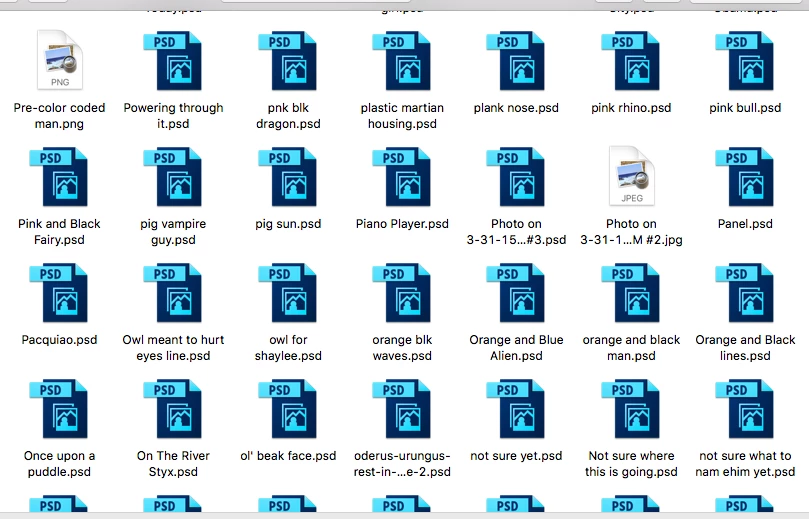
As you can imagine, I can't keep using PSE if I have to waste unnecessary and large amounts of time trying to find the correct file among thousands over and over.

Is it my settings that are somehow incorrect or is this a bug?

    This topic has been closed for replies.

    3 replies

    lotrdarkque
    Participant
    March 23, 2024

    Ensure Thumbnails Are EnabledClick on three horizontal dots at the right end of the ribbon tabs and then choose Options from the menu. In the Folder Options window, uncheck the box beside Always show icons, never thumbnails (if it's checked). Click Apply and hit Ok.

    Mystic_Lark0D44
    Participating Frequently
    December 12, 2016

    Please, anyone? I cannot keep working like this. It is driving me nuts and wasting tons of my time. It's not just PSDs. It's lots of my files.

    This was using the 'place' feature:

    Adobe Employee
    December 12, 2016

    Hi,

    Can you please restart your system and then try to open the files.

    Does it work for you?

    Thanks,

    Rupali

    Mystic_Lark0D44
    Participating Frequently
    December 12, 2016

    Thank you for your help.

    After restarting my system, the problem is gone again. It's done this before and then the problem comes back. I hope it stays away this time.

    Additionally, whenever I open PSE15 it gives me this update alert. But it never installs and the error log doesn't help me. Could this be related?

    99jon
    Genius
    December 7, 2016

    It’s an operating system setting.

    Launch Finder and go to the folder containing the PSD files. Then press Cmd+J

    Put a checkmark in the box “Show icon preview” and click the red button top left to quit the dialog.

    Mystic_Lark0D44
    Participating Frequently
    December 7, 2016

    I double checked, and I do have show icon preview enabled. They display in Finder just fine. It's only through PSE that they become icons.

    99jon
    Genius
    December 7, 2016

    Have you created the files yourself? Have they been saved as optimized PSD files?

    From the menu bar go to:

    Adobe Photoshop Elements Editor >> Preferences >> Saving Files

    Ensure Maximize is set to “Always”

    Try re-saving one of the PSD files or create a new one and save and let us know if that makes any difference.

    Otherwise the only work around is to choose a thumbnail in Finder and use right-click (control-click) and choose:

    Open With