


Inspiring
August 16, 2017
Answered

PSE 13 Place Tag google map not showing

  • August 16, 2017
  • 10 replies
  • 3010 views

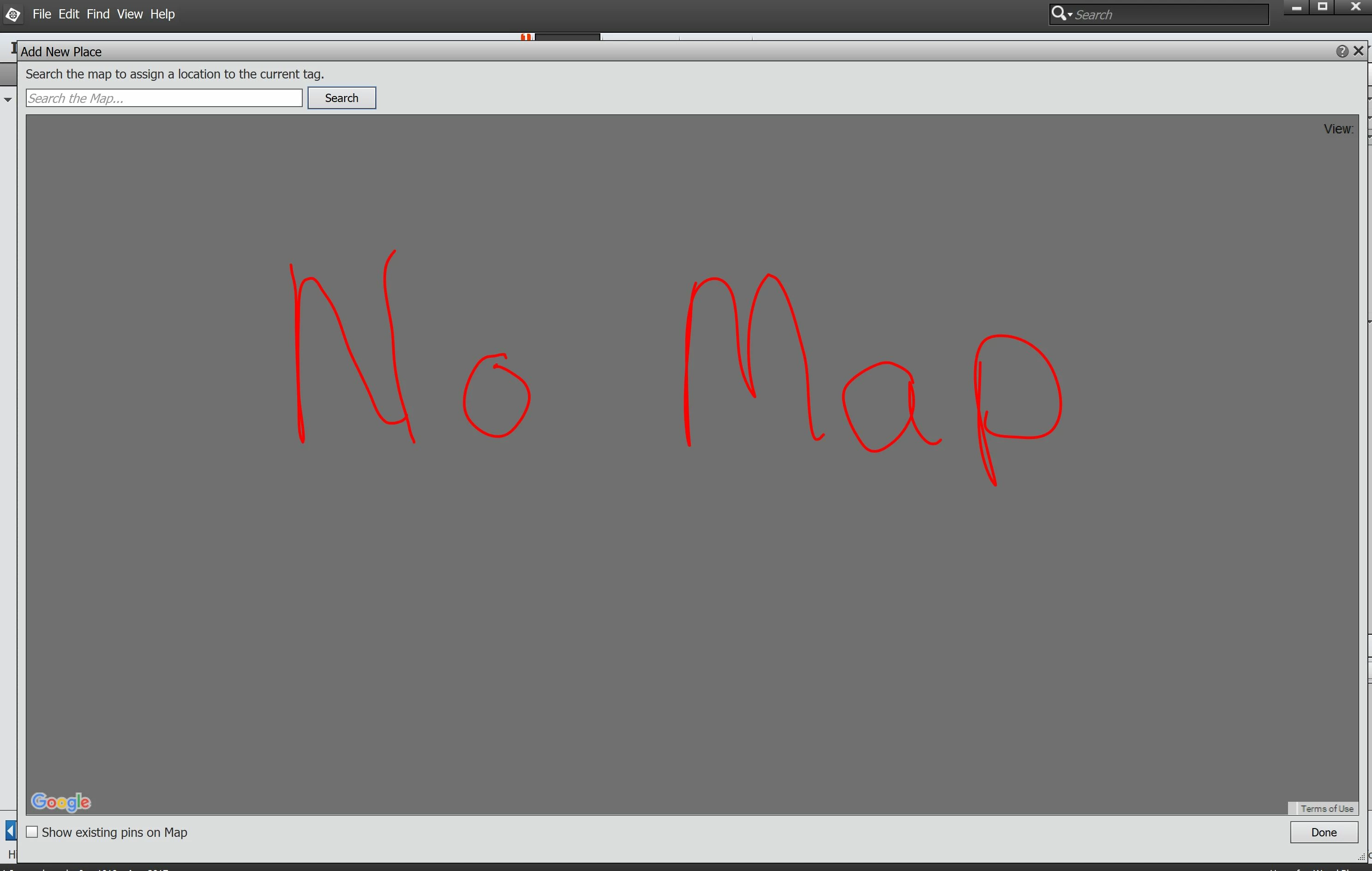
I have PSE 13 and use it to organize my photos, as well as edit them. I like to tag my photos with the "Place Tag" and have used it with no problem in the past. I went to tag some new photos and when I clicked on "Place Tag" and tried to add a new location the google map window opened, but no map ever appears. The window just remains blank.
Here is a screen shot of what I have:

How do I get the map to appear?
This topic has been closed for replies.
Correct answer Anwesha Dev Chaudhary

Hi,


Sorry for the inconvenience.

We are aware of this issue and are working on possible solutions . For more details, please see Map does not load in Elements Organizer 11, 12, 13, and 14

Thanks,

Anwesha

10 replies

KenSympson
Participating Frequently
March 4, 2021

I've just started using Adobe Premiere Elements 2021, and I have the same problem as described by others for previouw versions of Elements Organizer. I saw this from Adobe, but I guess they lost something when they produced. NEED HELP!!


arshla jindal
Adobe Employee , Nov 21, 2017
Copy link to clipboard


Hi,


Maps in Photoshop Elements Organizer are up and working now. You can continue using the same. Let us know in case you've any issues.


Thanks

Arshla Jindal

Known Participant
November 23, 2017

It is working again. Thanks!

mmf46798212
Participant
November 5, 2017

Don't you realize that Adobe is not going to fix it? They want you to download the latest version so the software. That how those companies earn money. So, don't cry, but download it to get new software from some other company.

Adobe Employee
November 22, 2017

Hi,

Maps in Photoshop Elements Organizer are up and working now. You can continue using the same. Let us know in case you've any issues.

Thanks

Arshla Jindal

MWazzyAuthor
Inspiring
October 22, 2017

The problem still has not been fixed and maps still are not showing up in the Organizer.
Is it even going to be fixed? Or is this just a way to get people to keep buying the newest software?

MWazzyAuthor
Inspiring
August 21, 2017

If so many of us with different versions of Photoshop Elements are having the same issues, you would think Adobe would be motivated to fix this problem.
What say you Adobe?
How about letting us know you're working on fixing this problem?

Anwesha Dev ChaudharyCorrect answer
Participating Frequently
August 24, 2017

Hi,


Sorry for the inconvenience.

We are aware of this issue and are working on possible solutions . For more details, please see Map does not load in Elements Organizer 11, 12, 13, and 14

Thanks,

Anwesha

MWazzyAuthor
Inspiring
August 24, 2017

Thank you for letting us know what's going on.
Let's hope Adobe can resolve the google maps issue SOON.

remic57174383
Participant
August 21, 2017

La même chose pour moi, Windows 8, Photoshop element 11. Ca ne semble pas lié à une version particulière de PSE. Que fait Adobe, au prix des logiciels ?

nick_t
Participant
August 20, 2017

I also have the same problem, come on ADOBE sort it out, doesn't make you want to upgrade when the one you have doesn't work properly does it.

Participant
August 20, 2017

aujourd'hui 20 aout, j'ai le même problème avec windows 10 et élément 11 alors qu'il n'y avait pas de problème lors de ma dernière connexion le 11 aout

Inspiring
August 19, 2017

I have the same problem. Decided to make use of the organiser, at long last.  Lokks like I should be looking for a different package!

MWazzyAuthor
Inspiring
August 17, 2017

Searching online and I can not find anything like this particular problem. I also can not find anything in the pdf users' manual about the organizer.
So frustrating!

Known Participant
August 19, 2017

I have the same problem. Other users report the same problem with PSE14 and PSE15 also in the adobe forums (Re: PSE 15 Add Location not working...Search does not return​  PSE14 MAP NOT WORKING PSE14 GLOBAL MAP WON'T OPEN ).

I have Windows 10 Home Version 1703. That Windows Creators version was newly installed last week. After that I see the reported problem. Maybe it's just a coincidence with the windows update, but that could be a hint.

Anyway, I expect Adobe to fix that widespread problem soon.

MWazzyAuthor
Inspiring
August 19, 2017

I was wondering if it had something to do with an update of either Windows or PSE.
It's been a little while since I've done anything in PSE, so wasn't sure when the problem first showed up.
Getting so I don't want to do any updates b/c something always quits working correctly (printer, other programs, etc.).
Well, here's hoping Adobe does fix the problem and soon.