
Participant
January 3, 2023
Answered

PSE 15 Installation Licence Error

  • January 3, 2023
  • 2 replies
  • 429 views

Dear All,

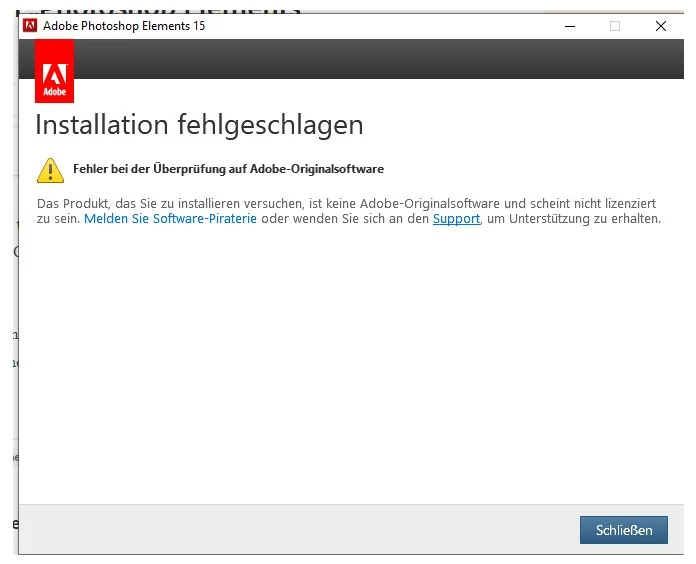
I have bought a new PC and want to install PSE 15 on a new computer. I have deinstalled the old version and tried to install it on the new PC. But I get the error message that the software is not a orginal Adobe software. 


I could log into my Adobe Account and download there the install files. The serial number was accepted during the installation processs, the error message appears later.


Any idea what I could do?


Stefan
 

This topic has been closed for replies.
Correct answer hatstead

I suggest that you contact Adobe directly. You can initiate a chat session or by phone.

Reach us by phone (adobe.com)

2 replies

Greg_S.
Community Expert
Community Expert
January 3, 2023

Since the problem seems to be related to licensing, I suggest you download and install the free Creative Cloud desktop application.  There is no need to purchase any subscription.  However, this application seems to be involved in the license process for older versions of Elements and many users have reported success when having problems similar to yours.

StofferlAuthor
Participant
January 4, 2023

Thanks for this - but unfortunately it did not work.

hatstead
hatsteadCorrect answer
Inspiring
January 3, 2023

I suggest that you contact Adobe directly. You can initiate a chat session or by phone.

Reach us by phone (adobe.com)

StofferlAuthor
Participant
January 3, 2023

I fear that for PSE15 that is not an option because I only get forum support for this according to https://helpx.adobe.com/contact/what-contact-options.html

hatstead
Inspiring
January 3, 2023

The license for PSE is for use on 2 computers, and according to your posting you uninstalled on the old machine. You are in compliance with the ground rule! You do not require support for use of the software, just with installation on your new computer. You can do as you wish, but I would contact Adobe and explain to the agent that the issue is related to installation.
