
Participant
December 30, 2016
Question

PSE 15 won't start after reboot

  • December 30, 2016
  • 2 replies
  • 389 views

After installing PSE15 on my Windows 10 computer it worked fine.

After rebooting the computer it will no longer start with error :
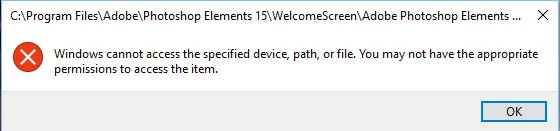
I have tried allowing Users full access to the Adobe folders, but no help.

Reinstall it allows to work again, until reboot.

I see no errors in the event log.

I am running Windows 10 Home, fully updated.

PSE 9 is running successfully on this system.

    This topic has been closed for replies.

    2 replies

    Participating Frequently
    January 2, 2017

    Hi,

    Just a few questions:

    1. Did you install PSE15 from Windows App Store?

    2. If not, Try launching Photoshop Elements Editor directly from:

    C:\Program Files\Adobe\Photoshop Elements 15\PhotoshopElementsEditor.exe in Run As Administrator mode.

    Let us know if it helps.

    Thanks,
    Anwesha

    Participant
    January 2, 2017

    I did not install from Windows App Store. This was from a purchased CD.

    Since I have done the changes above, the program will run, without Administrator mode. Prior to the changes, it would not run as Administrator.

    Peru Bob
    Community Expert
    Community Expert
    December 31, 2016
    Participant
    December 31, 2016

    I got this to work in three steps.

    1. The permissions on my install only had System and Administrators with full control and LogonSessionId_0_818039 (NT AUTHORITY) with Read & execute/Read. I added my account with Read & execute/Read permissions.

    2. Rt click on Adobe Photoshop Elements 15.0.exe and  pick "Troubleshoot compatibility". Select "Troubleshoot program" and then check box "The program requires additional permissions". Click "Next" and "Test the program", then "Next", and "Yes, save these settings for this program". This allowed the program to run, but came up with the "User Account Control" message. 

    3. From the "User Account Control" box select "show more details", and then "Change when these notifications appear". In the User Account Control Settings box move the slider down to "Never notify" and click OK. When the "User Account Control" box is re-displayed, click "Yes", and the screen will clear. Now starting Photoshop Elements will start normally.

    This seems like a lot of work and defeats the User Account Control security settings, but it did allow PSE 15 to run.