
Participant
December 2, 2017
Answered

PSE 2018 Mac - copy and past

  • December 2, 2017
  • 1 reply
  • 426 views

Hi, I install PSE2018 yesterday and I have a problem to use copy and past as I always do with other PSE versions.

As you can see in the screenshot, I have selected a layer but a can't copy it, the copy command is not selectable and also cmd-c doesn't work.

How can I solve it?

And also, selection works in layer tab but if I point an element in the image I'm not able to select a single layer...

Thank you in advance for suggestions.
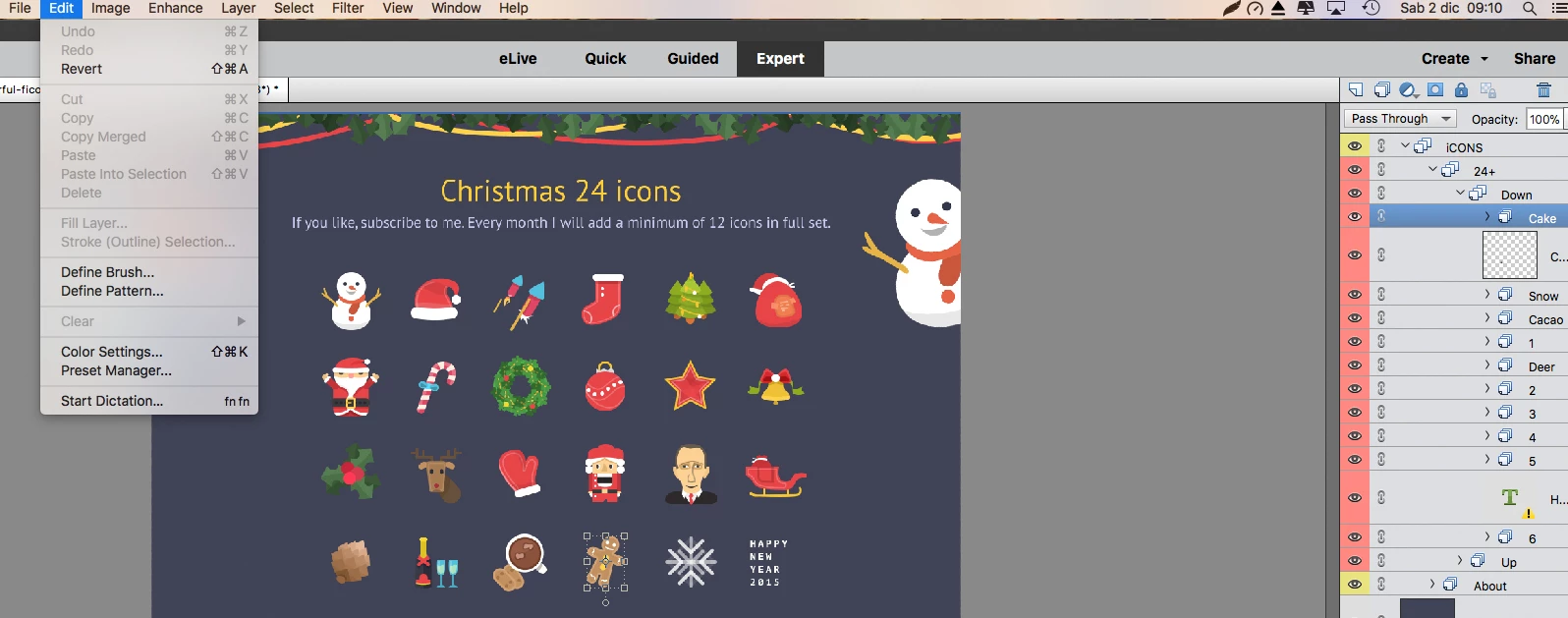
    This topic has been closed for replies.
    Correct answer Jeff Arola

    Also i should add that you have to do a Select>All before you can copy the contents of a layer to the clipboard.

    That is. make the layer you want to copy active in the layers panel by clicking on it, then go to Select>All, then Edit>Copy and finally Edit>Paste.

    1 reply

    MichelBParis
    Legend
    December 2, 2017

    Terefactor  wrote

    Hi, I install PSE2018 yesterday and I have a problem to use copy and past as I always do with other PSE versions.

    As you can see in the screenshot, I have selected a layer but a can't copy it, the copy command is not selectable and also cmd-c doesn't work.

    How can I solve it?

    And also, selection works in layer tab but if I point an element in the image I'm not able to select a single layer...

    Thank you in advance for suggestions.

    I must admit that I have not yet tested the new 'layer comps' addition in recent PSE versions... I think that may be the reason of the copy failure.

    For the second issue, check in the tool option panel on the bottom if  'auto select layer' is checked. Maybe another 'layer comp' restriction?

    Participant
    December 3, 2017

    Thank you Michel, for layer selection now I can move the selection ant it is ok, although to select the layer I have to do it in the layer tab and is not possible on the image.

    But, the copy and paste issue makes the product unusable . I hope it can be solved quickly.

    What do you think about it, there is a workaround?

    thank you again

    Jeff Arola
    Community Expert
    Community Expert
    December 3, 2017

    I think the problem is you have selected a Layer Group.

    (actually you have a Nested Layer Group selected)

    You need to select a layer within the group to be able to copy and paste individual layers.

    For example, in your screenshot instead of selecting the Group Cake, selected the layer below it and then try the copy and paste.

    Some more info on layer groups:

    Photoshop Layers - Layer Groups