Walter_H
Legend
January 26, 2021
Answered

PSE 2020 Default Brush Sets

  • January 26, 2021
  • 2 replies
  • 806 views

Hello,


What are the default brush sets installed in PSE 2020 and where are they installed? I'm using PSE 2020 in Windows 10.


I somehow have gotten my brushes all screwed up. I've added several downloaded brush sets to "C:\Program Files\Adobe\Photoshop Elements 2020\Presets\Brushes". But now, I'm seeing duplicate brush sets in the brush selector drop-down menu.


Some of the brush sets that I've added I really will never use - I just added them so I could see what they were. I want to delete these unneeded brush sets but I don't want to delete any of the default brush sets. Is there a list of the installed default brush sets in PSE 2020?


Thanks for your help!

 

This topic has been closed for replies.
Correct answer Jeff Arola

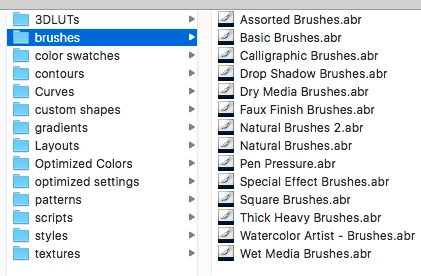
These are the brush sets that ship with photoshop elements located in

C:\Program Files\Adobe\Photoshop Elements 2020\Presets\Brushes


2 replies

Jeff Arola
Community Expert
Jeff ArolaCommunity ExpertCorrect answer
Community Expert
January 26, 2021

These are the brush sets that ship with photoshop elements located in

C:\Program Files\Adobe\Photoshop Elements 2020\Presets\Brushes


Walter_H
Walter_HAuthor
Legend
January 28, 2021

Thank you, Jeff!


--Walter in Davie, FL
Glenn 8675309
Legend
January 26, 2021

Look here:

C:\Users\User\AppData\Roaming\Adobe\Photoshop Elements\18.0\Presets\Brushes  (18 is pse 2020-- 19 is pse 2021)

The "user" is generally whatever name you gave your account when setting up windows... i didn't name anything so it says "user"- whats important is the roaming directory, not the program files directory. 

Just go to the brushes pre set folder and delete what you dont want.