


Known Participant
February 7, 2021
Question

PSE 2021 color picker not working properly after the Feb 4 update

  • February 7, 2021
  • 7 replies
  • 2085 views

RE: PSE 2021 color picker after the Feb 2021 update

Another PSE 2021 user who updated is experiecing the same problem with the color picker..not just me

The color picker is not functioning properly as it was before the update and has always worked in many versions of PSE. It is "easy" to work around, but not the way it should be.

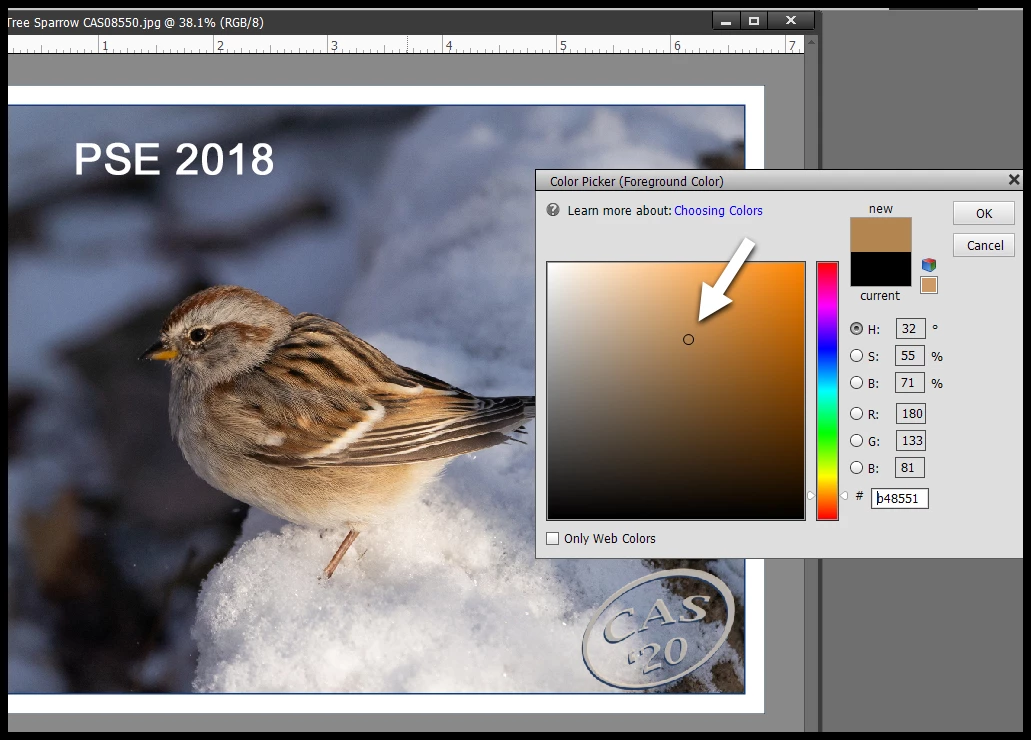
When the color picker eyedropper is used to select a forground color in the image, the actual color position should be indicated by the small O .. then it is easy to shift ↑ ↓ → ← to get the hue and value desired. Here is a shot from PSE 2018.


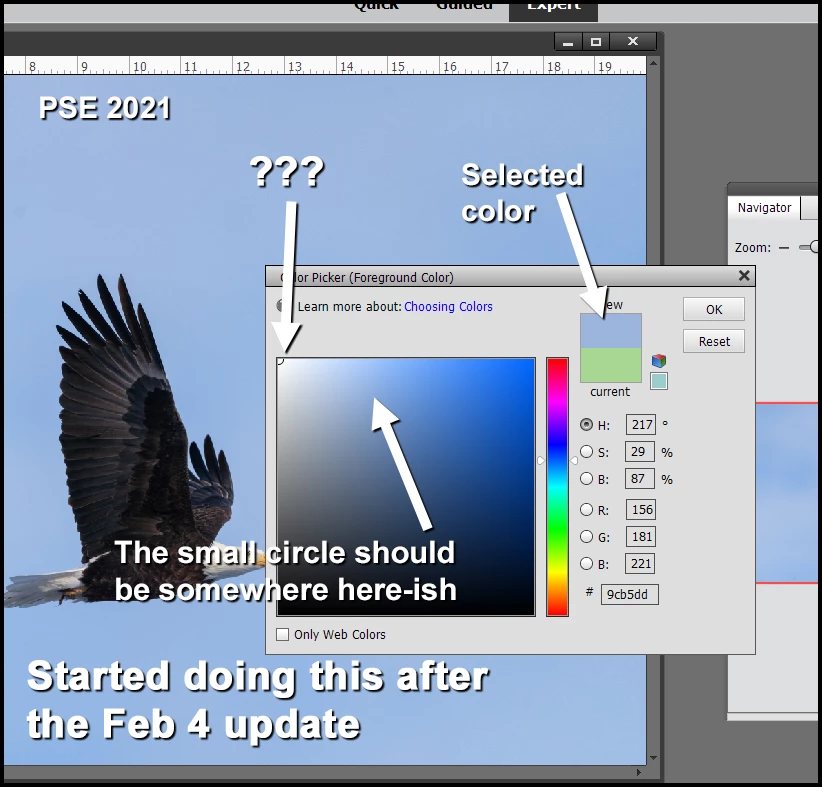
But now in 2021 after the update on Feb 4 or so, when I click on the foreground color to invoke the color picker tool, and then click somewhere darkish in the image to select the color I desire, the "new" color appears in the color picker panel, however, there is no little round circle to be seen anywhere in the color window and that's important. If I pick from a light region in the photo, the circle will appear in the upper left (pure white ?) even though the correct color is displayed in the "new" window and the RGB color units correct.


2021 after the update
 

Thanks for any support. 

Clive


This topic has been closed for replies.

7 replies

Glenn 8675309
Legend
May 22, 2021

By far, the absolute best images psoted in the past year describing an issue.  You even embedded them , instead of attaching them.   Give your self a raise! 

Participant
April 2, 2021

I am having a similar problem with RBG color discrepancy and the software either being sluggish or crashing. I upgraded to Adobe Elements 2021 after the latest Mac OSBig Sur (11.2.3) update was no longer compatible with my previous Elements version. Colors now look "off" and I find myself spending a lot of time attempting to work around the issue, many times unsuccessfully. I attempted to resolve the issue by contacting Adobe customer service, but after close to three hours on the phone, I was still unable to remedy the situation. Overall, an extremely frustrating experience as a long-time Elements user who has invested time (learning) and money (new verions) over the years, only to not be able to get the same past results.

Participating Frequently
February 15, 2021

I've discovered this behavior on my (macOS 10.15.7 Catalina) 2021 copy also.

The only time I get the small circle 'marker' is with fairly light colors. Of course, like pontiac1940 reported, it is nowhere near the actual selected color, it is always in the upper, left-hand corner (usually the most 'white' area).

Participant
February 8, 2021

Hi,

I also confirm the same Color picker issue sincne the last update for Photoshop Elements 2021. On Windows 10 Home 64. I am happy to see that the problem has been reported to Adobe. We are now waiting for the solution. Thank you. 

Adobe Employee
February 8, 2021

Thanks for reporting the issue. We are working on resolving this.

Greg_S.
Community Expert
Community Expert
February 8, 2021

@arshla jindal, please take a look at this thread too.  There appear to be problems with previews/responsiveness for a number of tools since the update.

Adobe Employee
February 8, 2021

Hi @Greg_S. , thanks for initimating us. The team is already working on this thread as well.

Jeff Arola
Community Expert
Community Expert
February 8, 2021

Confirming the same issue on macOS 10.14 and photoshop elements 2021.

Greg_S.
Community Expert
Community Expert
February 7, 2021

I can confirm your finding.  I will report it to Adobe.

Known Participant
February 7, 2021

Thank you Greg! 

Clive