Inspiring
June 14, 2021
Answered

PSE 2021 dropped Camera RAW Database?

  • June 14, 2021
  • 2 replies
  • 843 views

I've used the database with PSE 2018, but can't find a choice for it in PSE 2021. Am I overlooking something?

This topic has been closed for replies.
Correct answer Phil Pickering

Hi Frans,


The ability to save image settings in a Camera Raw database was deprecated in Adobe Camera Raw 12.3 which was released in July 2020.


Here's Andrew Rodney (aka @TheDigitalDog) on the Camera Raw database vs. XMP sidecar files over on the Camera Raw Support Community:


https://community.adobe.com/t5/camera-raw/bake-xmp-changed-into-my-canon-raw-files/m-p/11280998#M11672


Not convinced? Here are some workarounds:


- Hide the XMP sidecar files: If you still maintain a folder-based way of organizing your images, here's a quick video recording I made of a way to hide the XMP sidecar files in Windows 10's File Explorer:


Just remember to unhide them if you're manually copying the image files to another folder/drive/computer or you'll run into the same issues that Andrew Rodney described when he was talking about the Camera Raw database.


- Revert back to Adobe Camera Raw 12.2.1: Use the steps outlined here to replace your current Adobe Camera Raw plug-in with version 12.2.1 which still contains the option to save your image settings in the Camera Raw database:


Update the Camera Raw version on your Mac or Windows machine


Here are some screenshots of Adobe Camera Raw 12.2.1 working in Adobe Photoshop Elements 2021:
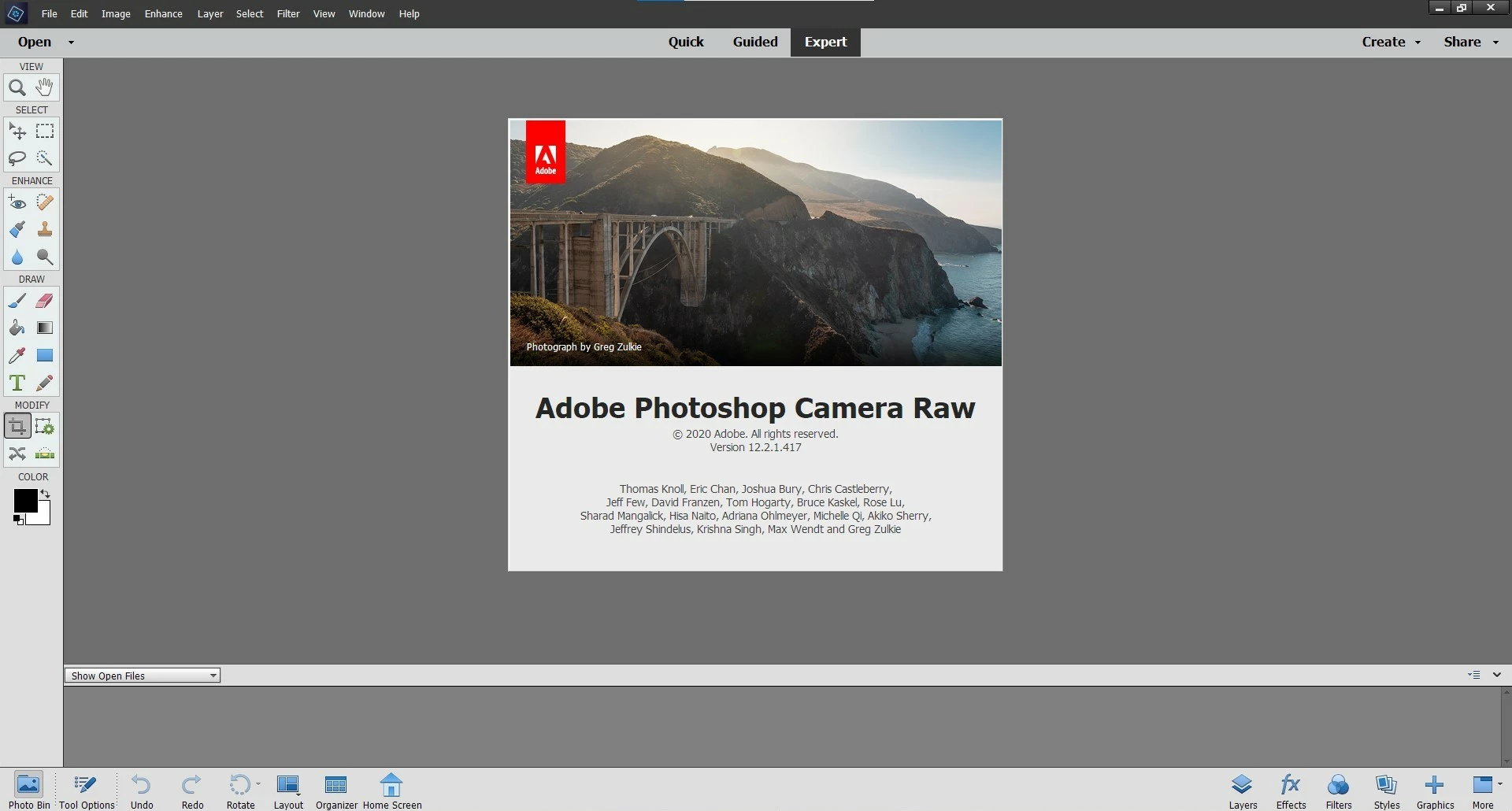


- Convert all your images to DNG files: if you really don't like XMP sidecar files AND you want to run the latest version of the Adobe Camera Raw plug-in, convert all your images to DNGs using Adobe's DNG Converter:


Adobe Digital Negative Converter


Hope that gives you enough info to help you make an informed choice 🙂

2 replies

Phil Pickering
Phil PickeringCorrect answer
Legend
June 15, 2021

Hi Frans,


The ability to save image settings in a Camera Raw database was deprecated in Adobe Camera Raw 12.3 which was released in July 2020.


Here's Andrew Rodney (aka @TheDigitalDog) on the Camera Raw database vs. XMP sidecar files over on the Camera Raw Support Community:


https://community.adobe.com/t5/camera-raw/bake-xmp-changed-into-my-canon-raw-files/m-p/11280998#M11672


Not convinced? Here are some workarounds:


- Hide the XMP sidecar files: If you still maintain a folder-based way of organizing your images, here's a quick video recording I made of a way to hide the XMP sidecar files in Windows 10's File Explorer:


Just remember to unhide them if you're manually copying the image files to another folder/drive/computer or you'll run into the same issues that Andrew Rodney described when he was talking about the Camera Raw database.


- Revert back to Adobe Camera Raw 12.2.1: Use the steps outlined here to replace your current Adobe Camera Raw plug-in with version 12.2.1 which still contains the option to save your image settings in the Camera Raw database:


Update the Camera Raw version on your Mac or Windows machine


Here are some screenshots of Adobe Camera Raw 12.2.1 working in Adobe Photoshop Elements 2021:
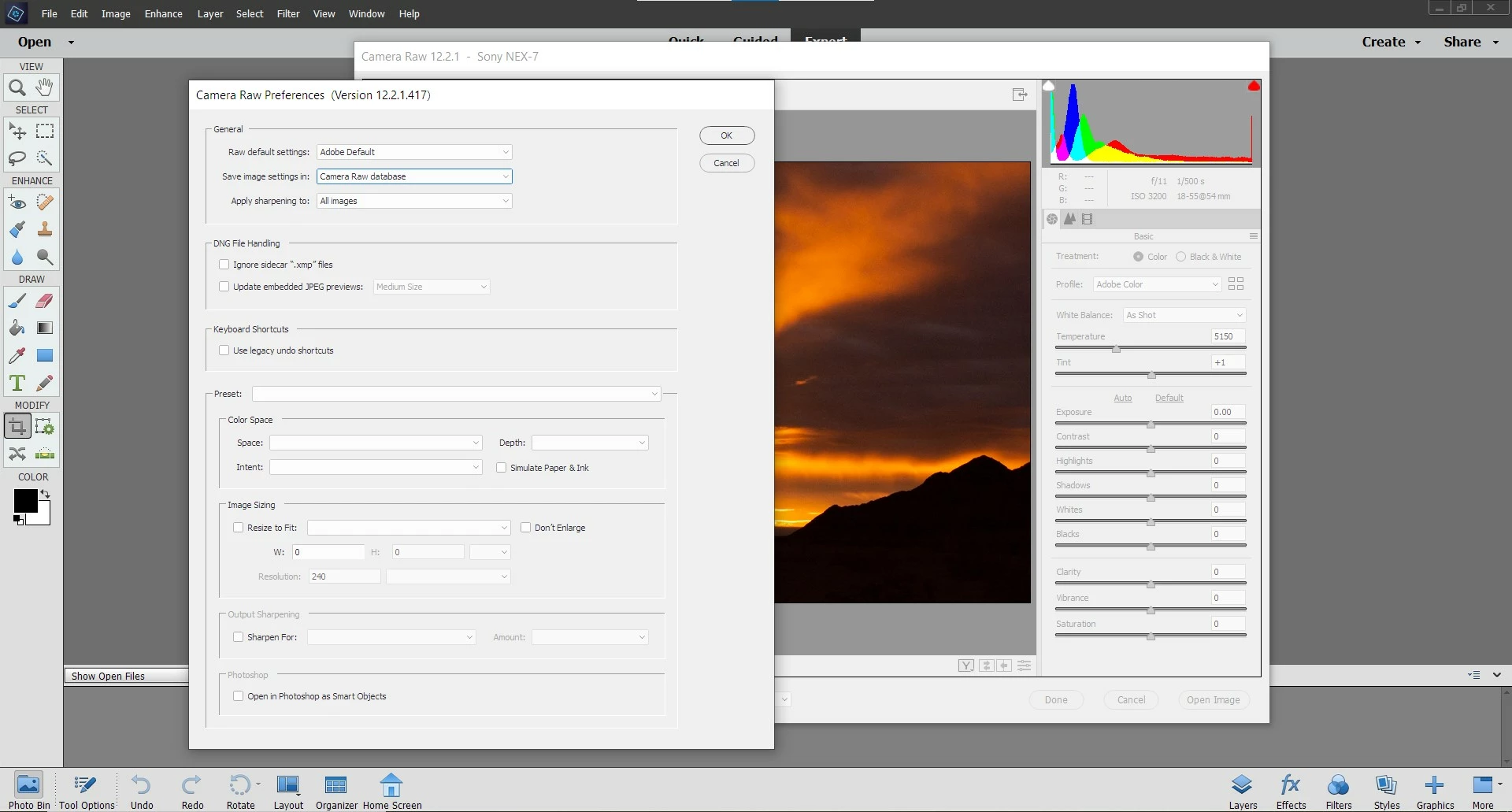


- Convert all your images to DNG files: if you really don't like XMP sidecar files AND you want to run the latest version of the Adobe Camera Raw plug-in, convert all your images to DNGs using Adobe's DNG Converter:


Adobe Digital Negative Converter


Hope that gives you enough info to help you make an informed choice 🙂

MichelBParis
Legend
June 14, 2021

Yes, Adobe dropped the database for Camera Raw. I thought that was older than PSE 2018...

I assume it was because practically no one was using it.

Frans2001Author
Inspiring
June 14, 2021

So, now I'm going to use XMP and clutter up my folders?

MichelBParis
Legend
June 14, 2021
quote

So, now I'm going to use XMP and clutter up my folders?


By @Frans2001


Think about it: there must be a reason why everybody finally preferred the xmp sidecar files to the raw database. I absolutely don't mind 'cluttering up' my folders since I use the organizer with its databases and don't care much about folders. You may find discussions about that organizing choice database vs xmp sidecars, but the only discussion about that in the present PSE forum was one I posted years ago. It did not get any answer or comment.


https://helpx.adobe.com/camera-raw/kb/user-interface-updates.html


Another link:

https://feedback.photoshop.com/conversations/camera-raw-and-dng/restore-embed-the-xmp-file-into-the-camera-raw-database/5f5f46224b561a3d4275685d