
Known Participant
April 27, 2023
Answered

PSE 2022 Marquee tool

  • April 27, 2023
  • 2 replies
  • 718 views

This tool no longer works correctly, although everything else seems OK.

Now when I select it and then click on an area in an image and drag all that happens is that a very small area is selected and then moves as I drag the cursor without the marquee changing size. It stays about 60px square.

Has anyone a solution to this problem?

Thanks.
This topic has been closed for replies.
Correct answer Walter_H

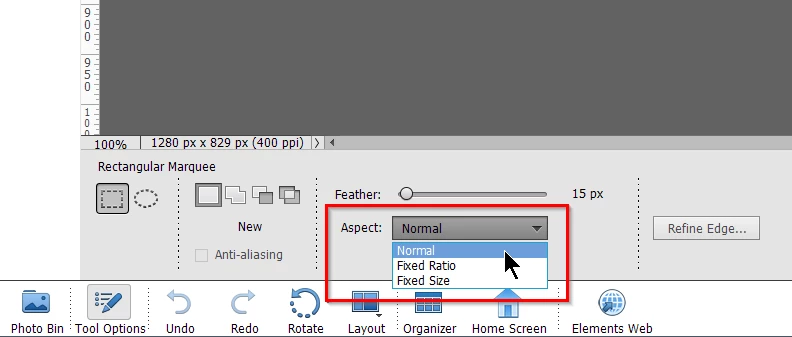
@vivski, it sounds as if your Rectangular Marquee tool got inadvertently set to Fixed Size. Check the tool options and be sure that the Aspect is set to Normal.


2 replies

Walter_H
Walter_HCorrect answer
Legend
April 28, 2023

@vivski, it sounds as if your Rectangular Marquee tool got inadvertently set to Fixed Size. Check the tool options and be sure that the Aspect is set to Normal.


--Walter in Davie, FL
vivskiAuthor
Known Participant
April 28, 2023

Thanks very much, you are correct. That is an option I had never looked at before. Problem solved.

Glenn 8675309
Legend
April 27, 2023

What's your OS, and what version of PSE do you have?

Do what the arrows are pointing at and restart the editor--- 50/50 chance that will fix it.

vivskiAuthor
Known Participant
April 28, 2023

Thanks for the suggestion, I am on Win11, PSE 2022. I did try that which did not help but Walter did give me the solution to my problem. I have no idea how the tool became set to Fixed Size, but am glad that it is back the way it should be.