
Artemus69
Participant
April 28, 2024
Answered

PSE 2024 Organizer Folder list format

  • April 28, 2024
  • 4 replies
  • 721 views

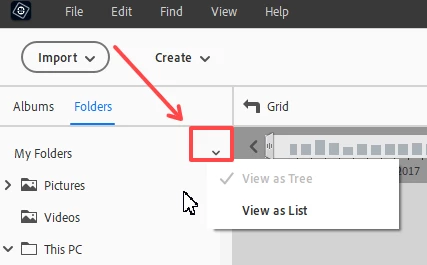
In the 2024 Organizer, the list of subfolders are separated form their parent folders and listed separately and alphabetically. In the older version that I had the folders and subfolders were displayed in a tree format.  How can I change the format of the folder list so that it will display as a tree?
This topic has been closed for replies.
Correct answer Greg_S.

Click on the small down arrow next to the My Folders panel heading.


4 replies

Greg_S.
Community Expert
Community Expert
April 28, 2024

@Artemus69, don't feel foolish.  Many others have been confused by small changes like this.

Greg_S.
Community Expert
Community Expert
April 28, 2024

As @Monte307 has demonstrated, there has been a change in the UI for this operation.  The hamburger icon in prior versions has changed to a chevron down arrow.

Artemus69
Artemus69Author
Participant
April 28, 2024

Thank you to everyone for the prompt responses.  I feel a little foolish for not trying that before asking for help.  It solved my issue.

Monte307
Inspiring
April 28, 2024

Here's what works in Org 2023: 

In the upper left click on the item show in attached (1.png).

This will bring up the 'view as tree/list' selector (2.png).

Greg_S.
Community Expert
Greg_S.Community ExpertCorrect answer
Community Expert
April 28, 2024

Click on the small down arrow next to the My Folders panel heading.


Participant
July 12, 2024

Halleluia!  Thank you, I've been struggling with this for the last four or five versions of Elements.