
Participating Frequently
February 27, 2024
Question

PSE 2024 panorama resolution loss

  • February 27, 2024
  • 2 replies
  • 653 views

Hello all, new to this forum, looking for a solution to my problem.

I'm a longtime user of PSE 14 and often used the panorama stitching functionality.

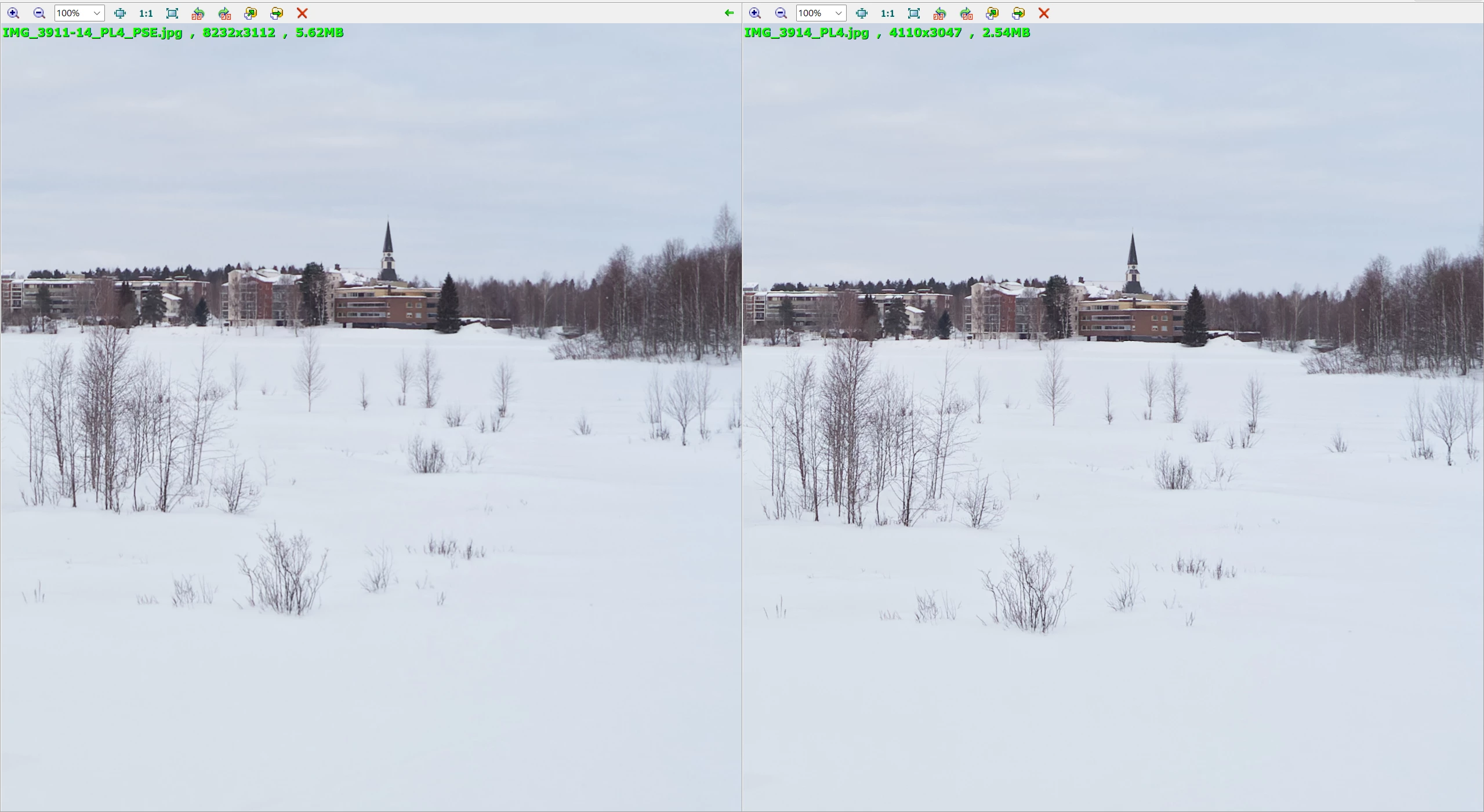
I now have a new PC build with Windows 11 and on that occasion I'm currently doing the 30 day trial of PSE 2024. Happy to see that this all works much like what I'm used to from PSE 14. However I'm running into a particular problem that, when looking side by side at the finished panorama and one of the input images, the panorama looks distinctly unsharp compared to its input images. I've confirmed this with several panoramas from two different cameras. PSE 14 doesn't do this...

Is this a settings problem, or has the software changed along the way? Most importantly: how do I solve this?

I'm attaching a PNG screenshot of two images looked at in FastStone (but the problem is visible in PSE 2024 itself). The panorama is on the left.

Many thanks for any assistance.
This topic has been closed for replies.

2 replies

Jeff Arola
Community Expert
Community Expert
March 1, 2024

Before you draw any firm conclusions i'd like to point out the demo images your showing are jpegs, therefore subject to compression which causes all kinds of anomalies.


A better comparison might be archived by saving the panos as flattened psd or tiff files from both pse 14 and pse 2014 and then comparing them.

Mark9473Author
Participating Frequently
March 1, 2024

Thanks for your comments, but I've only ever stitched panoramas from jpegs - in PSE 14 it didn't work with raw, TIFF or DNG files.

I'm getting the impression that this forum isn't where Adobe comes to address issues from its customers. Would you know how I can bring my concerns to their attention?

Jeff Arola
Community Expert
Community Expert
March 1, 2024

I've got both pse 14 and pse 2024, so i'll see if there's any difference here.


I've got plenty of jpegs for panos from cameras that only did jpegs.

Glenn 8675309
Legend
February 28, 2024

I think it would help to post a screen shot of the enitre program with the two images side by side.

Mark9473Author
Participating Frequently
February 28, 2024

I'm curious what your explanation will be for that request, so here you go, this is my complete screen:


Glenn 8675309
Legend
February 29, 2024

In photoshop elements, when you see the difference. 

Make sure we can see the panel bar on the right, and zoom each image to 100%