Whippet
Participant
February 11, 2020
Answered

PSE will not activate.

  • February 11, 2020
  • 4 replies
  • 1064 views

I have just changed my Windows 7, to a new desktop with Windows 10 and Chrome browser.

I installed PSE 15 from my disk.

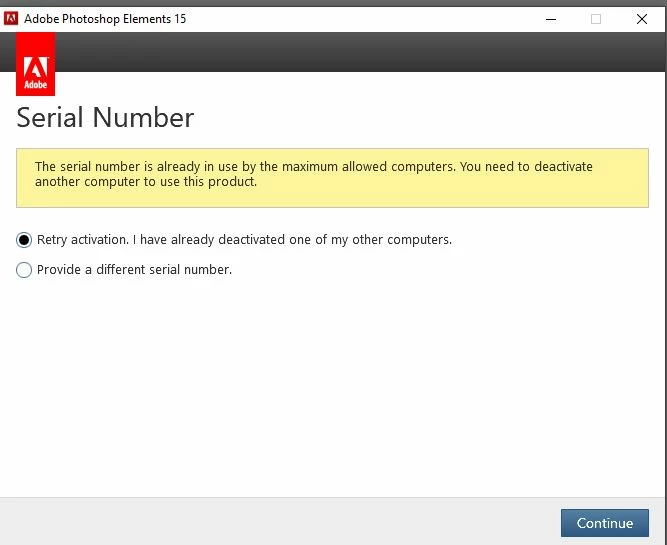
But when I try to start the program, I get this window up.

This is the only computer I have, so I can't understand why it won't accept my serial number.

Last time the computer went in for repair, PSE loaded again for me and worked, no problem.

Please can you help me.

I am not very computer literate!!!

This topic has been closed for replies.
Correct answer MichelBParis

Hi Whippet,

No mystery at all.

You are allowed to have two computers activated at the same time. Activation (or 'sign in) means that the license agreement is linked to the particular computer, its hardware and OS. If your old computer failed and got completely reinstalled, the first activation was lost (broken identification for the activation servers). Then, the second activation was used;  such circumstances are exactly why you have got two activations (it's also to allow one to use alternatively two computers).

Now, you are on a new computer. There is no activation left. The message tells you to deactivate on your previous computer (menu Help >> sign out). Then you can enter and validate your license key.

It's rather common to have a computer stolen, broken or lost. That's what happened to you the first time. To recover that activation, you must use the 'Customer Care' help option, choosing by chat and specifying it's an activation/license problem. Adobe staff can quickly remove the lost activation if your previous computer is no longer available.


4 replies

99jon
Legend
February 12, 2020

I would suggest trying on-line chat again. Make it clear you are not looking for support for an older product but need help with activation & deactivation as PSE15 is already installed. Don’t let them terminate the chat. Insist on being transferred to a supervisor or line manager if necessary.

Whippet
WhippetAuthor
Participant
February 13, 2020

Just seen Michel and 99jon's replies.

I gave up last night, and purchased PSE 2020.

The link which Michel posted, brings things up to date.


MichelBParis
Legend
February 12, 2020

Follow up:

Very bad experience from Whippet (the OP), see what's new in her answers from ??? from Adobe?.

http://photoshopelementsandmore.com/thread/6577/pse-15-windows-10?page=1&scrollTo=64845

Whoever answered the following should not be from Adobe:

We would like to inform you that PSE 15 is too old and no longer available and supported with Windows 10 64 Bit And Secondly PSE 15 servers have been shut down. If you will try to install or update it further then it will create conflict with your system. so we can do is we provide you the PSE 2020 so you can able to start your work in a proper way.

I know that accessing the chat session may result in sterile circles, but I'll try to get her theres.


99jon
Legend
February 11, 2020

This is a user to user community. For some issues it will be necessary to contact Adobe directly as Michel suggests. Click the following link and scroll down the page to Individual. Then click “Sign in to contact us” It should be possible to start an on-line chat with Adobe Support.
https://helpx.adobe.com/support.html

Whippet
WhippetAuthor
Participant
February 11, 2020

Thank you both so much for your help - and the link.

MichelBParis
MichelBParisCorrect answer
Legend
February 11, 2020

Hi Whippet,

No mystery at all.

You are allowed to have two computers activated at the same time. Activation (or 'sign in) means that the license agreement is linked to the particular computer, its hardware and OS. If your old computer failed and got completely reinstalled, the first activation was lost (broken identification for the activation servers). Then, the second activation was used;  such circumstances are exactly why you have got two activations (it's also to allow one to use alternatively two computers).

Now, you are on a new computer. There is no activation left. The message tells you to deactivate on your previous computer (menu Help >> sign out). Then you can enter and validate your license key.

It's rather common to have a computer stolen, broken or lost. That's what happened to you the first time. To recover that activation, you must use the 'Customer Care' help option, choosing by chat and specifying it's an activation/license problem. Adobe staff can quickly remove the lost activation if your previous computer is no longer available.