Participant
July 24, 2017
Question

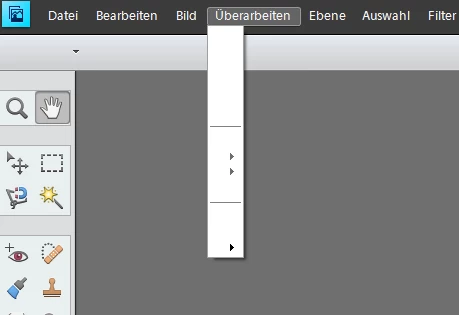
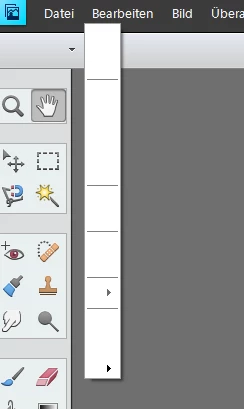
PSE11 shows no sub menue text

  • July 24, 2017
  • 3 replies
  • 778 views

PSE works well for years (Win10), no changes made, but since yesterday no sub-menu text is visible. I de-installed PSE and installed it again - but no changes.

Two screen shot examples of empty sub-menues:
  

Who has an idea what can help?

    This topic has been closed for replies.

    3 replies

    Participant
    August 8, 2017

    Thanks for this links.

    Helpful was the page Re: PhotoShop Elements 12 und WIN10  with the contribution of were it was recomended to install some deleted fonds. The link to this fonds can be downloaded by https://office.1und1.de/guest?path=Fonts%20-%20info%40digemotion.de&token=24C99C517F02EF5C &mandant=02&product=onlineoffice&locale=de&viewType=0&guestToken=k8MCeKbgSwKsQTVJE6UNWw&lo ginName=info%40digemotion.de

    Fonds downloaded, copy them to a folder, install them (right click on the fonds-icons), restart windows and PSE works fine

    Thanks to georg_58!!!

    Participant
    August 31, 2017

    Unfortunately the described solution helps only temporary. After the next windows start the failure are back again and the procedure has to be repeated.

    I found a better fix at Re: Problems in Windows 10 Creators Update with Fonts Installed via “Shortcut”!  from Dov Isaacs. Hope that this solution works permanent.

    Participating Frequently
    August 3, 2017

    Solution to a similar problem is being talked about in this thread https://answers.microsoft.com/en-us/windows/forum/windows_10-performance/photoshop-element s-10-pulldown-menus-are-now-bl…

    Please see if this is helpful.

    Thanks,

    Anwesha

    Adobe Employee
    July 25, 2017

    Hi,

    Please check for and install all latest windows updates.

    Please see related thread: Photoshop Elements 12 missing menu text.

    Thanks,

    Arshla