
Participating Frequently
June 20, 2017
Answered

PSE14 help - screen display is checkerboard [edited for clarity]

  • June 20, 2017
  • 1 reply
  • 1042 views

Help!

I uploaded pictures from camera and when I went to edit a picture I get a display of a checkerboard design.  I may have hit the rotate option.  I can only minimize the screen not kill it.

Next day I tired to upload other pictures and when I hit edit I get the same checkerboard.
This topic has been closed for replies.
Correct answer hatstead

I cannot move it off of Quick.


tractormanbill  wrote

I cannot move it off of Quick.

Exit PSE, shut down your computer, wait 30 sec. Restart computer.

Open PSE, in Editor go to Expert tab.

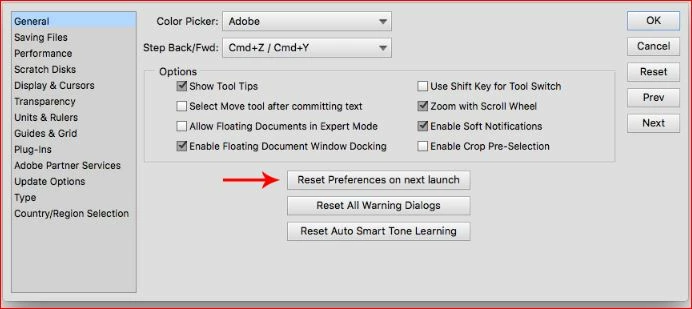
Go to Edit>Preferences>General and reset preferences to default. Look for this:

Relaunch as directed and try to open a picture file.

1 reply

Nancy OShea
Community Expert
Community Expert
June 20, 2017

What kind of images are you opening in Photoshop?

A checkerboard background denotes transparency.  See screenshot.  Below I have 2 layers.  The bottom layer is a transparent background and the top layer is a solid shape.

Nancy

Nancy O'Shea— Product User & Community Expert
Participating Frequently
June 21, 2017

Nancy,

Thanks for any help but I have only used photoshop to get jpg photos from my camera, resize them and save them for the web.

I don’t use layers that I know of.

I can remove the checkerboard by going to image/transform/perspective and the picture shows up but if I try to rotate it goes to checkerboard.

Thanks,

Bill Bailes

Nancy OShea
Community Expert
Community Expert
June 21, 2017

Can you post of a screenshot of your workspace?  It's unclear what's going on.

When getting JPGS into PS, what method are you using?

I normally use File > Open and browse to the folder on my hard drive that contains my images.

Nancy

Nancy O'Shea— Product User & Community Expert