
Participating Frequently
January 6, 2023
Answered

PSE9 opening images with border

  • January 6, 2023
  • 1 reply
  • 281 views

My PSE9 is opening my images with a black border around them. It's like they're opening in a new window. The border includes the maximize/minimize/full screen option at the top right. I can enlare it by dragging it but then when I get it large enough the tools nor the horizontal scroll bar show which I need. I absolutely HATE it! I'm a digital scrapbook designer so I'm on my PSE9 several hours daily. Can anyone tell me how to get it to open image files the way it used to? Your help is greatly appreciated. This is my job so it's important to me.

This topic has been closed for replies.
Correct answer Greg_S.

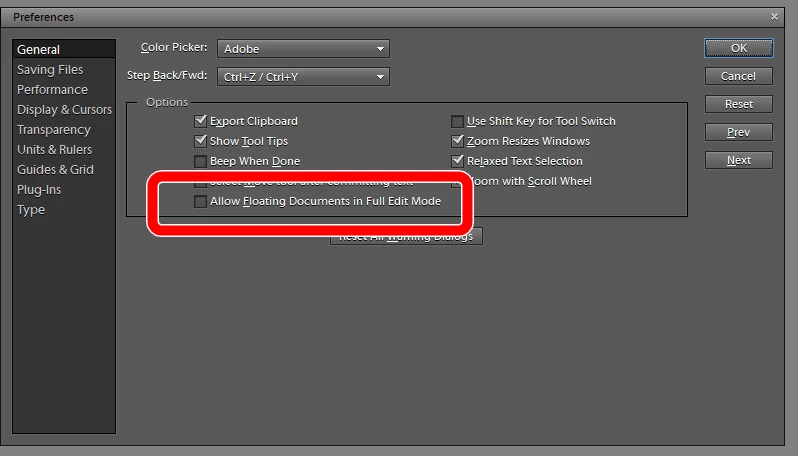
You are opening several images at a time and your workspace is set to allow floating documents instead of using tabs for the open documents.  You can go to the Edit>Preferences>General dialog and uncheck the box for Allow Floating Documents in Full Edit Mode.  This screenshot is from Elements 10, but I assume that it is also available in Elements 9. 

1 reply

Greg_S.
Community Expert
Greg_S.Community ExpertCorrect answer
Community Expert
January 15, 2023

You are opening several images at a time and your workspace is set to allow floating documents instead of using tabs for the open documents.  You can go to the Edit>Preferences>General dialog and uncheck the box for Allow Floating Documents in Full Edit Mode.  This screenshot is from Elements 10, but I assume that it is also available in Elements 9. 

ditzbitzAuthor
Participating Frequently
January 15, 2023
Thank you so much! You're saving me a lot of time & an immense amount of
frustration!


Ditz Bitz <>