Inspiring
June 18, 2021
Answered

Raw conversion screen Elements 2021

  • June 18, 2021
  • 1 reply
  • 392 views

Is there a way to save my normal settings in the raw conversion screen ?    In my previous version this was possible but with 2021 it always re drystone zero for every setting.    Also can I get rid of the Welcome screen and jump straight to Organizer?


This topic has been closed for replies.
Correct answer Phil Pickering

Hi Ann,


Unfortunately, the Adobe Camera Raw plug-in for Adobe Photoshop Elements' interface was changed in version 12.0 and one downside was that you can no longer Save New Camera Raw Defaults as you could in earlier versions.


Adobe Photoshop Elements 2021 is officially currently up to version 13.0 of the Camera Raw plug-in, but you can retrograde back to version 11.4.1 by following the instructions in this Adobe Knowledge Base article:


Update the Camera Raw version on your Mac or Windows machine


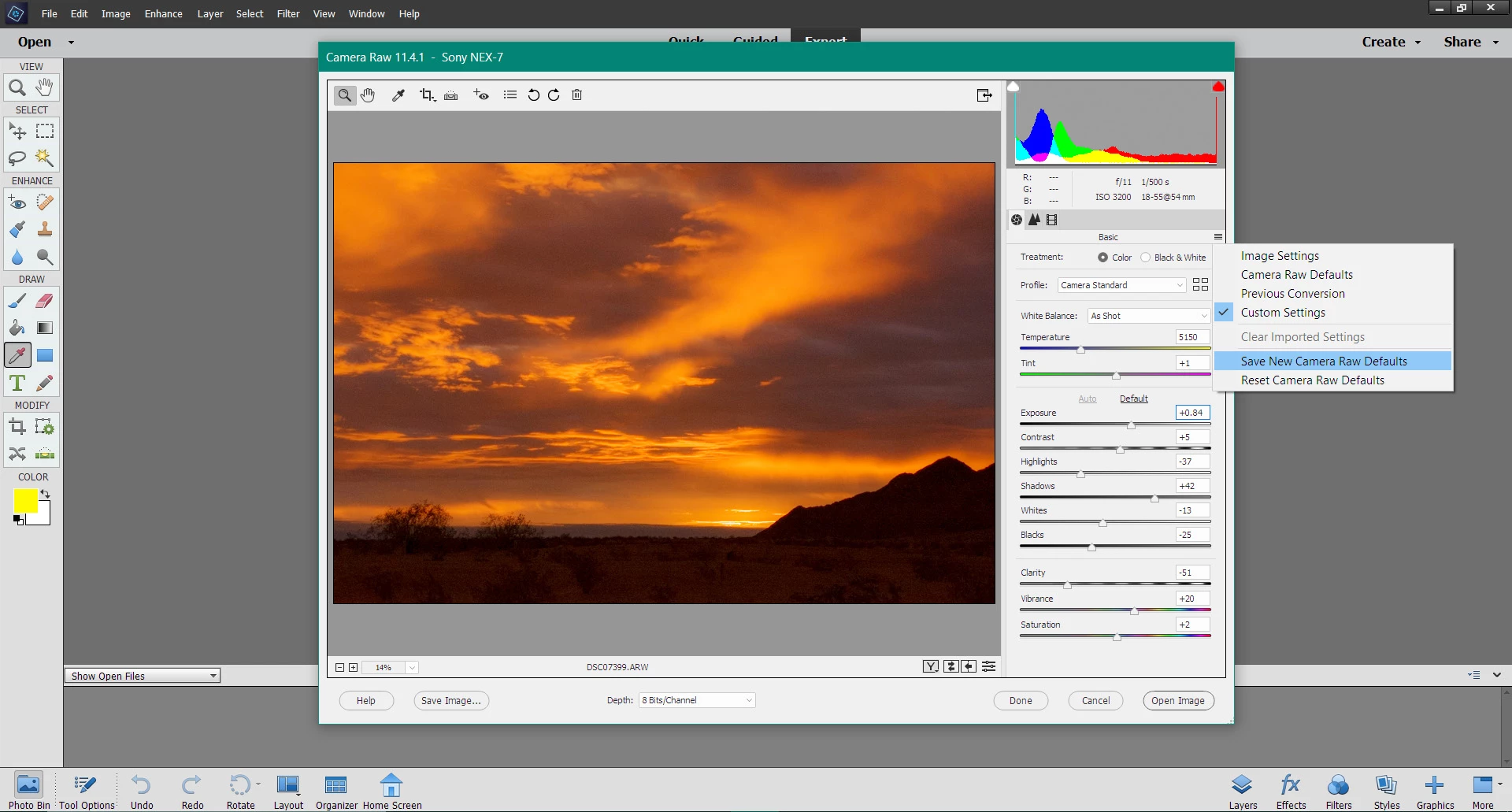
I've just double-checked and everything seems OK running this version of the Camera Raw plug-in in Photoshop Elements 2021:


And if you really have to (I like the Home screen... 🙂 ), here's how to bypass it in Windows 10:


- In File Explorer, navigate to C: Program Files > Adobe > Photoshop Elements 2021 > PhotoshopElementsEditor.exe

- Right-click on PhotoshopElementsEditor.exe and choose Pin to taskbar


Hope that helps 🙂

1 reply

Phil Pickering
Phil PickeringCorrect answer
Legend
June 18, 2021

Hi Ann,


Unfortunately, the Adobe Camera Raw plug-in for Adobe Photoshop Elements' interface was changed in version 12.0 and one downside was that you can no longer Save New Camera Raw Defaults as you could in earlier versions.


Adobe Photoshop Elements 2021 is officially currently up to version 13.0 of the Camera Raw plug-in, but you can retrograde back to version 11.4.1 by following the instructions in this Adobe Knowledge Base article:


Update the Camera Raw version on your Mac or Windows machine


I've just double-checked and everything seems OK running this version of the Camera Raw plug-in in Photoshop Elements 2021:


And if you really have to (I like the Home screen... 🙂 ), here's how to bypass it in Windows 10:


- In File Explorer, navigate to C: Program Files > Adobe > Photoshop Elements 2021 > PhotoshopElementsEditor.exe

- Right-click on PhotoshopElementsEditor.exe and choose Pin to taskbar


Hope that helps 🙂

AnnsbeadsAuthor
Inspiring
June 21, 2021

Hi Phil

Thanks for replying and the information.   I have bypassed the home screen as you explained (I don't like it😞!) and will think about the raw screen solution.   Will need to check it will recognise my camera first.    Cheers.

