craigm22874798
Participant
January 6, 2025
Answered

Raw Editor to JPG

  • January 6, 2025
  • 3 replies
  • 379 views

Hi Team

I have recently upgraded to the new PSE 2025


I note that when I edit in RAW and hit Open, I now enter the PSE Editor with a RAW file

(I understand this is to allow foe DNG files rather than XMP sidecars)


Is there a way to customise the workflow so that the edited RAW file opens in the Editor as a JPG (I am sure this is what used to happen)


Thanks v much

Correct answer Greg_S.

I think you must have opened the raw file as a 16 bit file.  That's why some of the menu options you mention are not available.  While you are still in the ACR Editor, make sure that the color depth is set to 8bit:


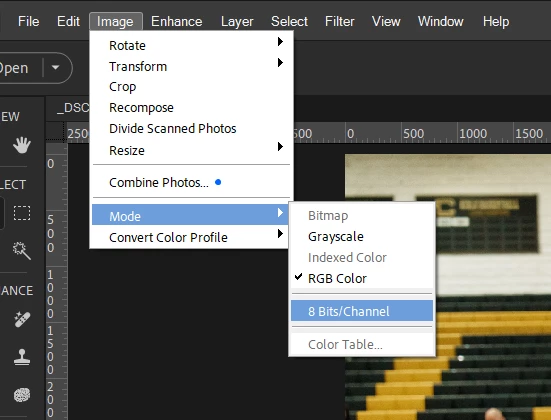
This setting should remain sticky.  If, for some reason, the file is opened in the PSE Editor as a 16 bit file, you can convert it to 8 bit in the Image>Mode menu:


All of your normal workflow editing options should then be available.

3 replies

Greg_S.
Community Expert
Greg_S.Community ExpertCorrect answer
Community Expert
January 6, 2025

I think you must have opened the raw file as a 16 bit file.  That's why some of the menu options you mention are not available.  While you are still in the ACR Editor, make sure that the color depth is set to 8bit:


This setting should remain sticky.  If, for some reason, the file is opened in the PSE Editor as a 16 bit file, you can convert it to 8 bit in the Image>Mode menu:


All of your normal workflow editing options should then be available.

craigm22874798
Participant
January 6, 2025

Legend


Thanks very much - much appreciated

Greg_S.
Community Expert
Community Expert
January 6, 2025

. . .  I forgot to mention that you can click on the ACR's Convert and Save button at the top right of the ACR Editor to convert a raw file to .dng format.


craigm22874798
Participant
January 6, 2025

Hi Greg


Thanks for taking the time to reply so quickly


Prior to moving to PSE 25 my workflow was:

Open CR2 file in RAW Editor

Edit in RAW

Open into the PSE Editor

Edit the new file - including favourites like "Remove Colour Cast" and "Spot Healing Brush"

Save as .jpg


After the move to PSE25, those edit options are no longer available when I enter the PSE Editor from Raw

So the equivalent workflow is now

Open CR2 file in RAW Editor

Edit in RAW

Open into the PSE Editor

Edit the new file - excluding favourites like "Remove Colour Cast" and "Spot Healing Brush"

Save as .jpg

Close the CR2 while deciding whether or not to save it

Find and open the just-saved .jpg version

Do the additional edits such as "Spot Healing Brush"

Re-save the jpg


So I am wondering if there is a way to set defaults so that I can replicate my old workflow


Thanks again

Greg_S.
Community Expert
Community Expert
January 6, 2025

The purpose of the Open button is to use the Editor for further editing or saving the file in another format such as jpeg.


Whenever any file is opened in the Editor, it is converted to .psd format, not jpeg.  Save or Save As allow the file to be saved in its original format e.g. jpeg, as a .psd (by default on edited file) or in an entirely different format.


I'm not exactly sure what you want to do.  So please provide more detail in light of my comments.