
Recompose tool draws crazy lines
Wonky Photoshop
Crazy lines! Right now I am using the Recomprose tool in Photoshop 24. If I click on my photo, I get a line, as you would expect; however, the line doesn’t quit. The line shoots all over the photo I am editing. Then, the screen freezes and I can’t continue editing. I can’t get to the main screen to use the computer. In order for me to return to my edit, I have to turn off the laptop. I can use Ctrl Alt Delete. Then there are options: Lock, Task Manager, Shut Down. The Lock choice is selected. If I select Shut Down, I lose any editing I have made on the photo. But Shut down it is. Start all over again only to be foiled by Photoshop misbehaving. I have battled this problem for the better part of a year. It’s holding up my project. The machine has been checked out by several sources. No one has an explanation.
I uninstalled/reinstalled Photoshop. That didn’t help. In desperation, I bought Photoshop Elements 25. To my horror, it does the same thing!
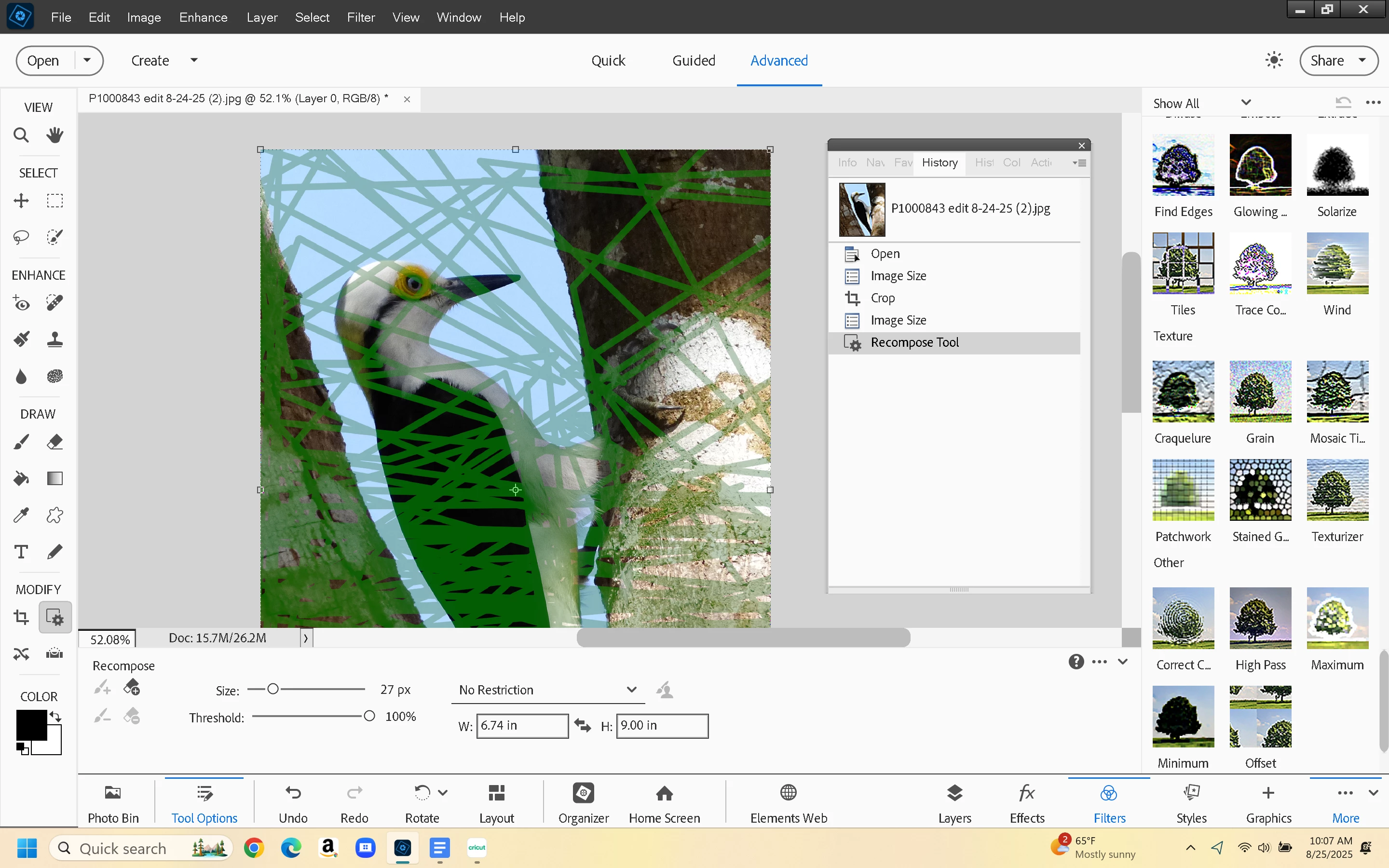
was marking an area for protection using the Recompose tool. This is the result. The screen is frozen.


 AdChoices