
Participating Frequently
August 3, 2025
Question

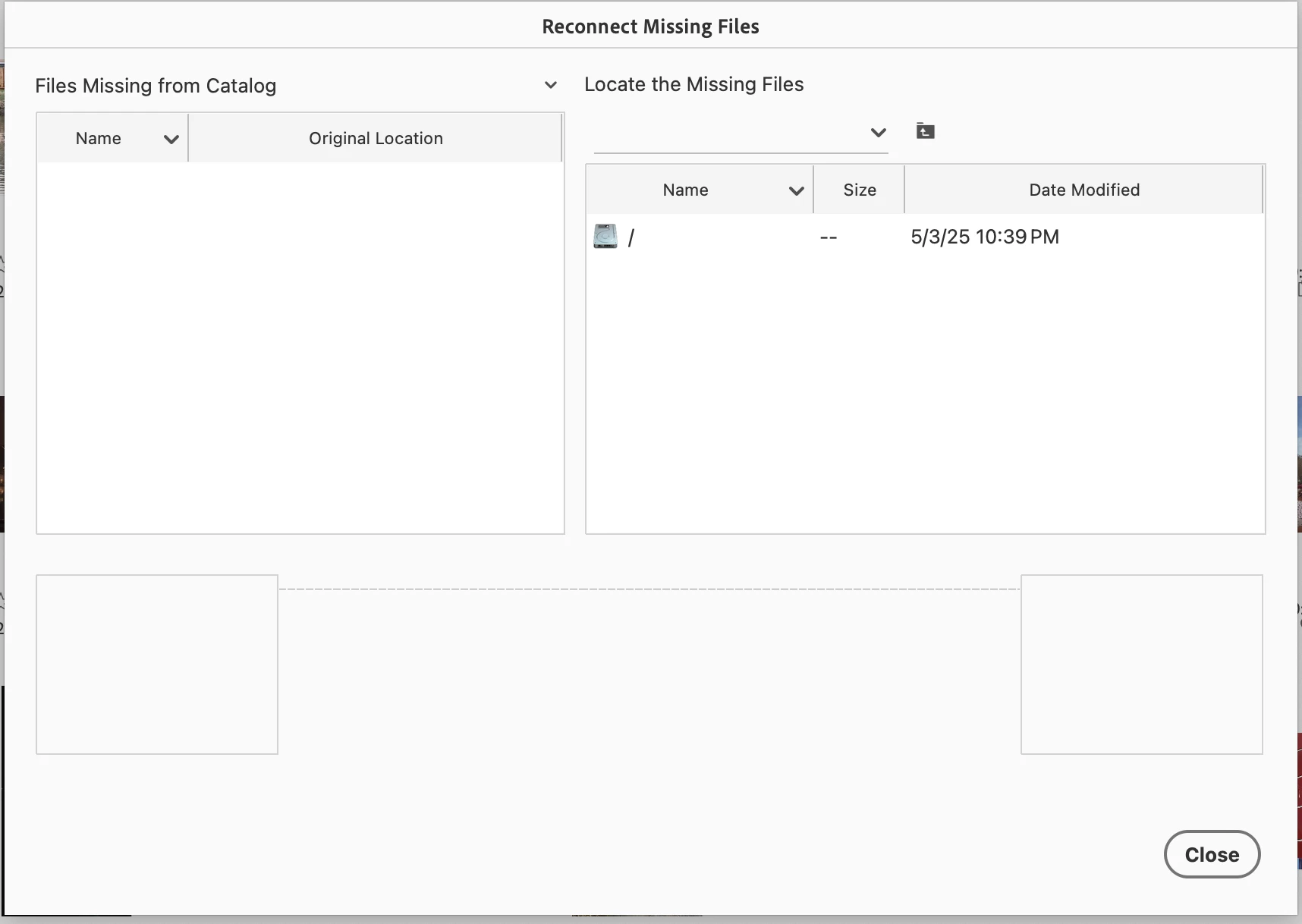
Reconnect Missing Files Screen is Blank

  • August 3, 2025
  • 3 replies
  • 403 views

I am running Mac OS 15.5. I just upgraded to PSE 25. I converted my 3 catalogs. Two are fine. The third shows this screen when I try to Backup and/or Reconnect Missing Files. I optimzed the catalog but this still appears.  I also tried letting it auto reconnect, and it ran through everything but obviously since so files are listed there is nothing to reconnect. Any ideas?
 

3 replies

Greg_S.
Community Expert
Community Expert
August 7, 2025

It looks like there is a corruption in the database file.  Have you tried repairing the catalog from the Manage Catalogs dialog?  Otherwise, you should try contacting Elements support. You can start a chat session by going to the Contact Adobe Support page. (https://helpx.adobe.com/contact.html?rghtup=autoOpen) Make sure you are signed into your Adobe account and try typing Agent when the chat window opens. (If you use my link, the chat window should open automatically.)  

Participating Frequently
September 3, 2025

Greg, I don't know if there is anything you can do for me. I contacted Support and talked to two agents.  The first person seemed to understand the issue, he uninstalled and reinstalled PSE 25 and the problem persisted.  He then said "Missing files are showing those folder is no longer available".  When I asked for clarification, he ended the call.  I then reconnected with a second agent, who didn't seem to understand the issue.  Sorry, this is long, but here is a portion of our chat:

"Date: 2025-09-02 17:43:21 PDT
To: Everyone
From: Mahender (Adobe)
There is no issue in the organizer
----------------------------------------------------------
Date: 2025-09-02 17:43:29 PDT
To: Everyone
From: Laurie Woodfill
Then when I search for missing files why don't I get the message that there are no missing files
----------------------------------------------------------
Date: 2025-09-02 17:43:51 PDT
To: Everyone
From: Mahender (Adobe)
Yes, why it is showing the error message because there is no missing file there
----------------------------------------------------------
Date: 2025-09-02 17:44:04 PDT
To: Everyone
From: Mahender (Adobe)
It will always show if there is no missing file there
----------------------------------------------------------
Date: 2025-09-02 17:44:10 PDT
To: Everyone
From: Laurie Woodfill
What is the 52 in the lower left corner and the Jan 1400
----------------------------------------------------------
Date: 2025-09-02 17:44:12 PDT
To: Everyone
From: Mahender (Adobe)
There is no issue and no missing file there
----------------------------------------------------------
Date: 2025-09-02 17:44:20 PDT
To: Everyone
From: Mahender (Adobe)
They are the data only showing
----------------------------------------------------------
Date: 2025-09-02 17:44:23 PDT
To: Everyone
From: Laurie Woodfill
Is that a date? Is that the files it can't find?
----------------------------------------------------------
Date: 2025-09-02 17:44:26 PDT
To: Everyone
From: Mahender (Adobe)
thats set
----------------------------------------------------------
Date: 2025-09-02 17:44:52 PDT
To: Everyone
From: Mahender (Adobe)
It just showing you the data, The file is not there and that is reason you do not have any missing file there"


He then also disconnected.  I really don't know what else to do.  Thanks in advance.

Jeff Arola
Community Expert
Community Expert
August 4, 2025

From what version of Photoshop Elements did you upgrade from?


If you go to Apple>System Settings>Privacy & Security>Files & Folders is the Adobe Elements 2025 Organizer listed?

Participating Frequently
August 4, 2025

Hi Jeff,

I upgarded from PSE 2023.  Yes, Adoble Elements 2025 Organizer is listed in Files & Folders. 

Greg_S.
Community Expert
Community Expert
August 3, 2025

I know nothing about Macs, so I'm not sure if the workflow is the same as Windows.  I will ping @Jeff Arola, another Community Expert who may be able to help you.


In the meantime:

How did you invoke the Reconnect Missing Files dialog shown in your screenshot?

What happens if you use the Find>All Missing Files command and double-click on a missing file?

How many missing files do you have in your catalog?

Are any of the missing files Hidden?

How did the missing files become missing?  Did you move or rename them outside of the Organizer?

Participating Frequently
August 4, 2025

Thanks for your reply Greg.  To answer your questions:

1. I have used the Reconnect>All Missing Files, and I get the dialog box as shown in my screenshot. Also when I start a backup, the program tells me some files have been moved and then the blank Reconnect Missing Files dialog appears.

2. I just tried Find>All Missing Files. It shows All Missing Files at the top but the rest is blank.  At the bottom, though, I see 52 items and also Jan 1400.  I don't have any files with a date of 1400 in the regular list.  When I look at all files, it says there are 105.549 items dating Dec 1999-Apr 2022.  So I am really confused about the Jan 1400.

3. I shouldn't have any missing files in my catalog. I backed up before I converted to PSE 2025 and there were none.

4. I checked for Hidden Files and I am not seeing any

5. I didn't move or rename any files, just did the conversion.  I have 3 catalogs, and the first two worked fine.  It's this last one that has the missing files bug.

Thank you!