


Participant
November 3, 2021
Question

Recovery from crashed hard drive Elements 2018

  • November 3, 2021
  • 3 replies
  • 136 views

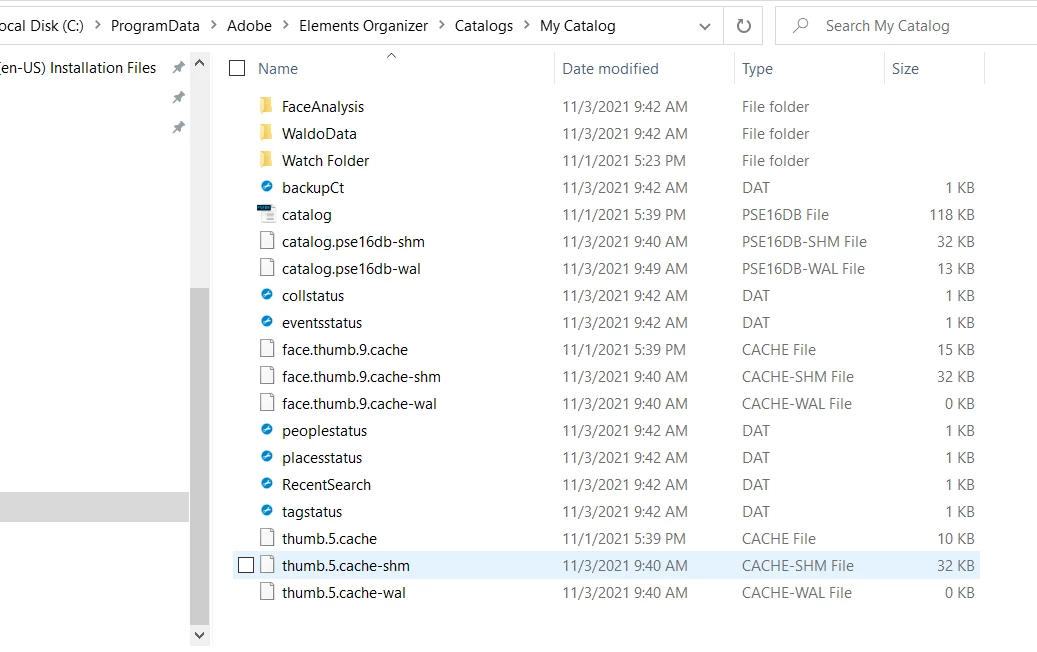
I am recovering a Windows 10 laptop after a SSD crash. My system was backed up with a remote hard disk. I did not use the Organizer Elements back up. My problem is that my catalog will not load.  It looks like everything is in place (see below) but when I go to manage catalogs the open box is grayed out even after selecting My Catalog.  How can I get My Catalog back?


This topic is closed to new replies. Start a new post to keep the conversation going.

3 replies

MichelBParis
Legend
November 3, 2021

Your catalog folder seems ok.

If the media files are still on the same spot (or have been restored to the same spot) your catalog should work.

Just try to open the catalog you are showing by double clicking on the 'catalog' with the extension pse16db file, which should open the organizer with that catalog.

If the media files are no longer on the same location as when the catalog was last active, you may be out of luck. That's why an organizer backup is always the safest solution to recover both media and catalog, with the correct links in the database.

Participant
November 11, 2021

I was able to find the catalog and opened it by double clicking.  All the photos are back in thier original file locations but I have not imported them to Elements. The catalog looks blank, see below. Should I be seeing key words? Should I go ahead and import all photos? 


I am proceeding with caution so I do not loose 10 years of organization work.  


Thank you for your help on this.


Wayne 


MichelBParis
Legend
November 12, 2021

Wayne,

Click on the < icon left of 'All media' in the third line. Can you see more?

You may have to click on the + icon left of 'This PC' to unfold the folder hierarchy when you are in 'tree' folder view, not 'list' view (toggle view with the icon on the right of 'My Pictures'.