
Inspiring
September 5, 2017
Answered

Recurrent Elements 10 "Error" Message

  • September 5, 2017
  • 1 reply
  • 483 views

I have Elements 10 {version 10.0. (20110831.m.17215)} on my iMac (10.12.4). I usually leave Elements 10 open in the Dock at all times. But when I log into my iMac after an overnight "sleep", the Photoshop icon in the dock starts popping/jumping up and down, and I get a message to the effect that something (?) is unable to perform "this action". I have absolutely no idea what this messages is about (i.e. exactly what action would it be referring to???), nor where the msg is coming from (Adobe or Apple or other?) Otherwise, Elements still works OK?! This started to happen a short while ago, and I wonder if it might have something to do with the fact I recently set up my iMac to open Elements 10 and other apps on startup?? I get no similar msg with the other apps I set up to auto-start. Would anyone have any ideas about this, please? Thank you.

Message was edited by: Phil Carter
This topic has been closed for replies.
Correct answer Phlurim

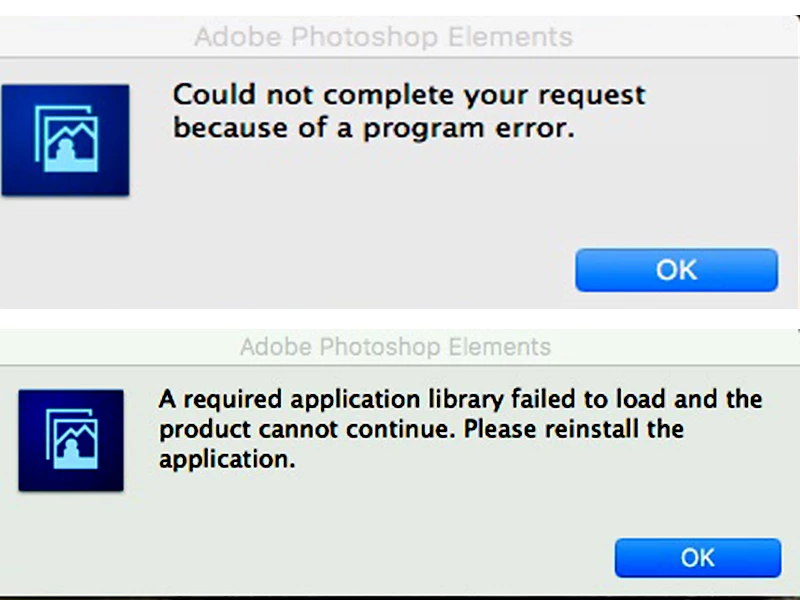
Still not solved. I now get the following pair of error msgs. BUT Elements 10 (v 10.0) still works fine on my iMac Sierra, despite these recurring msgs at startup of the app?! Any other thoughts?


Jeff Arola's suggested solution to a different PSE10 problem I was having, titled "Tools Panel Won't Stay On Workspace Window", seems to have also fixed this recurring error msg problem. Double thanks to Jeff.

1 reply

Peru Bob
Community Expert
Community Expert
September 5, 2017

Take it out of auto startup and see if that fixes it.

PhlurimAuthor
Inspiring
September 7, 2017

While in Elements 10, I clicked on Welcome under the Windows tab, and it restarted in edit mode. But the error message is now gone! I can't explain this! And it's still set for auto-startup. Any ideas?

PhlurimAuthor
Inspiring
September 18, 2017

Still not solved. I now get the following pair of error msgs. BUT Elements 10 (v 10.0) still works fine on my iMac Sierra, despite these recurring msgs at startup of the app?! Any other thoughts?