

Reducing The Size of PSD Files
My camera takes 4000 x 6000 pixel images. This is what I have discovered about the file size of PSD files with PSE 2020.
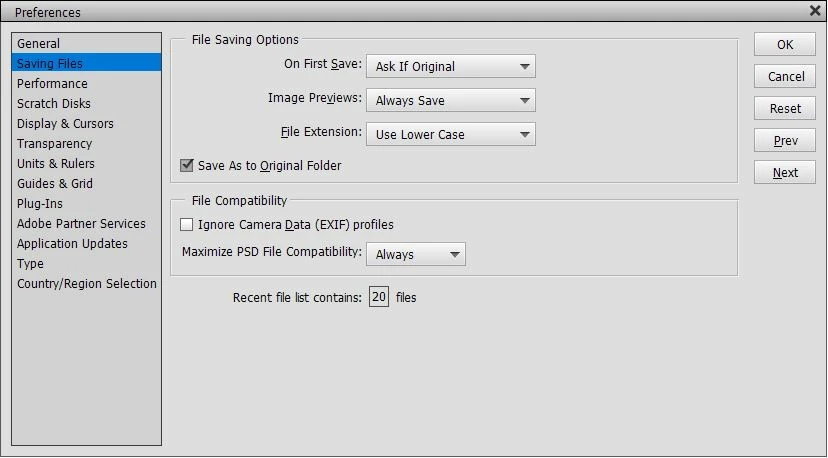
Experiment 1 with default saving preferences:
One original Background layer = 69 Mbt
Making A duplicate layer = 206 Mbt or about 127 Mbt more
I tried disabling previews in preferences = still 206 Mbt after saving
Making a third white solid colour layer top = 140 Mbt a saving of 66 Mbt???
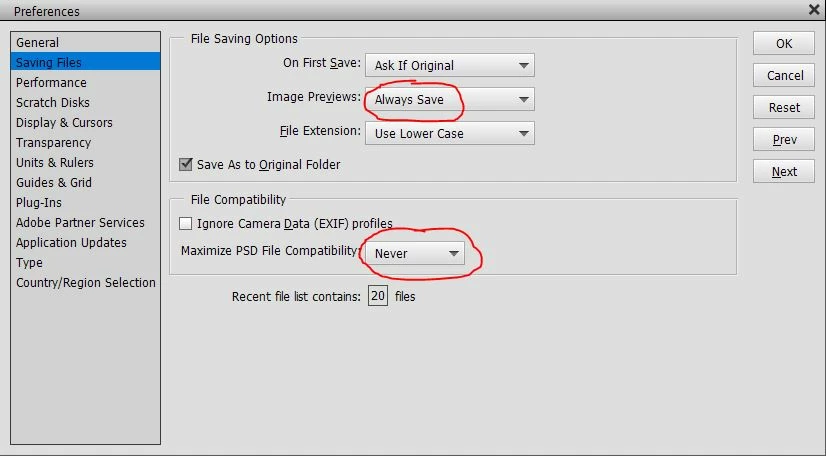
Experiment 2 with mazimize PSD compatibility set to Never:
One original Background layer = 69 Mbt
Making A duplicate layer = 138 Mbt or double (Not 206 Mbt like before)
I tried disabling previews in preferences = still 138 Mbt after saving
Making a third white solid colour layer top = still 138 Mbt
So it appears the greatest saving is by setting PSD compatibility to never.
I need help with three questions please.
Q- In the first experiment, why is just making a solid white layer on top reducing the file size by 66 Mbt? Does the image preview take that much space?
Q- The file size is greatly reduced if I disable maximum psd compatibility. Are there any disadvantages if I leave it like this? I generally do not need to share psd files. I think I can still open them with my older version of PSE 9.
Q- Is it better to leave the setting to always save image previews? What does this do anyway? There is no reduction in file size. Whether its turned on or off I can still see my thumbnails in Windows explorer.
Your advice would be appreciated.
Kind regards


 AdChoices