


Participant
December 11, 2020
Answered

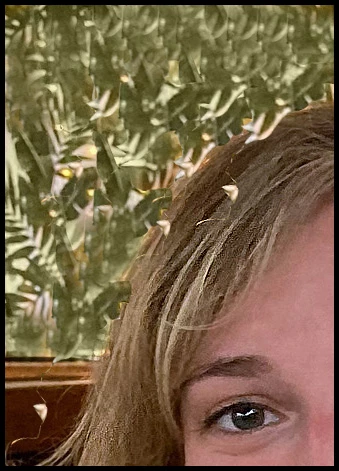
Remove a yellow spotlighted area?

  • December 11, 2020
  • 3 replies
  • 363 views

Behind the subject there's a distracting background area lit by an incandescent. How do I subtract yellow from just that area? It's a non-simple area, but both the green and white should be affected equally, so I don't thank that adds to the complexity. I tried a selection layer adjusting photo filter, levels, hue. BTW it's only Photoshop Elements 9... Thanks

 

This topic is closed to new replies. Start a new post to keep the conversation going.
Correct answer hatstead

I used the lasso tool to select a "good" portion of the green pattern to save it as a patch.

I then placed the selection on its own layer (CTRL+J), and activated the transform tool (CTRL+T), then dragged the patch over a yellow area.

I repeated this several times, and finally filled in small areas with the clone stamp tool.


3 replies

Participant
December 12, 2020

hatstead
hatsteadCorrect answer
Inspiring
December 12, 2020

I used the lasso tool to select a "good" portion of the green pattern to save it as a patch.

I then placed the selection on its own layer (CTRL+J), and activated the transform tool (CTRL+T), then dragged the patch over a yellow area.

I repeated this several times, and finally filled in small areas with the clone stamp tool.


Peru Bob
Community Expert
Community Expert
December 11, 2020