


Participating Frequently
June 19, 2021
Question

Remove Creative Cloud

  • June 19, 2021
  • 3 replies
  • 648 views

I am running Windows 10 Home 21H1 build 19043-1055


Recently I had to reinstall windows 10 which means I had to reinstall Photoshop Elements 2021. I went to my Adobe account to do this. I only downloaded PSE and Premiere Elements. I did not download Creative Cloud, I have never used Creative Cloud. I keep getting notices about a Creative Cloud update and I just close them. I have tried to uninstall Creative Cloud but it will not let me. When I try to unistall it I get the following window... 
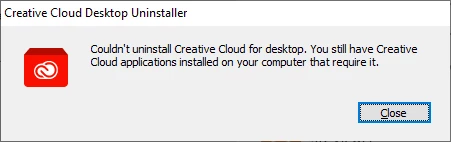
How do I get rid of a piece of software I never installed in the first place?


I know others have to be having this issue.


Even if I installed it by mistake I do not waht it, so how do I get rid of it?


Any and all help is appreciated. 

This topic has been closed for replies.

3 replies

hatstead
Inspiring
June 19, 2021

Last week I installed Adobe Acrobat DC on my computer and Creative Cloud desktop was installed without active intervention on my part. You had the same experience with PSE. 

Phil Pickering
Legend
June 19, 2021

Hi Ray,


I'm in agreement with @Greg_S. and will add there are a whole load of other perks that come with having a free Adobe Creative Cloud account:


Benefits of a free Adobe Creative Cloud membership


(Plus Adobe Bridge for free too!)


But, if it really bothers you, you can uninstall the Creative Cloud Desktop application and from the user reports I've read, it appears there are no nasty side effects 🙂


Uninstall the Adobe Creative Cloud desktop application


If you have tried this method, and are getting the error message you have posted, make sure you have closed the Creative Cloud Desktop application before running the uninstaller.


Hope that helps 🙂

RayGoLXXVAuthor
Participating Frequently
June 19, 2021

Thank you for the info I am going to leave it as is for now and do the update the next time it pops up/

Greg_S.
Community Expert
Community Expert
June 19, 2021

The Creative Cloud is installed as part of Elements because some (but not all) users receive a small Adobe Cloud account which can be used to save your files.  You are not being charged for anything.  Because of the way this "new feature" is integrated into the program, it is not advisable to remove it.

RayGoLXXVAuthor
Participating Frequently
June 19, 2021

Thank you for the quick reply. I will leave it on my pc and do the update the next time it pops up.