
bperniciaro
Participating Frequently
April 28, 2017
Answered

Resizing an Image

  • April 28, 2017
  • 2 replies
  • 617 views

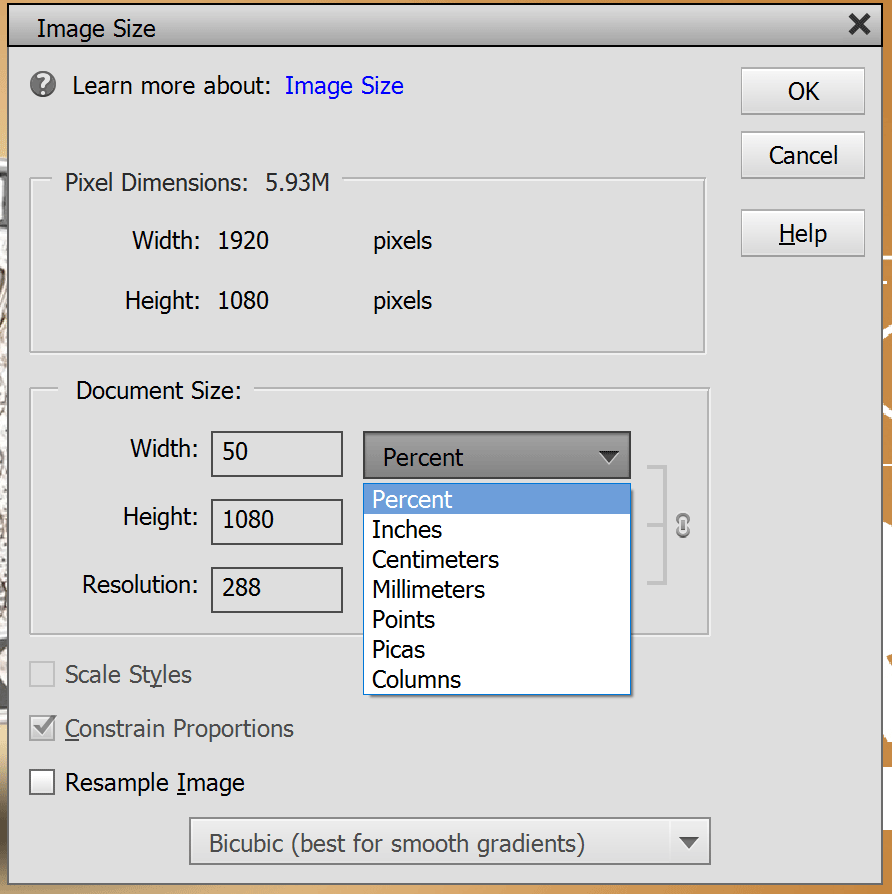
I open an image and go to Image->Resize->ImageSize.  First of all, the image is in pixels, but I cannot choose pixels when resizing the image??

Ignoring that for a second, if I choose to change the image size to 50% (or anything else for that matter), nothing happens.  The image stays the exact same size.  Am I missing something?
This topic has been closed for replies.
Correct answer ajays74965046

Hi,

Please Click on Resample image in the above shown window and uncheck Constrain Proportions. Try changing the size after that.

This should work.

Thanks and regards

2 replies

bperniciaro
Participating Frequently
April 30, 2017

That did it, thanks!

ajays74965046
ajays74965046Correct answer
Participating Frequently
April 28, 2017

Hi,

Please Click on Resample image in the above shown window and uncheck Constrain Proportions. Try changing the size after that.

This should work.

Thanks and regards