
Participating Frequently
July 23, 2024
Answered

Resolution of the program

  • July 23, 2024
  • 1 reply
  • 204 views

When Photoshop Elements 2020 boots up,

the program fills my screen, which is great.

Only drawback is that the words are so tiny 

that I am almost forced to get 

an electron microscope to read them.

All of the searches I have conducted lead to

tutorials on altering inage sizes,

but not the program's display.


Any help is greatly appreciated..
This topic has been closed for replies.
Correct answer Jeff Arola

What operating system are you using?


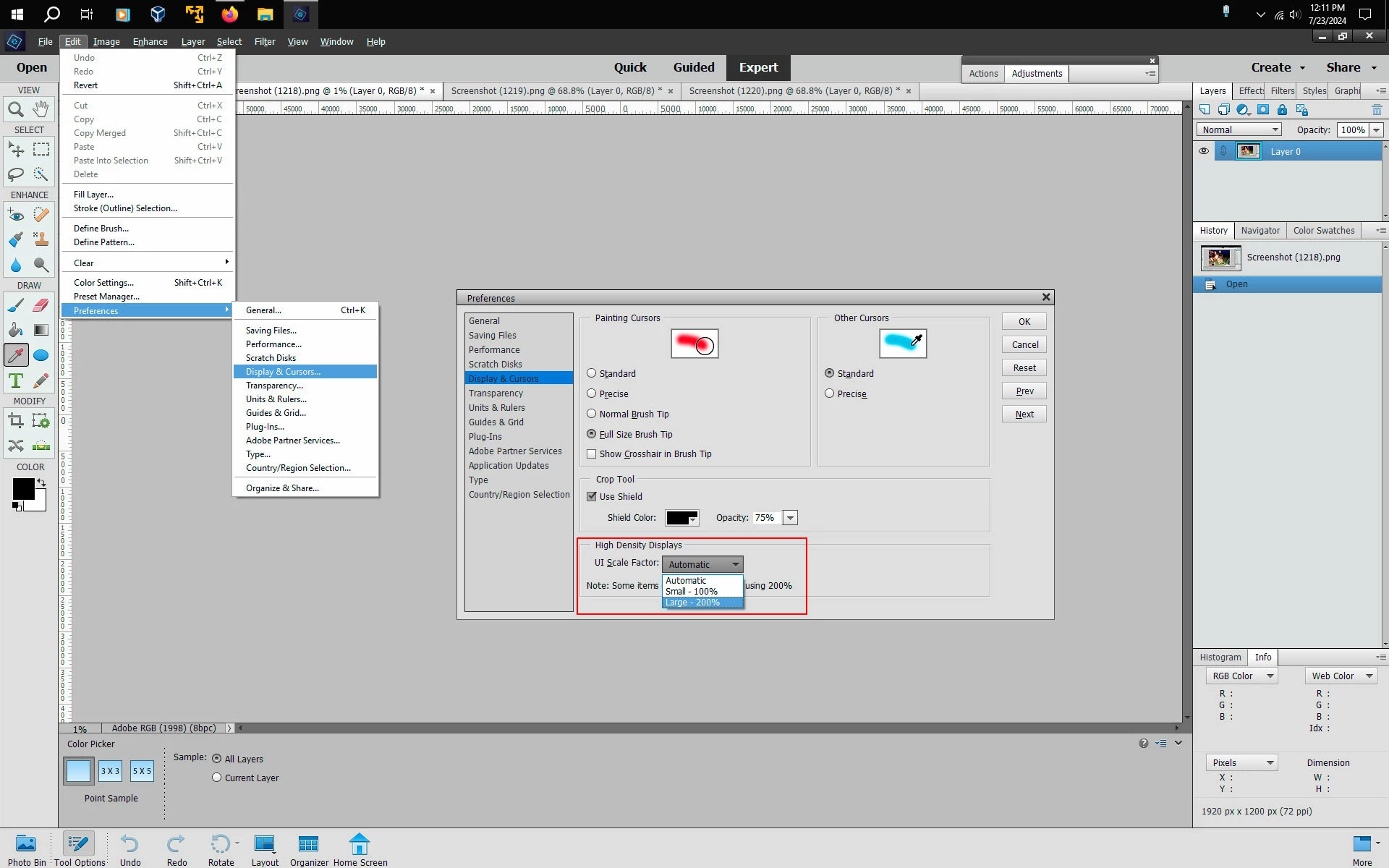
If your using Windows, then in the Photoshop Elements Editor go to Edit>Preferences>Display & Cursors, set the

UI Scale Factor to Large - 200% and then restart the Photoshop Elements Editor.


1 reply

Jeff Arola
Community Expert
Jeff ArolaCommunity ExpertCorrect answer
Community Expert
July 23, 2024

What operating system are you using?


If your using Windows, then in the Photoshop Elements Editor go to Edit>Preferences>Display & Cursors, set the

UI Scale Factor to Large - 200% and then restart the Photoshop Elements Editor.


Participating Frequently
July 23, 2024

AWESOME!!!

Thanks for the swift and accurate reply.

That worked.

Many thanks.