Hi Grace. I'm still not sure what you have done, so I'm going to ask a bunch more questions about statements you have made:
I am using Photoshop Elements 2020 on a Dell computer with Windows 11 Operating system.
Is this a new computer or have you used it in the past with Elements 2020 working properly?
I started to try to use a Seagate Hard Drive Backup because I saw a notice that it had done a complete back up.
What kind of backup message did you receive?
Was this an Elements backup message or was it a backup performed for your entire hard drive?
What do you mean when you say you tried to use a Seagate Hard Drive Backup? Were you trying to create a backup or restore a backup? And what was your purpose for doing whatever it is you did?
I can not find that back up file.
If you are talking about a backup of your Organizer catalog, look for a folder that contains a file with the extension .tly.
I changed the Drive name and that confused the Organizer.
Did you change the drive letter associated with the drive or did you simply give the drive a new common name? And why did you make this change?
Do you have more than one external hard drive?
So I did a restore from that day's Organizer backup. I saw it all come back. But now I can not open the Organizer.
How many Catalog backups do you have? Are they full backups or incremental backups?
(I assume you have now been able to open the Organizer.)
I do see the Organizer with the tags I created but a message to import all the photos.
Please explain what you mean. Has a catalog opened with all your tags showing in the Elements Organizer? Or are you looking in Windows File Explorer?
My photos are all stored on a different EHD. So the folders that show on the left are the ones I had previously imported.
Please explain how many external drives you have and where are the photos stored exactly. I assume you are talking about the folder panel on the left. Are you in tree view which shows the organization of your computer with all the drives or are you in the list view which displays the folders in alpha-numeric order? Here is a tree view:
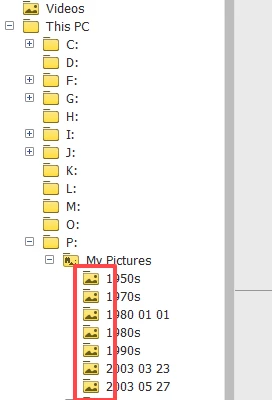
Do you have folders with the icons shown in my screenshot? If so, if you select a folder, do any photos dispaly in your grid? And if they do, are they "missing" ? (A yellow question mark will appear on the thumbnail or a dialog will pop up if you double-click on the thumbnail.)
Please be as detailed as you can be in responding to my questions. And provide any further screenshots that you think may be helpful.



 AdChoices