
Restoring from a backup in PSE18 - instructions wrong?
Hi,
Sorry in advance for the lengthy post! This post is regarding restoring a catalog from a backup in PSE 2018. In case its relevant I upgraded from an older version of PSE (11?) last October.
I have just installed an SSD into my Windows 10 machine. I made a PSE catalog backup before I started, but I have wasted hours and hours trying to work out how to restore it as it was before. In the end I have finally worked out the Adobe Help instructions at Move Elements Organizer catalog are wrong. I went down many blind alleys to get to this point including installing PSE multiple times and even reinstalling Windows (although this was no big deal as it was a new install anyway).
The specific issue relates to the dialog box I get when I go to File > Restore Catalog. I do not get the same dialog as is shown in the link above, in particular the option to restore to the original location is no longer there:
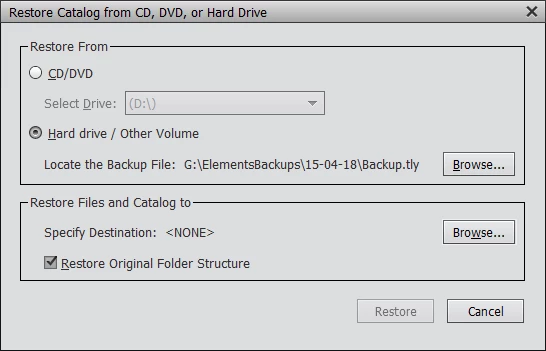
So I have to specify a destination and it is far from obvious what this should be, even to restore everything as it was but with a replacement C: disk.
I originally wanted to restore my catalog where it was before but the photos themselves on a second drive (E:) rather than C:, and I redirected my user Pictures folder to be a folder on E:. I had various issues when I tried to do this and although I restored the catalog OK I ended up with a folder structure on E: that I looked very odd, including lots of folders that looked like system folders. To cut a long story short I eventually decided to restore the catalog as it had been before, with only the SSD in my machine. I assume it was something I'd done related to fitting my old HDD as E: that caused me to get a different dialog to the one in the instructions. When I still didn't get the option to restore to the original location I finally concluded the instructions were wrong.
I tried a couple of things for the destination which didn't work. Eventually I found another forum post (Re: PSE 2018 Doesn't locate MY Catalog ) which gave me the idea of trying C:\ProgramData\Adobe\Elements Organizer\Catalogs as the restore location. I had to enable the showing of Hidden Files in Windows Explorer to even see this location in the Browse dialog! However the structure I then ended up with was that my photos were in:
C:\ProgramData\Adobe\Elements Organizer\Catalogs\Users\simon\Pictures!
So my first question is: how do I restore a backup so I get it as it was before, with my pictures in C:\Users\simon\Pictures, and with the catalog files themselves wherever they were before, probably in C:\ProgramData somewhere.
Maybe I could try entering C:\ as the restore location, but I started down that road before and it requires running PSE in Administrator mode which doesn’t seem right.
Whatever the answer is, surely there should be correct instructions somewhere?
As a separate point, one of the reasons I ended up reinstalling Windows was that it appears impossible to uninstall PSE fully. The first time PSE is run after installation it shows a screen showing no media, but if there is any media imported and a catalog created it seems impossible to start from scratch again. Every time I uninstalled PSE, even if I also cleared the registry entries, after I reinstalled it and started it, it raised an error because it couldn't find the previous catalog. The only reliable way I found to fix this was to reinstall Windows. Given it was a new install onto an SSD anyway this wasn't that big a deal, although it all takes time. I later found some detailed (and lengthy) instructions for a full manual install of PSE13 and some older versions, but haven't found one for PSE18.
As I am now again in a situation with a catalog and pictures in the wrong place in my file system, I either need to completely remove PSE somehow or reinstall Windows again. So my second question is: what is the easiest way to proceed from where I am now, or do I need to reinstalling Windows again?
I really think Adobe should:
a) Update the instructions for restoring a catalog
b) Ideally offer a proper uninstallation tool that really fully deletes the application and old catalogs, at least as an option.
c) If I can't have b), then at least documentation on the limitation of the uninstall tool and a description of how to fully manually uninstall PSE18.
If I’m being stupid apologies in advance!
Any help much appreciated.
Simon


 AdChoices