Participant
January 27, 2022
Answered

Second file extension added after batch processing

  • January 27, 2022
  • 6 replies
  • 711 views

Hey,


I have an issue with Photoshop Elements 13 (I know, old version, but, works fine under Windows 10): I batch process some images, with .jpeg file extension. I apply a picture resize for all images, so that they're all 600 pixels high. Apart from that, I set no other settings for the batch processing (no file conversion done either). After the batch processing, all files have a .jpeg.jpg file extension. 


Why does PS Elements add the .jpg file extension, and doesn't keep the .jpeg file extension?

This topic has been closed for replies.
Correct answer Jeff Arola

Okay i can replicate the error (bug?) in pse 13, pse 14 and pse 2018.


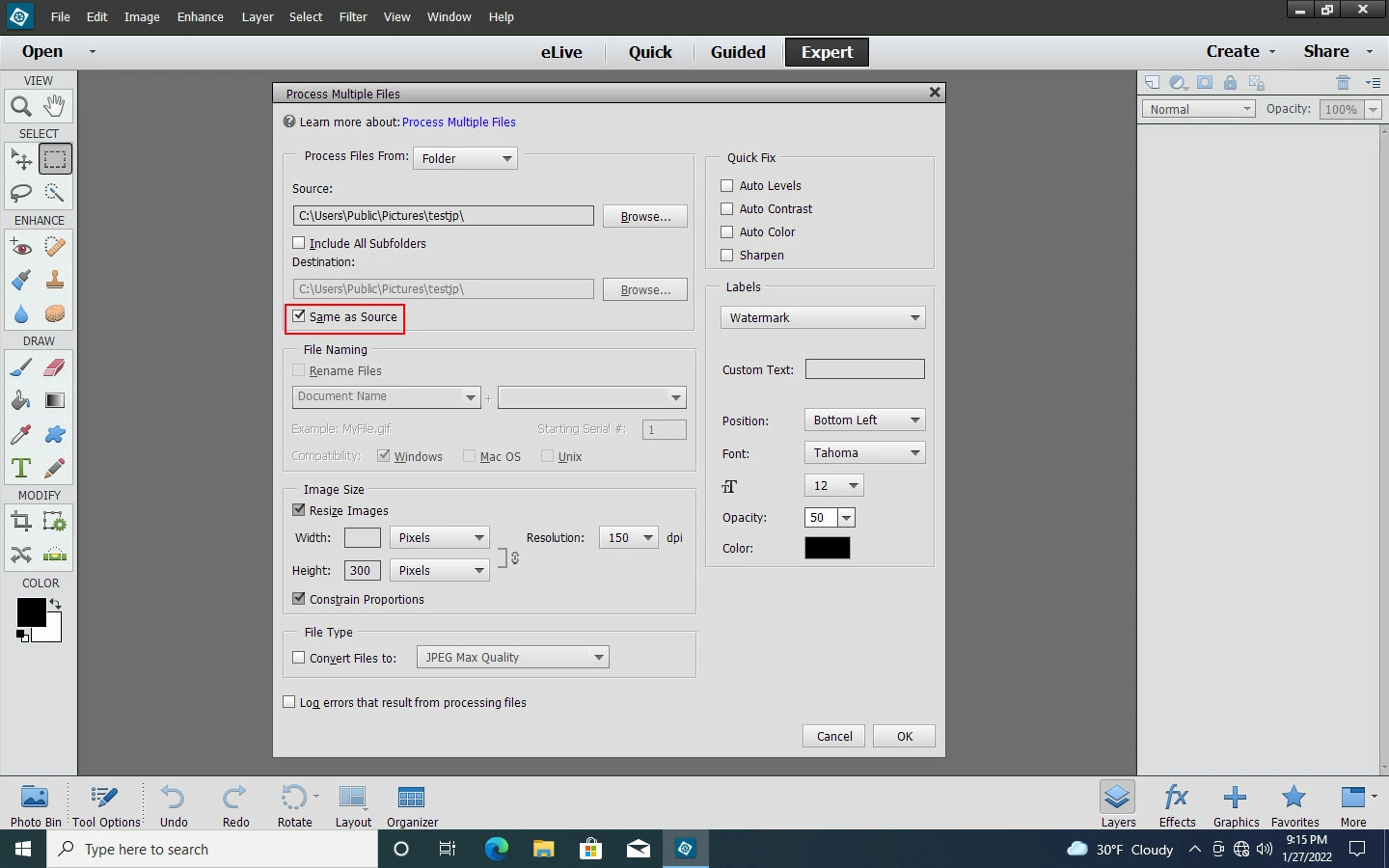
The only setting, so far, that doesn't give the double extension, is to save the new files to the source folder by checking Same As Source in pse 13.


Some older versions of photoshop like cs6 do the same error, however, the newest photoshop 2022 version does not produce the double extension when using File>Automate>Batch.

6 replies

Participant
January 28, 2022

Hey guys,


thanks a lot for your replies. I didn't expect so many after such a short period of time, this seems to be a very actice community. 🙂 Thanks also for confirming what I experienced. The way I will "solve" this for now is to batch rename the source files, so that they have a .jpg extension. I do a bit of Powershell scripting, and, that kind of stuff is very easy with it.


I still think this is a bug which needs to be fixed in PS Elements though. Of course, I'm not sure if it actually has been fixed in more current versions.

Jeff Arola
Community Expert
Community Expert
January 28, 2022

As far as i can tell, this has been fixed in the current version of photoshop elements 2022.

Jeff Arola
Community Expert
Jeff ArolaCommunity ExpertCorrect answer
Community Expert
January 28, 2022

Okay i can replicate the error (bug?) in pse 13, pse 14 and pse 2018.


The only setting, so far, that doesn't give the double extension, is to save the new files to the source folder by checking Same As Source in pse 13.


Some older versions of photoshop like cs6 do the same error, however, the newest photoshop 2022 version does not produce the double extension when using File>Automate>Batch.

Jeff Arola
Community Expert
Community Expert
January 28, 2022

Are you using File>Process Multiple Files in the pse 13 editor?


Can you post a screenshot of the settings your using?


I must be missing something since i tried to replicate that which both you and Greg S. describe on pse 2022 running on windows 10 and don't get the same results of a double file exstension of jpeg,jpg

Greg_S.
Community Expert
Community Expert
January 28, 2022

I think @Stephen Marsh has the answer.  I just tried using the batch process with Elements 13 and your settings.  The processed folder had two copies of a single file.  One file had a .jpg extension and the other a .jpeg extension.  Here is what I ended up with:

  • a folder with 3 files
  • the .jpeg extension file was copied and the .jpg extension was added to the name
  • the .jpg file was resized and overwritten (as instructed in the dialog)


Chuck Uebele
Community Expert
Community Expert
January 28, 2022

Moved to the Photoshop Elements forum, from the Photoshop forum.

Stephen Marsh
Community Expert
Community Expert
January 28, 2022

This is the Photoshop forum, not Elements so I can't answer from experience as I don't use Elements. I'd suggest you move away from .jpeg as it is not a standard extension and use .jpg instead.


Adobe Bridge, Mac Finder or other batch renaming software can be used to fix the names, but better to resolve this at the source.


Good luck!