
Participating Frequently
June 29, 2024
Answered

Shadow Highlights preview not changing with slider Elements 2024

  • June 29, 2024
  • 6 replies
  • 888 views

I recently updated to Photoshop Elements 2024 from version 13. One of the tools I use most in Expert Mode is the Adjust Lighting: Shadows/ Highlights. In version 13, the preview adjusts instantly as I move the slider, so I know exactly where to stop without having to release the mouse button. In Photoshop Elements 2024, nothing happens to the prieview until the mouse button is released which means I cannot see dynamically the changes to the image and have no idea where on the slider I need to be. This is a complete deal breaker for me, and if there isn't a way to overcome this shortcome, I will be asking for a refund. Has anyone found a fix?
This topic has been closed for replies.
Correct answer Greg_S.

. . .  But I have found the solution for you:


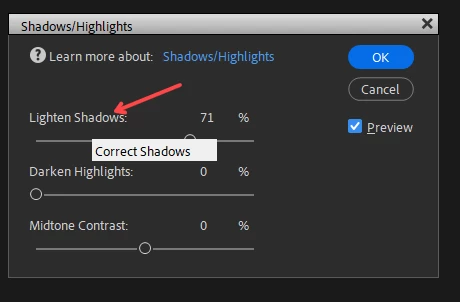
Hover over the control label and a two-headed arrow will appear.  (A tooltip will also pop up as shown in my screenshot  below which does not capture the cursor itself.)

Move your mouse to the left or right and the preview will change dynamically.


6 replies

Greg_S.
Community Expert
Community Expert
June 30, 2024

@Susan383333057axq said:  I'm probably editing my photos all wrong (completely untrained photographer and editor), but it has been getting me good enough results for my usage.


If you want to be more advanced with your editing, I have a couple of suggestions for you.

  • Try using the Adobe Camera Raw editor.  It is not just for raw files, but also handles jpegs.  Go to File>Open in Camera Raw and select a file to edit from the Browser.  The Camera Raw dialog gives you a lot of control over the color and tone of your image.  And it uses the sliders that you like.  Once you have adjusted your photo, click the Open button and it will open in the regular Editor.  This will allow you to save the file in the normal way.  Unfortunately, you cannot use the Organizer to open a file in Camera Raw so you need to know where the file is stored on your computer.
  • There are many more Guided Edits in Elements 2024 than there were in Elements 13.  They provide good learning tools.
  • You can also use the Search box on the Home Screen to type in a how-to question in simple English.  It will provide a number of resources to learn something new.  There are also a number of tutorial links on the Home Screen.

Participating Frequently
June 30, 2024

thank you! I did not know that you can edit .jpg in camera raw. I will definitely experiment. I recently discovered how to play with layers and make a kaleidoscope from my photograph. So much to learn and do!

Greg_S.
Community Expert
Greg_S.Community ExpertCorrect answer
Community Expert
June 29, 2024

. . .  But I have found the solution for you:


Hover over the control label and a two-headed arrow will appear.  (A tooltip will also pop up as shown in my screenshot  below which does not capture the cursor itself.)

Move your mouse to the left or right and the preview will change dynamically.


Participating Frequently
June 29, 2024

That works!

Thank you very much. I'm probably editing my photos all wrong (completely untrained photographer and editor), but it has been getting me good enough results for my usage.

Greg_S.
Community Expert
Community Expert
June 29, 2024

Forget everything I have said!!!


I have just checked the behavior of Elements 13 against Elements 2024.  There is a difference.  In Elements 2024, the slider does not change the preview until the mouse is released.  In 13, it did. 

Greg_S.
Community Expert
Community Expert
June 29, 2024

I believe your CPU is on the lower end of the performance spectrum with a clock speed of 1.3 Ghz.  So, there may be nothing that can be done about it.  To be more certain whether this may be a factor, go to Windows Settings>System>About and tell us the exact CPU. 


Did you try unchecking the use graphics card box?

Glenn 8675309
Legend
June 29, 2024

Participating Frequently
June 29, 2024

I don't think this is the type of shadow I am using. I am talking about Adjust Light: Shadows/Highlights to lighten just the dark parts of an image, not to add a shadow as a border to an image

Glenn 8675309
Legend
June 29, 2024

Greg_S.
Community Expert
Community Expert
June 29, 2024

What are the specs of your computer, including CPU and Graphics card?  Do you have an integrated GPU and a separate graphics card?

Make sure that your Graphics driver is up to date.


In Edit>Preferences>Performance, change whatever setting you have for Use Graphics Card for improved performance:


Participating Frequently
June 29, 2024

Dell Desktop 1L4N2FP, Windows 11

Intel i7, 1.3 Ghz

Intel Iris Plus graphics, 27.20.100.9365

It is set to use Graphics card.


not sure about integration