
boba44585016
Known Participant
March 10, 2020
Answered

Shortcut to close the average from the filter?

  • March 10, 2020
  • 2 replies
  • 448 views

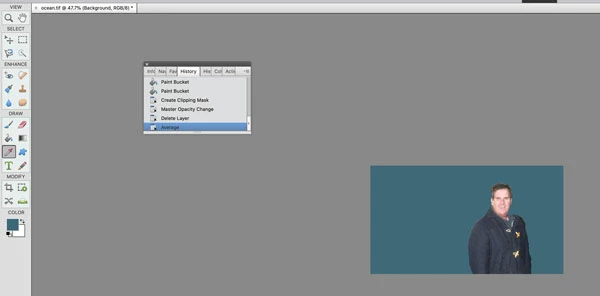
I clicked on the filter and chose avage and used the color picker to choose the color. I tried to use the shortcut option and control z on the Imac  but it didn't work. I just bought 2020 imac and bought photoshop element. 2020 What is the shortcut to close the average from the filter. Thx
    This topic has been closed for replies.
    Correct answer 99jon

    It’s difficult to see from your screenshot which is quite small. What is the top layer? Try deleting it.

    Then click: Layer >> New Fill Layer >> Solid Color >> OK

    Then click on your blue color chip (bottom left in the toolbox) and click OK

    Clip the fill layer to the person layer below. Then reduce the opacity of the fill layer to zero and gradually increase the opacity slider to blend the person with the background.

    You could also experiment e.g. keep opacity at 100% and change the blend mode from normal to soft light. See which method you like best.


    2 replies

    99jon
    99jonCorrect answer
    Legend
    March 11, 2020

    It’s difficult to see from your screenshot which is quite small. What is the top layer? Try deleting it.

    Then click: Layer >> New Fill Layer >> Solid Color >> OK

    Then click on your blue color chip (bottom left in the toolbox) and click OK

    Clip the fill layer to the person layer below. Then reduce the opacity of the fill layer to zero and gradually increase the opacity slider to blend the person with the background.

    You could also experiment e.g. keep opacity at 100% and change the blend mode from normal to soft light. See which method you like best.


    boba44585016
    Known Participant
    March 11, 2020

    It works :-} Thx

    99jon
    Legend
    March 10, 2020

    I would start by duplicating the background layer (Cmd+j) then use layer 1 to set the average color and after your paint bucket fill with the set color on the clipping layer simply select layer 1 and delete it by clicking the trash can icon at the top of the layers pallet.

    boba44585016
    Known Participant
    March 10, 2020

    Thanks for helping me :}