
Participant
April 30, 2017
Question

Shutdown Photoshop elements 14 when saving files

  • April 30, 2017
  • 2 replies
  • 645 views

When I want to save a file the contains a (imported) pdf file or layer, my programm gives a total error and shuts down.
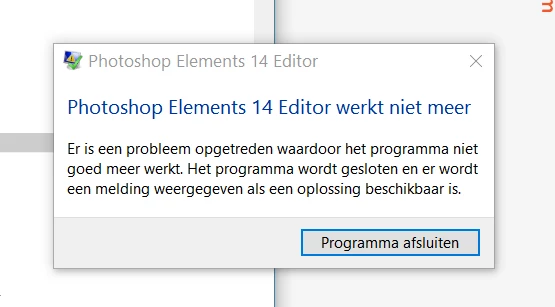
The problem doesn't occur with any other filesorts; with jpg's, psd's or png's there are no problems.

I have update Elements (already had the latest version).

Can anyone help me to solve this problem?

Thank you

This topic has been closed for replies.

2 replies

piyushc76752533
Participating Frequently
May 11, 2017

Hi MCOVG,

As suggested by dhananjays36801738  repair for Microsoft Visual C++ should fix the issue however if not then please try giving permission to the folder where you are saving your project.

Here is how you can give permission to that folder:

How do I change folder and file Permissions? - Microsoft Community

Regards,

Piyush

Participating Frequently
April 30, 2017

Please try clearing preferences once.

To do so, go to Edit > Preferences.

Click on Reset Preferences on next launch. Now re-launch Editor.

Thanks,
Anwesha

MCOVGAuthor
Participant
May 1, 2017

Thank you for your fact reply Anwesha.

Unfortunately it hasn´t solved my problem yet,

Best wishes

Mayka

Dhananjay Sati
Participating Frequently
May 1, 2017

Hi MCOVG,

Thanks for posting in Adobe forums.

I understand you are facing issue with the crash of Adobe Photoshop Elements 14.

Can we try the following steps:

- Open "Control Panel"

- Open "Programs & Features"

- Repair the following list of programs

* Microsoft Visual C++ 2012 Redistributable (x64)

* Microsoft Visual C++ 2012 Redistributable (x86)

* Microsoft Visual C++ 2013 Redistributable (x64)

* Microsoft Visual C++ 2013 Redistributable (x86)

* Microsoft Visual C++ 2015 Redistributable (x64)

* Microsoft Visual C++ 2015 Redistributable (x86)

- Restart your machine & check Adobe Photoshop Elements

If your issue doesn't resolve please provide your crash logs.

Thanks

Regards

Dhananjay