

CharlesSBanks
Known Participant
October 24, 2020
Answered

Single JPEG snapshot of video clip

  • October 24, 2020
  • 1 reply
  • 471 views

I am using Premire Elements 2019 and added a video file to my project.  What I would like to do is (essentially) take a snapshot of one frame and save it to a jpeg file as a photo.  The only available option I see is 'smart trim' but is not what I want to do.  I have searched for this question but nothing relavent comes up.  Please provide me with instructions on how to take a frame from a video clip and save it as a jpeg photo.


Thanks
This topic has been closed for replies.
Correct answer Greg_S.

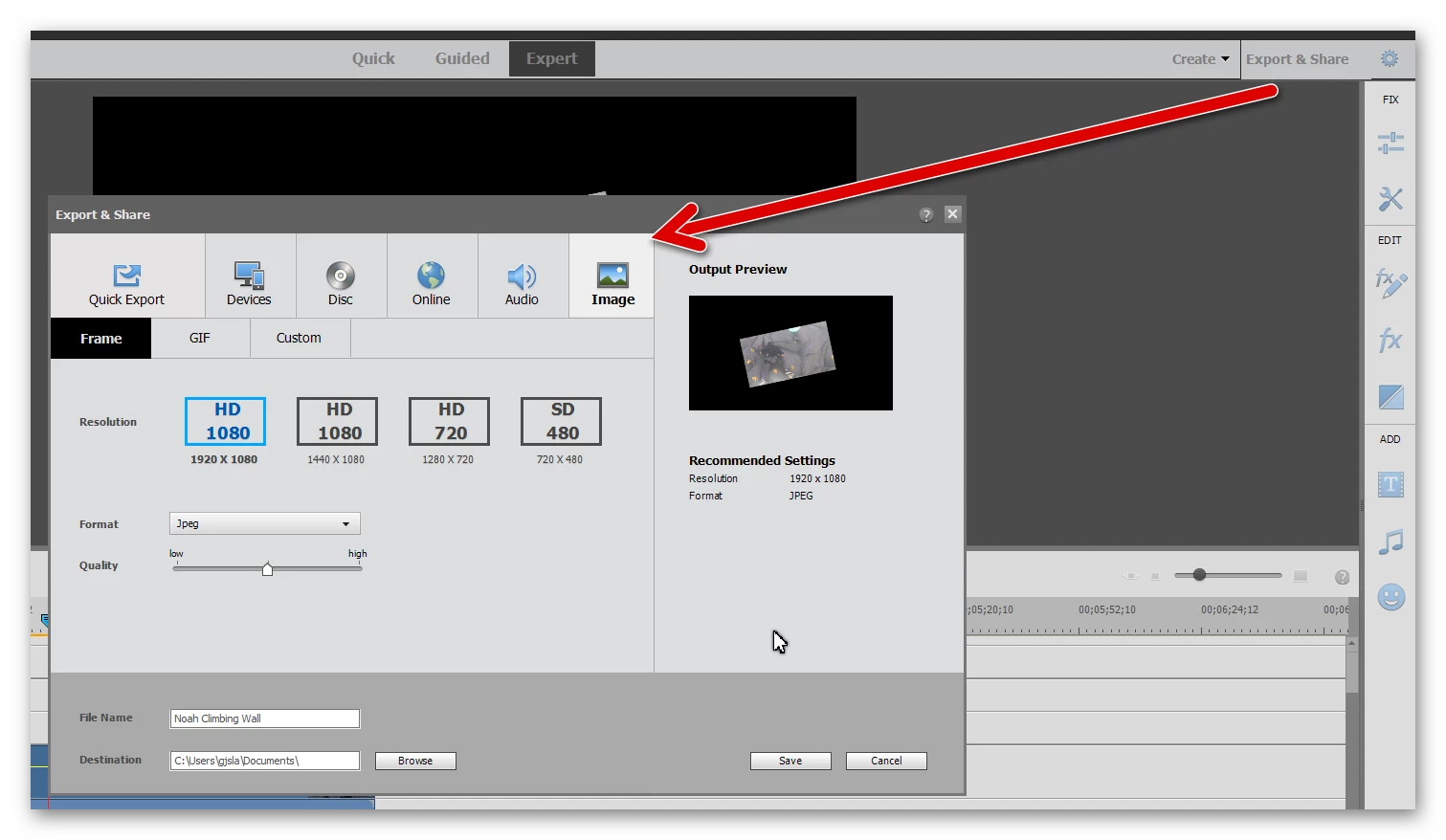
Charles, I don't currently have PRE 2019 on my computer.  In 2020 (in Expert Mode), go to Edit & Share and Select Image for your output.


1 reply

Greg_S.
Community Expert
Greg_S.Community ExpertCorrect answer
Community Expert
October 24, 2020

Charles, I don't currently have PRE 2019 on my computer.  In 2020 (in Expert Mode), go to Edit & Share and Select Image for your output.


CharlesSBanks
Known Participant
October 24, 2020

Greg,

Thank You!  I kept working from smart trim and when I went to export and share from there it never saved the frame I was actually trying to.  Totally missed the "simple" approach.


Charles