
Inspiring
January 29, 2023
Answered

Size of text

  • January 29, 2023
  • 2 replies
  • 567 views

Ever since I have used Elements, there is an annoying problem.  The text works okay, then for some reason, the text size becomes tiny.  I have discovered this happens when I work on my iPhone pictures, but when working with my normal camera, the text size usually works okay.  Thanks for any explanation, if not cure.
This topic has been closed for replies.
Correct answer Greg_S.

The number of pixels per inch generally only matters if you are printing your photos on paper.  Most folk will say that 300 ppi should be used for printing, but 72 ppi is fine for viewing on a digital monitor (or phone screen).  To learn more about resizing photos, see this HelpX article.


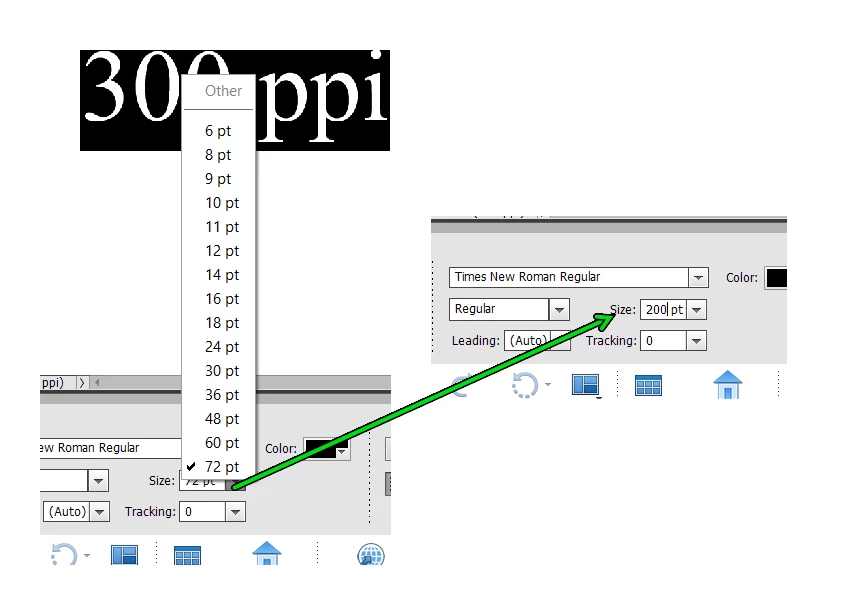
And rather than use the Transform tool to resize the type font/size, you may not be aware that the font size is not limited to the 72 pt text displayed in the size popup menu.  If you click in the size box, you can type in the font size to whatever number you want:


2 replies

Greg_S.
Community Expert
Greg_S.Community ExpertCorrect answer
Community Expert
January 30, 2023

The number of pixels per inch generally only matters if you are printing your photos on paper.  Most folk will say that 300 ppi should be used for printing, but 72 ppi is fine for viewing on a digital monitor (or phone screen).  To learn more about resizing photos, see this HelpX article.


And rather than use the Transform tool to resize the type font/size, you may not be aware that the font size is not limited to the 72 pt text displayed in the size popup menu.  If you click in the size box, you can type in the font size to whatever number you want:


Inspiring
January 30, 2023

Thank you.  That's useful.

Greg_S.
Community Expert
Community Expert
January 29, 2023

The explanation is the resolution of the images and ppi of their display.  Your iPhone photos are probably 72 ppi and your normal camera images are probably 300 ppi.  The dimensions of the images are also probably different.  In the following screenshot, I have created a text layer, using a font set at 72 points.  This creates text approximately 1 inch high.   The two documents on the left are 6000x4000 pixels.  Those on the right are 3000x2000 pixels (or half the resolution).  The documents on top are set at 300 ppi, the bottom are 72 ppi.  You can compare the size in inches of each file by looking at the dimensions in the lower left corner of each window.


The "cure" is to change the resolution of the file or the font size.


Inspiring
January 29, 2023

Thank you for that.  That answers it. I have changed the size in the past by Transform and making the text big enough to read.  Is there a way to increase the resolution to 300, and if so is it worth doing.  What are the advantages and disadvantages?