
Participant
September 13, 2017
Answered

Sizing an Image

  • September 13, 2017
  • 3 replies
  • 330 views

I have an image I need to send by email. It is required to be at least 9x12 inches and at least 300 dpi.  As such the file is too large to send (8.6 mb). How can I get it smaller in order to send but still meet the requirements?
    This topic has been closed for replies.
    Correct answer Jeff Arola

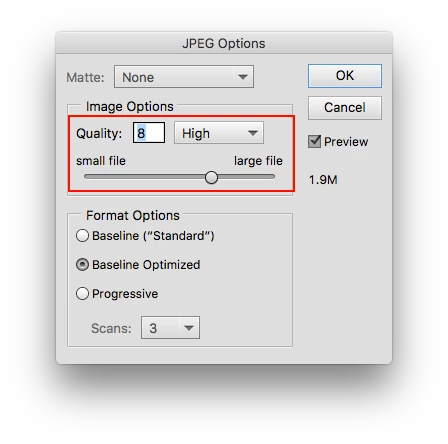
    You could use Jpeg and set the Quality to around 8 which is a good compromise between size and quality.

    https://helpx.adobe.com/photoshop-elements/using/saving-exporting-images.html

    In the Photoshop elements editor, File>Save As>JPEG

    3 replies

    drtlhAuthor
    Participant
    September 14, 2017

    Thank you very much.  That solved my problem.

    hatstead
    Inspiring
    September 13, 2017

    drtlh  wrote

    I have an image I need to send by email. It is required to be at least 9x12 inches and at least 300 dpi.  As such the file is too large to send (8.6 mb). How can I get it smaller in order to send but still meet the requirements?

    In this situation, I avail myself of the File>Save for web command. In the dialog, make the long side 800px or so, and save in JPEG (compression) file format.

    Note that you have no control of dpi, dots/inch. This is determined by your printer or the recipient's printer.

    PPI=pixels/inch, is the resolution of the file. You can ascertain what this is by going to Image>resize>image size and reading the native resolution in this dialog. A requirement of 300px/in may be unrealistic.

    It is recommended that for printing the resolution for a good print should be in the 240-300px/in range, but I have printed many times at a resolution below this value with good result, esp. a print with large physical dimensions, where the observer's eye is at a distance from the canvas.

    Jeff Arola
    Community Expert
    Jeff ArolaCommunity ExpertCorrect answer
    Community Expert
    September 13, 2017

    You could use Jpeg and set the Quality to around 8 which is a good compromise between size and quality.

    https://helpx.adobe.com/photoshop-elements/using/saving-exporting-images.html

    In the Photoshop elements editor, File>Save As>JPEG