
Participant
August 22, 2017
Answered

Smart Fixing groups of photos

  • August 22, 2017
  • 2 replies
  • 777 views

I used to be able to select a group of photos and click on "Smart Fix". and the program would Smart Fix them all one at a time until it was finished with them all. I now have PSE 15 and I don't see anywhere i can do this.  All I see is Smart Fixing images one at a time in the Editor.  I used to be able to do it in the Organizer.  What gives?
    This topic has been closed for replies.
    Correct answer Anwesha Dev Chaudhary

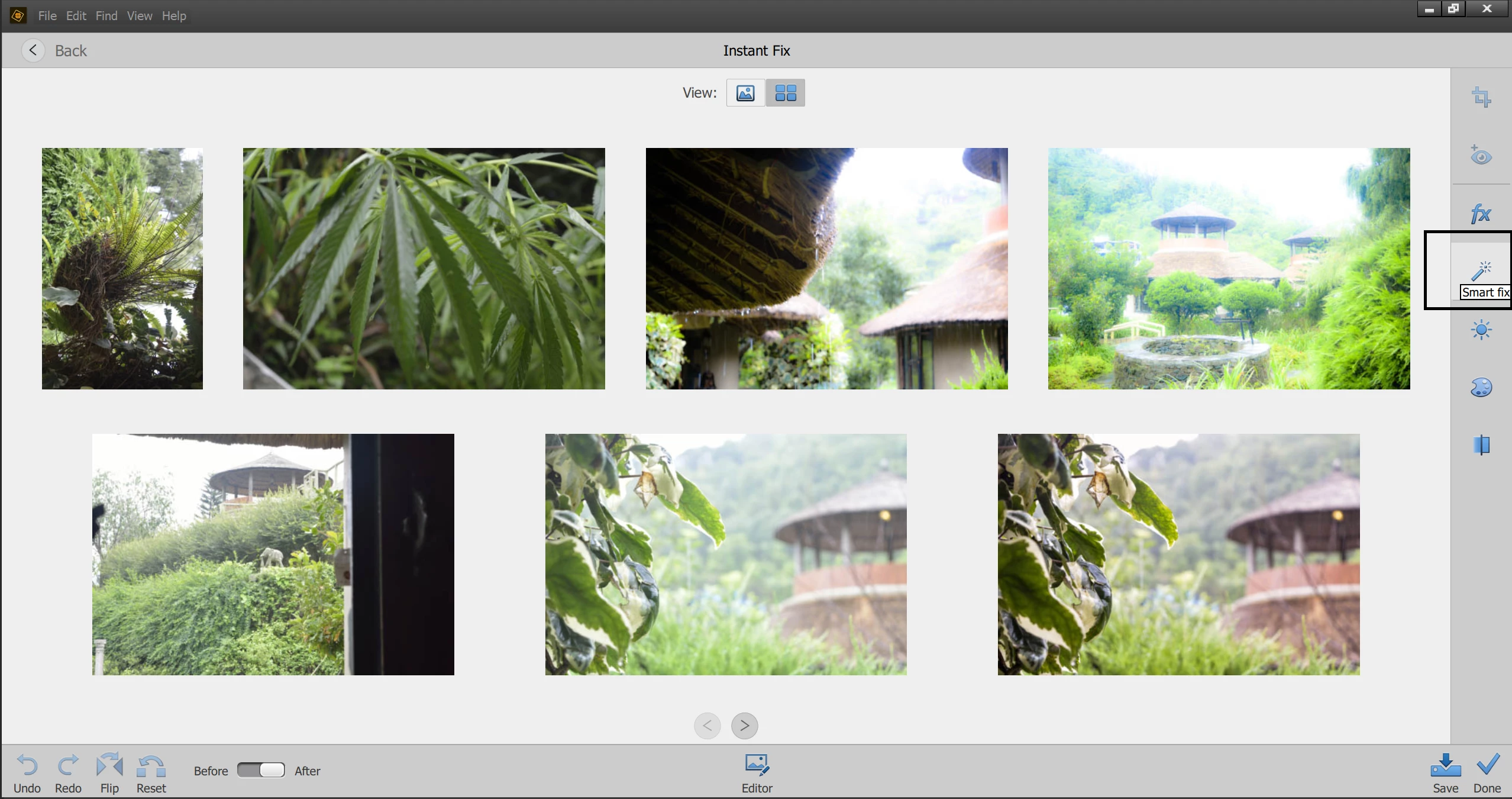
    When you select multiple images and click on Instant Fix icon, selected images are taken to Instant Fix view.

    There you will see a smart fix icon on the right panel, you can use this to smart fix multiple images with just one click.

    Thanks,
    Anwesha

    2 replies

    Participating Frequently
    August 22, 2017

    For more details, please see Fixing photos in Elements Organizer

    Thanks,

    Anwesha

    Participant
    August 30, 2017

    Thank you, Anwesha, but I think there's a difference between the use of "Instant Fix" and "Smartfix".  I am specifically interested in Smartfix, and I still do not find how I can apply Smartfix to a an entire group of photos in the Organizer like I used to with earlier versions oh PSE.  It can be applied to one photo at a time within the Editor, but that is very tedious to do.   Any ideas?

    Anwesha Dev ChaudharyCorrect answer
    Participating Frequently
    August 31, 2017

    When you select multiple images and click on Instant Fix icon, selected images are taken to Instant Fix view.

    There you will see a smart fix icon on the right panel, you can use this to smart fix multiple images with just one click.

    Thanks,
    Anwesha

    Jeff Arola
    Community Expert
    Community Expert
    August 22, 2017

    After selecting the photos in the organizer, click on Instant Fix icon at the bottom of the organizer window and then one of the choices on the right is Smart Fix.