February 19, 2018
Answered

Some items could not be insalled successfully?

  • February 19, 2018
  • 6 replies
  • 7810 views

A couple of days ago I purchased Photoshop Elements 2018 and attempted to install it on my Windows 10 Pro build 16299 system.  The installation progressed well and eventually I was asked to insert my serial number.  This too went well until I received this message: -
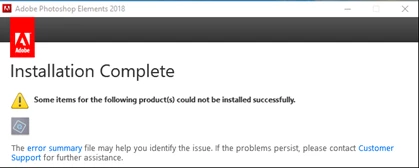
Since the message referred to an "error summary" then I selected that but was told "Your file was not found.  It may have been removed or deleted".  Despite this messages, I opened up the software but Windows 10 then created this error report: -

Source

AAM Updates Notifier Application

Summary

Stopped working

Date

‎19/‎02/‎2018 13:41

Status

Report sent

Description

Faulting Application Path:               C:\Program Files (x86)\Common Files\Adobe\OOBE\PDApp\UWA\AAM Updates Notifier.exe

Problem signature

Problem Event Name:      APPCRASH

Application Name:           AAM Updates Notifier.exe

Application Version:         9.0.0.281

Application Timestamp:   5776ade0

Fault Module Name:        UpdaterCore.dll

Fault Module Version:      9.0.0.30

Fault Module Timestamp:                5773799f

Exception Code:                c0000005

Exception Offset:              0006287e

OS Version:        10.0.16299.2.0.0.256.48

Locale ID:           2057

Additional Information 1:               2beb

Additional Information 2:               2beba6fb4680d73a8c78ca7c24ccdb46

Additional Information 3:               3ad0

Additional Information 4:               3ad0e9f4486e91d86927e4a71227ee49

I have tried uninstalling and reinstalling but the problem persists.

Can anyone please help me to resolve this problem?

    This topic has been closed for replies.
    Correct answer VipinGupta

    Can you please try this last solution, as this issue can be with any of the pre-installed VC runtimes and not specific to VC 2017.

    I would like you to try to uninstall all the VC runtimes shown on the screenshot below, along with the product and then install the PSE again on your computer.

    Even after trying the above steps, if you see the same error page and not able to find the Summary.htm file on the previously specified location, then click on the error summary URL shown on the installation window.

    I expect it to still show as the file has been removed, but no need to worry, this could be a problem of redirection.

    To see the error summary screen, copy the URL where you see the 'File Not found' error, and then replace all the '%5C' string with a backslash(/), and then open that URL on a browser, this should open the error summary and help to debug the issue.

    example of correcting the URL:

    Actual URL copied from the browser:

    file:///C:/%5CUsers%5Cusername%5CAppData%5CLocal%5CTemp%5C%7B7DE7497B-3AC4-4D2A-971A-70836359F350%7D%5Csummary.htm

    After replacing %5C from the URL:

    file:///C:/Users/username/AppData/Local/Temp/%7B7DE7497B-3AC4-4D2A-971A-70836359F350%7D/summary.htm

    Thanks

    Vipin

    6 replies

    Participant
    January 6, 2020

    Download adobe creative cloud cleaner, install and run it. That will solve the problem

    peterm67243608
    Participating Frequently
    June 4, 2018

    I have the same issue: I purchased a DVD containing PSE 2018 and tried to install it on a brand new laptop with all MS updates installed. I received error messages for several VC redistributables. Then I downloaded the latest version of PSE 2018 from the Adobe web site. As a result, error messages concerning earlier versions of VC libraries were gone, only messages about the VC 2017 remained. The issue seems to be that the laptop has version Mircosoft VC Redistributable 2017 (x64) 14.11.25325 and that PSE tries to install version 14.10.25017, which obviously is an earlier version. I cannot accept to delete the current Redistributable and install the outdated Adobe version, since this could create all kinds of problems on the laptop. PSE 2017, as it is installed, cannot parse many of my jpegs in raw mode, even after updating the raw mode editor from the web site. It is completely unacceptable that such issues are left to the user. If this issue will not be solved, I'll undo the purchase.

    VipinGupta
    Adobe Employee
    Adobe Employee
    June 5, 2018

    If you already have the latest runtimes installed, then this is not because of the error message that you see on the installer window.

    Could you please give more details of the steps and the platform on which you are using the product?

    Thanks

    Vipin

    peterm67243608
    Participating Frequently
    June 5, 2018

    HW: Gigabyte Aero 14 laptop, Intel Core I7-8750H, Intel UHD Graphics 630, Driver: 24.20.100.6025, Intel Video BIOS, NVIDIA GEFORCE GTX 1050, 16 GB RAM (powerful laptop selected to run Photoshop fast)

    OS: Windows Home Version 1803 Build 17134.81

    Trying to install

    PhotoshopElements_2018_LS30_win64.exe  File version 1.0.5.1 Product Version 1.02

    Error report:

    Exit Code: 6

    Please see specific errors below for troubleshooting. For example,  ERROR: DW003, DW071 ...

    -------------------------------------- Summary --------------------------------------

    - 0 fatal error(s), 6 error(s)

    ----------- Payload: Microsoft Visual C++ 2017 Redistributable Package (x64) 14.10.25017.0 {636D196A-789E-455D-825E-5FA79F670001} -----------

    ERROR: DW071:

    ERROR: DW003: Third party payload installer vc_redist.x64.exe failed with exit code: 1638

    ERROR: Failed to install Microsoft Visual C++ 2017 Redistributable Package (x64). Please try installing it by double clicking on the executable at "C:\Users\peter\Downloads\entzip\PSE 2018\payloads\Microsoft VC 2017 Redist (x64)\vc_redist.x64.exe", or download and install the latest Microsoft Visual C++ 2017 Redistributable Package (x64) from Microsoft website - www.microsoft.com

    ----------- Payload: Microsoft Visual C++ 2017 Redistributable Package (x86) 14.10.25017.0 {636D196A-789E-455D-825E-5FA79F670000} -----------

    ERROR: DW071:

    ERROR: DW003: Third party payload installer vc_redist.x86.exe failed with exit code: 1638

    ERROR: Failed to install Microsoft Visual C++ 2017 Redistributable Package (x86). Please try installing it by double clicking on the executable at "C:\Users\peter\Downloads\entzip\PSE 2018\payloads\Microsoft VC 2017 Redist (x86)\vc_redist.x86.exe", or download and install the latest Microsoft Visual C++ 2017 Redistributable Package (x86) from Microsoft website - www.microsoft.com

    -------------------------------------------------------------------------------------

    System Requirements

    Double clicking as instructed above results in the following error log:

    [30D4:330C][2018-06-05T22:08:47]i001: Burn v3.7.3813.0, Windows v10.0 (Build 17134: Service Pack 0), path: C:\Users\peter\Downloads\entzip\PSE 2018\payloads\Microsoft VC 2017 Redist (x64)\vc_redist.x64.exe, cmdline: ''

    [30D4:330C][2018-06-05T22:08:47]i000: Setting string variable 'WixBundleLog' to value 'C:\Users\peter\AppData\Local\Temp\dd_vcredist_amd64_20180605220847.log'

    [30D4:330C][2018-06-05T22:08:47]i000: Setting string variable 'WixBundleOriginalSource' to value 'C:\Users\peter\Downloads\entzip\PSE 2018\payloads\Microsoft VC 2017 Redist (x64)\vc_redist.x64.exe'

    [30D4:330C][2018-06-05T22:08:47]i000: Setting string variable 'WixBundleOriginalSourceFolder' to value 'C:\Users\peter\Downloads\entzip\PSE 2018\payloads\Microsoft VC 2017 Redist (x64)\'

    [30D4:330C][2018-06-05T22:08:47]i000: Setting string variable 'WixBundleName' to value 'Microsoft Visual C++ 2017 Redistributable (x64) - 14.10.25017'

    [30D4:330C][2018-06-05T22:08:47]i100: Detect begin, 10 packages

    [30D4:330C][2018-06-05T22:08:47]i000: Setting version variable 'windows_uCRT_DetectKey' to value '10.0.17134.1'

    [30D4:330C][2018-06-05T22:08:47]i000: Setting numeric variable 'windows_uCRT_DetectKeyExists' to value 1

    [30D4:330C][2018-06-05T22:08:47]i107: Detected forward compatible bundle: {6c6356fe-cbfa-4944-9bed-a9e99f45cb7a}, type: Upgrade, scope: PerMachine, version: 14.11.25325.0, enabled: No

    [30D4:330C][2018-06-05T22:08:47]i102: Detected related bundle: {6c6356fe-cbfa-4944-9bed-a9e99f45cb7a}, type: Upgrade, scope: PerMachine, version: 14.11.25325.0, operation: Downgrade

    [30D4:330C][2018-06-05T22:08:47]i108: Detected compatible package: vcRuntimeMinimum_x64, provider: Microsoft.VS.VC_RuntimeMinimumVSU_amd64,v14, installed: {B0037450-526D-3448-A370-CACBD87769A0}, version: 14.11.25325, chained: {8D4F7A6D-6B81-3DC8-9C21-6008E4866727}

    [30D4:330C][2018-06-05T22:08:47]i103: Detected related package: {B0037450-526D-3448-A370-CACBD87769A0}, scope: PerMachine, version: 14.11.25325.0, language: 0 operation: Downgrade

    [30D4:330C][2018-06-05T22:08:47]i108: Detected compatible package: vcRuntimeAdditional_x64, provider: Microsoft.VS.VC_RuntimeAdditionalVSU_amd64,v14, installed: {B13B3E11-1555-353F-A63A-8933EE104FBD}, version: 14.11.25325, chained: {E512788E-C50B-3858-A4B9-73AD5F3F9E93}

    [30D4:330C][2018-06-05T22:08:47]i103: Detected related package: {B13B3E11-1555-353F-A63A-8933EE104FBD}, scope: PerMachine, version: 14.11.25325.0, language: 0 operation: Downgrade

    [30D4:330C][2018-06-05T22:08:47]i052: Condition '(VersionNT = v6.3 AND NOT VersionNT64) AND (windows_uCRT_DetectKeyExists AND windows_uCRT_DetectKey >= v10.0.10240.0)' evaluates to false.

    [30D4:330C][2018-06-05T22:08:47]i052: Condition '(VersionNT = v6.3 AND VersionNT64) AND (windows_uCRT_DetectKeyExists AND windows_uCRT_DetectKey >= v10.0.10240.0)' evaluates to false.

    [30D4:330C][2018-06-05T22:08:47]i052: Condition '(VersionNT = v6.2 AND NOT VersionNT64) AND (windows_uCRT_DetectKeyExists AND windows_uCRT_DetectKey >= v10.0.10240.0)' evaluates to false.

    [30D4:330C][2018-06-05T22:08:47]i052: Condition '(VersionNT = v6.2 AND VersionNT64) AND (windows_uCRT_DetectKeyExists AND windows_uCRT_DetectKey >= v10.0.10240.0)' evaluates to false.

    [30D4:330C][2018-06-05T22:08:47]i052: Condition '(VersionNT = v6.1 AND NOT VersionNT64) AND (windows_uCRT_DetectKeyExists AND windows_uCRT_DetectKey >= v10.0.10240.0)' evaluates to false.

    [30D4:330C][2018-06-05T22:08:47]i052: Condition '(VersionNT = v6.1 AND VersionNT64) AND (windows_uCRT_DetectKeyExists AND windows_uCRT_DetectKey >= v10.0.10240.0)' evaluates to false.

    [30D4:330C][2018-06-05T22:08:47]i052: Condition '(VersionNT = v6.0 AND NOT VersionNT64) AND (windows_uCRT_DetectKeyExists AND windows_uCRT_DetectKey >= v10.0.10240.0)' evaluates to false.

    [30D4:330C][2018-06-05T22:08:47]i052: Condition '(VersionNT = v6.0 AND VersionNT64) AND (windows_uCRT_DetectKeyExists AND windows_uCRT_DetectKey >= v10.0.10240.0)' evaluates to false.

    [30D4:330C][2018-06-05T22:08:47]i101: Detected package: vcRuntimeMinimum_x64, state: Obsolete, cached: None

    [30D4:330C][2018-06-05T22:08:47]i101: Detected package: vcRuntimeAdditional_x64, state: Obsolete, cached: None

    [30D4:330C][2018-06-05T22:08:47]i101: Detected package: Windows81_x86, state: Absent, cached: None

    [30D4:330C][2018-06-05T22:08:47]i101: Detected package: Windows81_x64, state: Absent, cached: None

    [30D4:330C][2018-06-05T22:08:47]i101: Detected package: Windows8_x86, state: Absent, cached: None

    [30D4:330C][2018-06-05T22:08:47]i101: Detected package: Windows8_x64, state: Absent, cached: None

    [30D4:330C][2018-06-05T22:08:47]i101: Detected package: Windows7_MSU_x86, state: Absent, cached: None

    [30D4:330C][2018-06-05T22:08:47]i101: Detected package: Windows7_MSU_x64, state: Absent, cached: None

    [30D4:330C][2018-06-05T22:08:47]i101: Detected package: WindowsVista_MSU_x86, state: Absent, cached: None

    [30D4:330C][2018-06-05T22:08:47]i101: Detected package: WindowsVista_MSU_x64, state: Absent, cached: None

    [30D4:330C][2018-06-05T22:08:47]i052: Condition 'VersionNT64 >= v6.0 OR (VersionNT64 = v5.2 AND ServicePackLevel >= 1)' evaluates to true.

    [30D4:330C][2018-06-05T22:08:47]i199: Detect complete, result: 0x0

    [30D4:32BC][2018-06-05T22:09:01]e000: Error 0x80070666: Cannot install a product when a newer version is installed.

    VipinGupta
    Adobe Employee
    Adobe Employee
    February 23, 2018

    Hi Stan,

    The logs shared by you looks fine.

    Could you please search for Summary.htm file on the same location where you found the previous log file.

    If you find this file, please double click to open it with you default browser, where you would see the errors faced during installation.

    I am assuming that it should say something about failed to install VC 2017 Runtime. If this is true, then please complete the below steps and see if your issue is resolved:

    1) Open Control Panel

    2) Click on 'Uninstall a Program'

    3) Uninstall all the components of VC Runtime 2017 installed on your machine.

    4) Install Photoshop Elements again your computer.

    In case if your issue is still not resolved, could you please share the error details that you see on the 'Summary.htm' files.?

    Thanks

    Vipin

    February 23, 2018

    Hi Vipin,

    I have now completed a thorough search for Summary.htm and, regrettably, it is not present. This probably explains why the software first tells me to examine the error file by clicking 0on the provided link but then tells me that nothing exists.

    Nevertheless, I then did a complete uninstall (including the VC 2017 runtime), reboot and new install but, once again (now about six times), I get the same errors.

    Kind regards,

    Stan

    VipinGupta
    Adobe Employee
    VipinGuptaCorrect answer
    Adobe Employee
    February 23, 2018

    Can you please try this last solution, as this issue can be with any of the pre-installed VC runtimes and not specific to VC 2017.

    I would like you to try to uninstall all the VC runtimes shown on the screenshot below, along with the product and then install the PSE again on your computer.

    Even after trying the above steps, if you see the same error page and not able to find the Summary.htm file on the previously specified location, then click on the error summary URL shown on the installation window.

    I expect it to still show as the file has been removed, but no need to worry, this could be a problem of redirection.

    To see the error summary screen, copy the URL where you see the 'File Not found' error, and then replace all the '%5C' string with a backslash(/), and then open that URL on a browser, this should open the error summary and help to debug the issue.

    example of correcting the URL:

    Actual URL copied from the browser:

    file:///C:/%5CUsers%5Cusername%5CAppData%5CLocal%5CTemp%5C%7B7DE7497B-3AC4-4D2A-971A-70836359F350%7D%5Csummary.htm

    After replacing %5C from the URL:

    file:///C:/Users/username/AppData/Local/Temp/%7B7DE7497B-3AC4-4D2A-971A-70836359F350%7D/summary.htm

    Thanks

    Vipin

    VipinGupta
    Adobe Employee
    Adobe Employee
    February 22, 2018

    Hello Stan,

    Could you please check if you can see any file suffixed with .log files(Example: AdobeIPCBroker.log ) on the below location of your computer:

    Location: "C:\Users\<User Account>\AppData\Local\Temp"

    The 'Appdata' folder is a hidden folder, so if you don't see this folder inside your user account, then please customize your windows viewing settings to show all hidden folders as well.(https://www.technipages.com/show-hidden-files-windows)

    On the specified location If you see any file suffixed with .log(Example: AdobeIPCBroker.log), then please search for errors inside these files, which should have been created at the time of the Product installation.

    NOTE: Errors inside these files are tagged with [ERROR] keyword.

    Kind Regards,

    Vipin

    February 22, 2018

    Hello Vipin,

    I have found the file that you describe and it does contains errors, viz: -

    2018-02-22 10:19:01:474 : ERROR vcfoundation::io::VCEndOfFile: WriteFile

    race: 1 010C27D2

    2 010BABE0

    3 010C592C

    4 010C3CED

    5 010C2C01

    6 010BB08B

    7 010D5B41

    8 75208654

    9 77584A77

    10 77584A47

    2018-02-22 10:20:22:504 : ERROR vcfoundation::io::VCEndOfFile: WriteFile

    race: 1 010C27D2

    2 010BABE0

    3 010C592C

    4 010C3CED

    5 010C2C01

    6 010BB08B

    7 010D5B41

    8 75208654

    9 77584A77

    10 77584A47

    2018-02-22 10:22:29:911 : ERROR vcfoundation::io::VCEndOfFile: WriteFile

    race: 1 010C27D2

    2 010BABE0

    3 010C592C

    4 010C3CED

    5 010C2C01

    6 010BB08B

    7 010D5B41

    8 75208654

    9 77584A77

    10 77584A47

    2018-02-22 10:23:09:020 : ERROR vcfoundation::io::VCEndOfFile: WriteFile

    race: 1 010C27D2

    2 010BABE0

    3 010C592C

    4 010C3CED

    5 010C2C01

    6 010BB08B

    7 010D5B41

    8 75208654

    9 77584A77

    10 77584A47

    2018-02-22 10:29:37:560 : ERROR vcfoundation::io::VCEndOfFile: WriteFile

    race: 1 010C27D2

    2 010BABE0

    3 010C592C

    4 010C3CED

    5 010C2C01

    6 010BB08B

    7 010D5B41

    8 75208654

    9 77584A77

    10 77584A47

    2018-02-22 10:42:48:621 : ERROR vcfoundation::io::VCEndOfFile: WriteFile

    race: 1 010C27D2

    2 010BABE0

    3 010C592C

    4 010C3CED

    5 010C2C01

    6 010BB08B

    7 010D5B41

    8 75208654

    9 77584A77

    10 77584A47

    2018-02-22 10:43:52:597 : ERROR vcfoundation::io::VCEndOfFile: WriteFile

    race: 1 010C27D2

    2 010BABE0

    3 010C592C

    4 010C3CED

    5 010C2C01

    6 010BB08B

    7 010D5B41

    8 75208654

    9 77584A77

    10 77584A47

    I hope that this will enable you to identify the problem.

    Kindest regards,

    Stan

    February 20, 2018

    Many thanks for the response Arshla.

    I made several attempts to download the updated Application Manager using the link in your email but was not directed to Application Manager.  I decided to visit this Forum to report my failure issue and before responding I clicked the link again and this time I was able to download the updated Application Manager - strange that the link via email did not work but the link via my browser did yet they both look identical?

    I did as you suggested but, unfortunately, I still get the messages about missing elements and I still get no error message.

    Adobe Employee
    February 22, 2018

    Please download the application from - Download Photoshop Elements | 2018, 15, and 14 - and use the same serial key for activation that you already possess.

    February 22, 2018

    Hi Arshla,

    I have done exactly as you suggested and once finished I got this message: -

    That is exactly the same message that I had previously. I then checked the date stamps and version numbers of the my original software and the software that you asked me to download. Since they are identical then can you please explain why you thought that the outcome would be different? Incidentally, since the so called “error summary” file again does not exist then clearly the software is not functioning correctly and needs to be examined and all bugs eliminated.

    Kindest regards,

    Stan

    Adobe Employee
    February 20, 2018

    Please download updates for Adobe Application manager from the following link and install them:

    Adobe - Adobe Application Manager : For Windows : Adobe Application Manager

    Now try installing Photoshop Elements.

    Thanks.