
Participant
March 21, 2017
Answered

Sorting by capture date on Photoshop elements 15.

  • March 21, 2017
  • 1 reply
  • 593 views

I have problems with sorting my photos and videos by capture date in Organizer.

At present Organizer is sorting by import date.

Does anyone have a solution to my problem?

[Moved from the Lounge (which is where you can "connect with your peers" from across all of Adobe's products for conversations that don't directly relate to help and support) to a product-specific support forum - moderator]
    This topic has been closed for replies.
    Correct answer arshla jindal

    Hi,

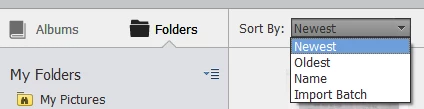
    Please set the sort by option ( at top of the grid) to Newest/Oldest to sort the media by capture date. Yours seem to be set to Import Batch right now.

    You can refer to this link to understand these sort orders: Viewing photos and videos in the Elements Organizer

    Please get back in case of any queries.

    Thanks,

    Arshla

    1 reply

    arshla jindalCorrect answer
    Adobe Employee
    March 22, 2017

    Hi,

    Please set the sort by option ( at top of the grid) to Newest/Oldest to sort the media by capture date. Yours seem to be set to Import Batch right now.

    You can refer to this link to understand these sort orders: Viewing photos and videos in the Elements Organizer

    Please get back in case of any queries.

    Thanks,

    Arshla

    Participant
    March 25, 2017

    Thank you for the help.

    However, I had ticked off the sort by oldest, and it sorted by import date

    After I got your suggestion, I ticked off "batch". It came up sorted by batch. When I then ticked back ti sort by oldest, everything worked fine. I really don't know what has happened, but it works.

    Again, thank you very much for your help.

    Best regards

    Gustav Paulsen