
Still having an issue with PSE 18 Presets...
PSE 18 - Empty Panel Bins?


I posted this a few days ago without any response - thought a photo may help.
OK here is my issue.
Background: Running W10 on a Dell Intel i5-4460 @ 320 GHz. I have a paid Version wiith a valid Prod #. I go back to PS 3 and have used several up grades since this last PS elements 16. I ordered the Elements 18 back in Aug 2018. I installed it soon afterward but never began to use it until recently as I had a project in PSE 16 that I wished to complete. Recently, I opened PSE 18 just to have a look not starting anything specific, I found that some of the tools in the bin were not yealding what I expected and used to in PSE 16. Namely Effects (Fx), Styles, Graphics seem to have no content. When promted to load these files it brings me to a directory that is empty of files of requiring that ext.
I have uninstalled the original PSE 16 and then installed PSE 18 no change uninstalled and reinstalled it - no change. I have
no clue?
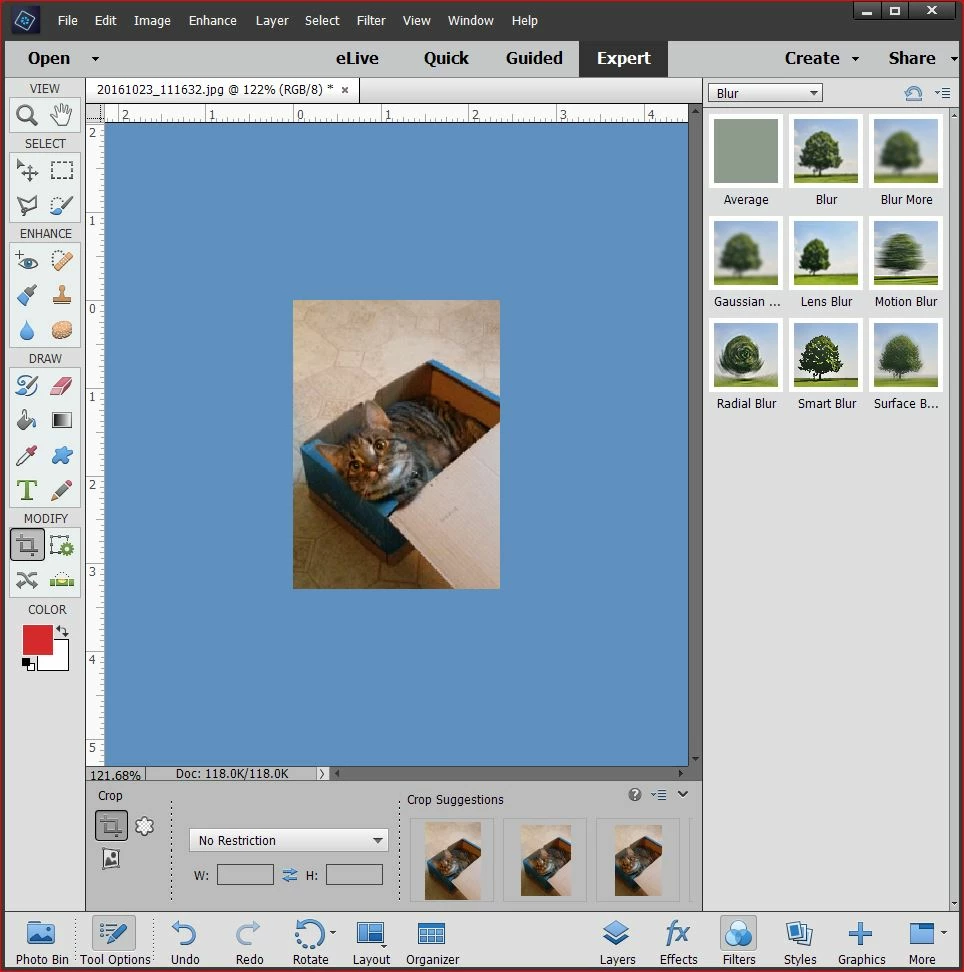
I have followed the suggestions in the HELP files and some in the forum with no success. Here is a screen dump of my PSE 18 screen. These are the ONLY Presets that are available. Is there a solution to this issue? Many have posted with problems regarding these presets with very few resolutions. Really could use some support on this issue. 
 AdChoices