
Participant
October 6, 2022
Answered

STOP AUTOMATIC UPLOADS OF VIDEOS AND PHOTOS TO ORGANIZER

  • October 6, 2022
  • 1 reply
  • 249 views

How can i stop the Organzer from automatically uploading videos and photos? There are many that I dont need to use on Adobe products and it they just clutter the organizer and takes up space, Thanks in advance for any assistance

This topic has been closed for replies.
Correct answer Jeff Arola

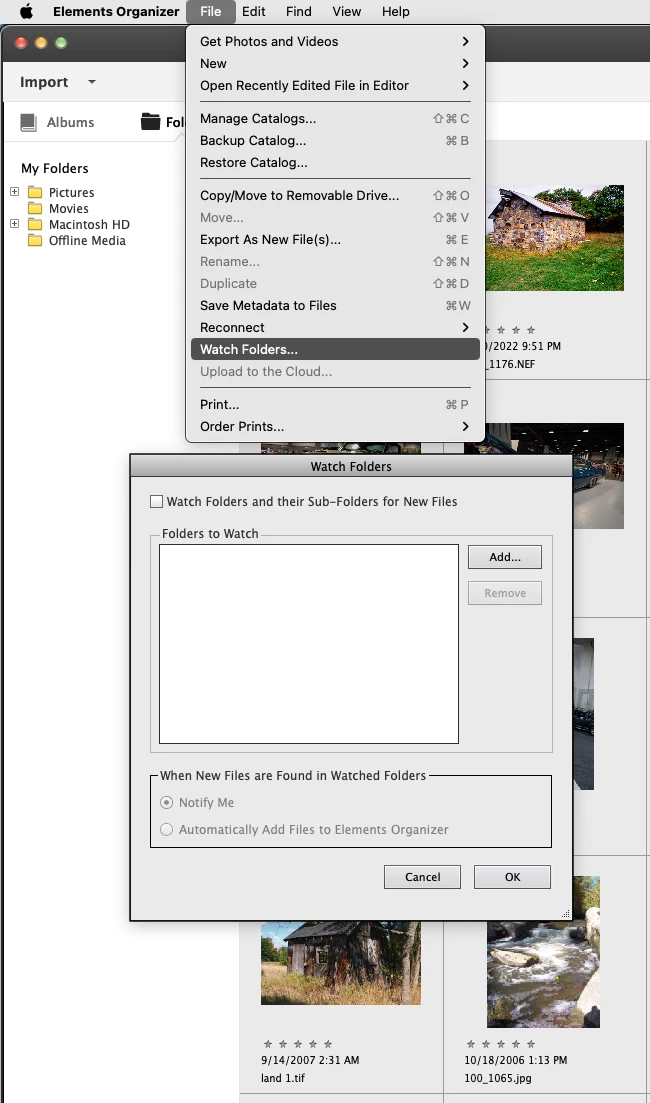
In the Organizer go to Edit>Watch Folders and in the dialog select the option that best suits you.


1 reply

Jeff Arola
Community Expert
Jeff ArolaCommunity ExpertCorrect answer
Community Expert
October 6, 2022

In the Organizer go to Edit>Watch Folders and in the dialog select the option that best suits you.


Ed5CC4Author
Participant
October 7, 2022
That did the trick! Thank you!

ed schilling
[3d079fba-c13b-43ba-8b7e-8b7c42d4889f]