
Participant
November 19, 2023
Answered

Test too small in Photoshop Elements 2024

  • November 19, 2023
  • 1 reply
  • 595 views

Hi all, just downloaded 2024, it has changed text sizes eg: 12 is now 36.21,  36 is now 277!!! I am writing a book, please help me sort this. It is REALLY frustrating having to reset everything when you don't know where the new things are. Why did I update?   Arrgghhh!!!


I don't know if this is in the correct place if it isn't sorry. 
This topic has been closed for replies.
Correct answer Jeff Arola

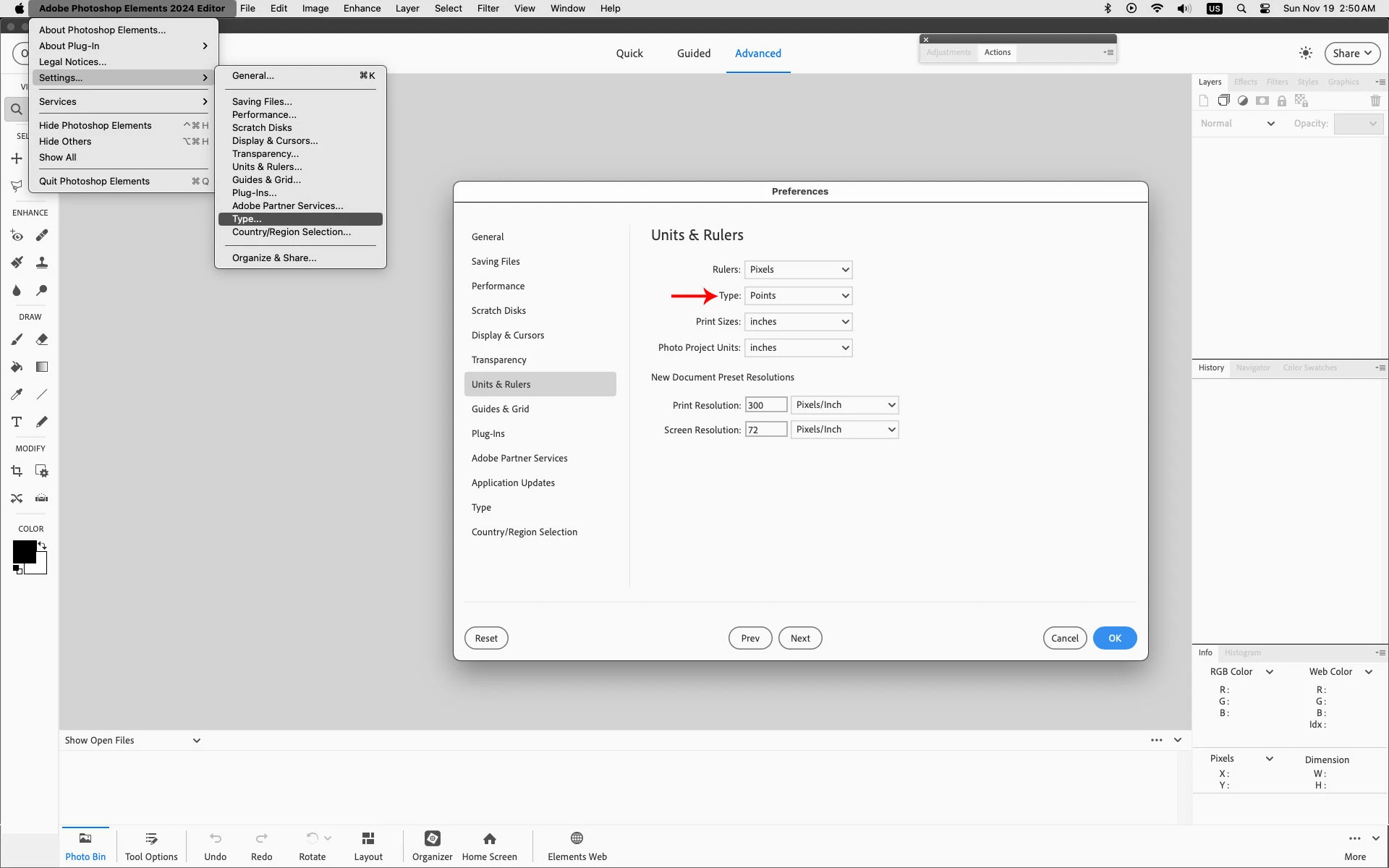
In the photoshop elements editor Preferences>Units & Rulers what unit is the Type set to?

On Windows it's Edit>Preferences>Units & Rulers


1 reply

Jeff Arola
Community Expert
Jeff ArolaCommunity ExpertCorrect answer
Community Expert
November 19, 2023

In the photoshop elements editor Preferences>Units & Rulers what unit is the Type set to?

On Windows it's Edit>Preferences>Units & Rulers


Participant
November 19, 2023

Hi Jeff, Oh thank you! Thank you 🙂


I changed my settings to the same as yours and it is working again. Thank you so much for your reply I appreciate it very much.